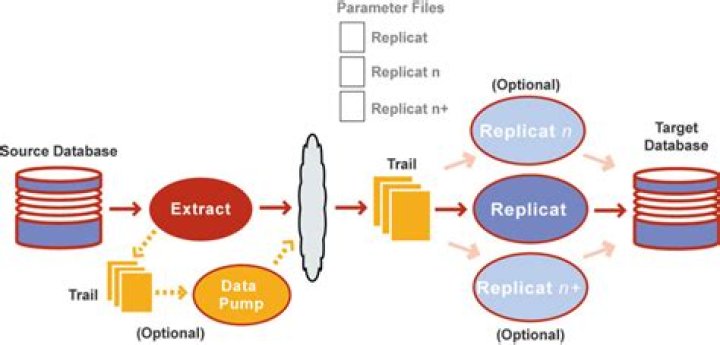

Failing to understand in which situation will an insert fail with no data found error. Any insights please.
Oracle GoldenGate Delivery for Oracle process started, group REPA discard file opened: 2020-08-21 18:32:07.326069 Current time: 2020-08-21 18:32:08 Discarded record from action ABEND on error 1403 No data found Aborting transaction on /zfssa/gg_02/ogg/dirdat/REPA/EX beginning at seqno 473 rba 425209949 error at seqno 473 rba 425214669 Problem replicating SRC.TABLE to TGT.TABLE. Record not found Mapping problem with insert record (target format) SCN:3329198919.29.23.78560... 2 Answers
An error by NO DATA FOUND usually points to a inconsistency problem. The REPLICAT is basically an application doing data manipulation using SQL statements. If it attempts to perform a DML and the database rejects it, normally is because of inconsistency with the attempted DML and the records related to it.
For example, attempting to delete a row which does not exist will fail with a database error. Aside from an Oracle GoldenGate bug, this usually points to target database inconsistencies. In other words, the target database is in a state that the customer did not expect it to be in.
Determine why your target database is not in the state that you expect it to be. Numerous reasons can cause this and below are some them. This list is by no means exhaustive.
Possible Causes
- The use of parameters to ignore previous errors such as HANDLECOLLISIONS, REPERROR with IGNORE or DISCARD options.
- Primary keys or key columns that are different between source and target database. They might be the same columns but the type and/or size are different.
- The target database is manipulated by an application program.
- The target replicat is MAPped by filters and selection, or the extract DML operations have filters. This will be based on your business needs and may or may not be intentional.
- Non-primary key table updates. If all the columns are used for replication there are cases whereby more than one update can occur making subsequent DML operations fail.
- Non-primary key table updates where KEYCOLS are used. These keys may not be unique. To test uniqueness of selected keys, run the query on the source database based on these KEYCOLS and sort them.
- The language and characterset in use (NLS, double-byte or multibyte charset) is different and may cause unexpected conversion issues automatically done by the database. Use SETENV parameter to change the language and set this before the USERID parameter.
- Your source database and target database are of a different type, for example Oracle to MSSQL and the conversion done on the primary keys or key columns are not what you expected.
- There are other specific configurations, patches, features, default database behaviors and so on. Search the My Oracle Support (MOS) Knowledge base for the database error number, example: "ORA-01403" under the Oracle GoldenGate core product. Review these knowledge solutions to see if they are related to your issue.
- In rare situations, this may be an Oracle GoldenGate bug in that a particular DML was not captured or the values were incorrectly interpreted. Please submit an SR if you think this is the case. You will need to provide in addition to the target replicat reports and materials stated above, all extract reports on the source machine and GoldenGate trails.
- Duplicate Mapping in replicat parameter with ALLOWDUPTARGETMAP parameter
- Incorrect use of Extract parameter THREADOPTIONS PROCESSTHREADS. This can cause it to miss data.
Possible Solutions
- What do you need to investigate a replicat database issue?
For a start you will need the replicat parameter file, report file and discard file. Report file: Contains all warnings, errors, tables that are already mapped, columns mapped or unmapped and all run time environment settings. Discard file: Display in detail the issue with mapping this table that generates the database error, the columns, its values, position of the record in the GoldenGate trail. Parameter file: Usually the parameters are within the report file but this will be useful if the report file has been rolled over (REPORTROLLOVER parameter).
- What are the next steps?
Query your target database based on the above data. Depending on the database error, the report file and/or discard file may contain the exact SQL statement used. Nevertheless one should be able to construct the appropriate query. This is to confirm that the replicat has indeed reported the correct database errors. For example if the Oracle DB error was ORA-01403 which means no data found, your query should be selecting the row with the primary keys or keys as specified. Your query should return the same results as the replicat.
- Fixing the replicat.
The first thing to consider is whether you can ignore this error for now and resolve the situation later on. If your business allows you to do so then you may either exclude this table altogether (TABLEEXCLUDE) or simply skip this error (REPERROR , DISCARD). If you skip the error, then start the replicat with REPERROR but run it for a short while (stop replicat) and remove this REPERROR. Then restart the replicat.
- Fixing the database.
No matter what the reason is, you will need to resync the table that caused this issue.
- Configuration Issue
If you have Duplicate mapping in replicat parameters in the replicat parameter file and ALLOWDUPTARGETMAP parameter is used, DML will be applied twice. This leads to ORA-1403 error on delete operation and ORA-001 error for Insert operation. Remove the duplicate mapping to fix the issue.
Summary, there are a lot of possibilities for a no data found error in a replicat process in GoldenGate.
This could also depend on the type of replicat you are using. Many of them perform queries inside the database prior to actually performing a DML statement. The error you have can often result from a lack of permissions in the target database, or if you are using something like a database vault, or other technology which manipulates how DML is performed.