I need to extract from a string a set of characters which are included between two delimiters, without returning the delimiters themselves.
A simple example should be helpful:
Target: extract the substring between square brackets, without returning the brackets themselves.
Base string: This is a test string [more or less]
If I use the following reg. ex.
\[.*?\]
The match is [more or less]. I need to get only more or less (without the brackets).
Is it possible to do it?
113 Answers
Easy done:
(?<=\[)(.*?)(?=\]) Technically that's using lookaheads and lookbehinds. See Lookahead and Lookbehind Zero-Width Assertions. The pattern consists of:
- is preceded by a
[that is not captured (lookbehind); - a non-greedy captured group. It's non-greedy to stop at the first
]; and - is followed by a
]that is not captured (lookahead).
Alternatively you can just capture what's between the square brackets:
\[(.*?)\] and return the first captured group instead of the entire match.
12If you are using JavaScript, the solution provided by cletus, (?<=\[)(.*?)(?=\]) won't work because JavaScript doesn't support the lookbehind operator.
Edit: actually, now (ES2018) it's possible to use the lookbehind operator. Just add / to define the regex string, like this:
var regex = /(?<=\[)(.*?)(?=\])/; Old answer:
Solution:
var regex = /\[(.*?)\]/; var strToMatch = "This is a test string [more or less]"; var matched = regex.exec(strToMatch); It will return:
["[more or less]", "more or less"] So, what you need is the second value. Use:
var matched = regex.exec(strToMatch)[1]; To return:
"more or less" You just need to 'capture' the bit between the brackets.
\[(.*?)\] To capture you put it inside parentheses. You do not say which language this is using. In Perl for example, you would access this using the $1 variable.
my $string ='This is the match [more or less]'; $string =~ /\[(.*?)\]/; print "match:$1\n"; Other languages will have different mechanisms. C#, for example, uses the Match collection class, I believe.
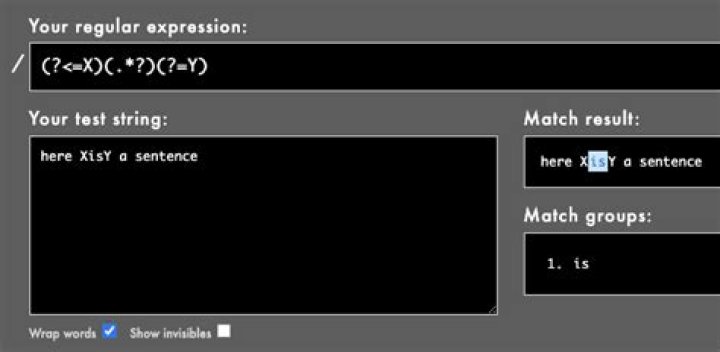
1Here's a general example with obvious delimiters (X and Y):
(?<=X)(.*?)(?=Y) Here it's used to find the string between X and Y. Rubular example here, or see image:

[^\[] Match any character that is not [.
+ Match 1 or more of the anything that is not [. Creates groups of these matches.
(?=\]) Positive lookahead ]. Matches a group ending with ] without including it in the result.
Done.
[^\[]+(?=\]) Proof.
Similar to the solution proposed by null. But the additional \] is not required. As an additional note, it appears \ is not required to escape the [ after the ^. For readability, I would leave it in.
Does not work in the situation in which the delimiters are identical. "more or less" for example.
PHP:
$string ='This is the match [more or less]'; preg_match('#\[(.*)\]#', $string, $match); var_dump($match[1]); Most updated solution
If you are using Javascript, the best solution that I came up with is using match instead of exec method. Then, iterate matches and remove the delimiters with the result of the first group using $1
const text = "This is a test string [more or less], [more] and [less]"; const regex = /\[(.*?)\]/gi; const resultMatchGroup = text.match(regex); // [ '[more or less]', '[more]', '[less]' ] const desiredRes = resultMatchGroup.map(match => match.replace(regex, "$1")) console.log("desiredRes", desiredRes); // [ 'more or less', 'more', 'less' ] As you can see, this is useful for multiple delimiters in the text as well
This one specifically works for javascript's regular expression parser /[^[\]]+(?=])/g
just run this in the console
var regex = /[^[\]]+(?=])/g; var str = "This is a test string [more or less]"; var match = regex.exec(str); match; To remove also the [] use:
\[.+\] I had the same problem using regex with bash scripting. I used a 2-step solution using pipes with grep -o applying
'\[(.*?)\]' first, then
'\b.*\b' Obviously not as efficient at the other answers, but an alternative.
I wanted to find a string between / and #, but # is sometimes optional. Here is the regex I use:
(?<=\/)([^#]+)(?=#*) Here is how I got without '[' and ']' in C#:
var text = "This is a test string [more or less]"; // Getting only string between '[' and ']' Regex regex = new Regex(@"\[(.+?)\]"); var matchGroups = regex.Matches(text); for (int i = 0; i < matchGroups.Count; i++) { Console.WriteLine(matchGroups[i].Groups[1]); } The output is:
more or less If you need extract the text without the brackets, you can use bash awk
echo " [hola mundo] " | awk -F'[][]' '{print $2}'
result:
hola mundo




