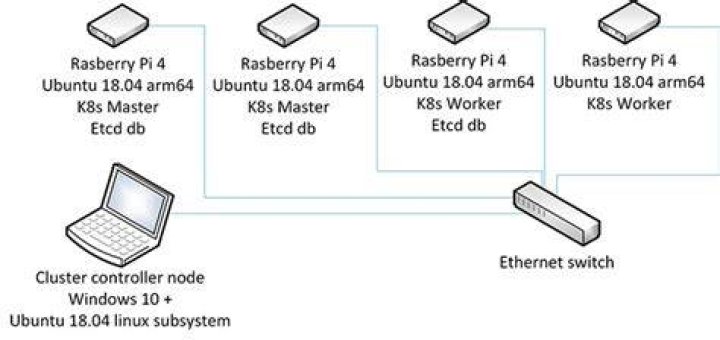

I'm attempting to get Ubuntu 20.04 to boot diskless on a Raspberry PI so I can run Ubuntu on a cluster.
So far, I moved the images from the boot partition on an installed RPi4b with Ubuntu installed, into a dnsmasq/TFTP server under the /srv/tftpboot/<serial>/ which is the default for a Raspberry Pi, Ive updated the bootloader and got the PI to boot.
The dnsmasq log shows the files being loaded at boot:
/var/log/dnsmasq.log
==> /var/log/dnsmasq.log <== Sep 6 14:25:03 dnsmasq-dhcp[4799]: 1527100745 available DHCP subnet: 192.168.254.254/255.255.255.0 Sep 6 14:25:03 dnsmasq-dhcp[4799]: 1527100745 vendor class: PXEClient:Arch:00000:UNDI:002001 Sep 6 14:25:03 dnsmasq-dhcp[4799]: 1527100745 PXE(eth0) dc:a6:32:b4:48:4f proxy Sep 6 14:25:03 dnsmasq-dhcp[4799]: 1527100745 tags: eth0 Sep 6 14:25:03 dnsmasq-dhcp[4799]: 1527100745 broadcast response Sep 6 14:25:03 dnsmasq-dhcp[4799]: 1527100745 sent size: 1 option: 53 message-type 2 Sep 6 14:25:03 dnsmasq-dhcp[4799]: 1527100745 sent size: 4 option: 54 server-identifier 192.168.254.254 Sep 6 14:25:03 dnsmasq-dhcp[4799]: 1527100745 sent size: 9 option: 60 vendor-class 50:58:45:43:6c:69:65:6e:74 Sep 6 14:25:03 dnsmasq-dhcp[4799]: 1527100745 sent size: 17 option: 97 client-machine-id 00:52:50:69:34:14:31:d0:00:32:b4:48:4f:f6... Sep 6 14:25:03 dnsmasq-dhcp[4799]: 1527100745 sent size: 32 option: 43 vendor-encap 06:01:03:0a:04:00:50:58:45:09:14:00:00:11... Sep 6 14:25:03 dnsmasq-dhcp[4799]: 1527100745 available DHCP subnet: 192.168.254.254/255.255.255.0 Sep 6 14:25:03 dnsmasq-dhcp[4799]: 1527100745 vendor class: PXEClient:Arch:00000:UNDI:002001 Sep 6 14:25:03 dnsmasq-tftp[4799]: error 0 Early terminate received from 192.168.254.253 Sep 6 14:25:03 dnsmasq-tftp[4799]: failed sending /srv/tftpboot/6b0bb1f6/start4.elf to 192.168.254.253 Sep 6 14:25:03 dnsmasq-tftp[4799]: sent /srv/tftpboot/6b0bb1f6/config.txt to 192.168.254.253 Sep 6 14:25:03 dnsmasq-tftp[4799]: file /srv/tftpboot/6b0bb1f6/pieeprom.sig not found Sep 6 14:25:03 dnsmasq-tftp[4799]: file /srv/tftpboot/6b0bb1f6/recover4.elf not found Sep 6 14:25:03 dnsmasq-tftp[4799]: file /srv/tftpboot/6b0bb1f6/recovery.elf not found Sep 6 14:25:04 dnsmasq-tftp[4799]: sent /srv/tftpboot/6b0bb1f6/start4.elf to 192.168.254.253 Sep 6 14:25:05 dnsmasq-tftp[4799]: sent /srv/tftpboot/6b0bb1f6/fixup4.dat to 192.168.254.253 Sep 6 14:25:05 dnsmasq-tftp[4799]: file /srv/tftpboot/6b0bb1f6/recovery.elf not found Sep 6 14:25:05 dnsmasq-tftp[4799]: sent /srv/tftpboot/6b0bb1f6/config.txt to 192.168.254.253 Sep 6 14:25:05 dnsmasq-tftp[4799]: sent /srv/tftpboot/6b0bb1f6/syscfg.txt to 192.168.254.253 Sep 6 14:25:05 dnsmasq-tftp[4799]: sent /srv/tftpboot/6b0bb1f6/usercfg.txt to 192.168.254.253 Sep 6 14:25:05 dnsmasq-tftp[4799]: sent /srv/tftpboot/6b0bb1f6/dt-blob.bin to 192.168.254.253 Sep 6 14:25:05 dnsmasq-tftp[4799]: file /srv/tftpboot/6b0bb1f6/recovery.elf not found Sep 6 14:25:05 dnsmasq-tftp[4799]: sent /srv/tftpboot/6b0bb1f6/config.txt to 192.168.254.253 Sep 6 14:25:05 dnsmasq-tftp[4799]: sent /srv/tftpboot/6b0bb1f6/syscfg.txt to 192.168.254.253 Sep 6 14:25:05 dnsmasq-tftp[4799]: sent /srv/tftpboot/6b0bb1f6/usercfg.txt to 192.168.254.253 Sep 6 14:25:05 dnsmasq-tftp[4799]: file /srv/tftpboot/6b0bb1f6/bootcfg.txt not found Sep 6 14:25:06 dnsmasq-tftp[4799]: sent /srv/tftpboot/6b0bb1f6/bcm2711-rpi-4-b.dtb to 192.168.254.253 Sep 6 14:25:06 dnsmasq-tftp[4799]: sent /srv/tftpboot/6b0bb1f6/overlays/overlay_map.dtb to 192.168.254.253 Sep 6 14:25:06 dnsmasq-tftp[4799]: sent /srv/tftpboot/6b0bb1f6/config.txt to 192.168.254.253 Sep 6 14:25:06 dnsmasq-tftp[4799]: sent /srv/tftpboot/6b0bb1f6/syscfg.txt to 192.168.254.253 Sep 6 14:25:06 dnsmasq-tftp[4799]: sent /srv/tftpboot/6b0bb1f6/usercfg.txt to 192.168.254.253 Sep 6 14:25:06 dnsmasq-tftp[4799]: sent /srv/tftpboot/6b0bb1f6/cmdline.txt to 192.168.254.253 Sep 6 14:25:08 dnsmasq-tftp[4799]: file /srv/tftpboot/6b0bb1f6/armstub8-gic.bin not found Sep 6 14:25:08 dnsmasq-tftp[4799]: error 0 Early terminate received from 192.168.254.253 Sep 6 14:25:08 dnsmasq-tftp[4799]: failed sending /srv/tftpboot/6b0bb1f6/uboot_rpi_4.bin to 192.168.254.253 Sep 6 14:25:08 dnsmasq-tftp[4799]: sent /srv/tftpboot/6b0bb1f6/uboot_rpi_4.bin to 192.168.254.253 Typically you would use an NFS server and update your cmdline.txt to contain the locations of the rootfs so once the initrd loads, you can use a root FS stored on the network.
I can't find much info on the options required for Ubuntu so I took them directly from the kernel docs at:
So I updated my cmdline.txt on the TFTP server to:
cmdline.txt
net.ifnames=0 dwc_otg.lpm_enable=0 console=serial0,115200 console=tty1 nfsrootdebug elevator=deadline rootwait fixrtc init=initrd.img ip=dhcp rootfstype=nfs4 root=/dev/nfs nfsroot=192.168.254.254/srv/nfs/6b0bb1f6 rw
I only got as far as the U-Boot console. The vmlinuz image wasn't being loaded so I decompressed my vmlinuz-5.4.0-1016-raspi to vmlinux on my installed pi running off the sdcard:
zcat /boot/vmlinuz-5.4.0-1016-raspi > vmlinux and placed this into the TFTP server then updated my config.txt in the [all] section to make use of the decompressed image.
config.txt
[all] arm_64bit=1 device_tree_address=0x03000000 enable_uart=1 cmdline=cmdline.txt include syscfg.txt include usercfg.txt kernel=vmlinux initramfs initrd.img followkernel I have managed to get as far as the initrd loading and the NFS mount scripts are not mounting the NFS share....
nfsmount: need a path Begin: Retrying nfs mount ... Extracting the initrd:
mkdir /root/initrd-expanded cd /root/initrd-expanded lz4 -cd /boot/initrd.img-5.4.0-1016-raspi | cpio -id and looking inside the nfs script:
# NFS root mounting nfs_mount_root() { nfs_top # For DHCP modprobe af_packet wait_for_udev 10 # Default delay is around 180s delay=${ROOTDELAY:-180} # loop until nfsmount succeeds nfs_mount_root_impl ret=$? nfs_retry_count=0 while [ ${nfs_retry_count} -lt "${delay}" ] \ && [ $ret -ne 0 ] ; do [ "$quiet" != "y" ] && log_begin_msg "Retrying nfs mount" sleep 1 nfs_mount_root_impl ret=$? nfs_retry_count=$(( nfs_retry_count + 1 )) [ "$quiet" != "y" ] && log_end_msg done } Nothing was hitting the NFS server, tcpdump port nfs and also adding debug logging:
/etc/default/nfs-kernel-server
RPCMOUNTDOPTS="--manage-gids --debug all" It appears that the path being passed to the nfsroot is incorrect...now this is where it get's a little confusing.
The handling for the nfsroot= on a base image install
nfsroot=192.168.254.254/srv/nfs/6b0bb1f6 -> works nfsroot=192.168.254.254:/srv/nfs/6b0bb1f6 -> fails If you take the installation from an installed SDCard after doing an apt update:
nfsroot=192.168.254.254/srv/nfs/6b0bb1f6 -> fails nfsroot=192.168.254.254:/srv/nfs/6b0bb1f6 -> works That was 5 hours spent pulling my hair out.
You cannot (or at least I couldn't) create a bootable NFS installed system from the images provided by Ubuntu for Raspberry PI. Go figure! If you attempt it you will get all sorts of errors about services not starting up.
So, Ill answer my own question.
2 Answers
Create a fully diskless system on Ubuntu 20.04.1 on a Raspberry PI 4b
1) Install a RaspberryPi Lite onto an SDCard
2) Boot the Rpi4 with the Raspberry OS SDCard, login and run the following to enable ssh:
cd /boot touch ssh reboot 3) Update the boot loader, from another machine. If you know the IP address of the PI and you enabled ssh (above), this script will set the boot code to 0xf12 which means it will try the network, sdcard, reboot in that order over and over. You might want to ensure the firmware version if this post gets old. It will also give you an env file which contains the serial and mac address which is handy, stored in a <uuid>.rpi.env file
./update-bootloader.sh <ip-address-of-the-pi> <ip-address-of-your-nfs-server>
e.g.
./update-bootloader.sh 192.168.0.254 192.169.0.254
#!/usr/bin/env bash # update-bootloader.sh - update the boot loader for Rpi4 RPI_IP=$1 KICKSTART_IP=$2 RPI_DEFAULT_PASS="raspberry" PI_EEPROM_DATE="2020-07-31" PI_EEPROM_VERSION="pieeprom-${PI_EEPROM_DATE}" PI_EEPROM_FILE="${PI_EEPROM_VERSION}.bin" PI_EEPROM_LINK="" UBUNTU_IMAGE_NAME="ubuntu-20.04.1-preinstalled-server-arm64+raspi.img" UBUNTU_IMAGE_FILE="${UBUNTU_IMAGE_NAME}.xz" UUID=$(cat /dev/urandom | tr -dc 'a-zA-Z0-9' | fold -w 32 | head -n 1) ssh-keygen -R ${RPI_IP} ssh-keyscan -H ${RPI_IP} >> ~/.ssh/known_hosts sshpass -p "${RPI_DEFAULT_PASS}" ssh pi@${RPI_IP} << EOF if [[ -f ${PI_EEPROM_FILE} ]];then rm ${PI_EEPROM_FILE} echo 'removed eeprom file' fi rm *.rpi.env echo 'removed old env' rm bootconf.txt echo 'removed bootconf.txt' if [[ ! -f ${PI_EEPROM_FILE} ]];then wget ${PI_EEPROM_LINK} fi echo "extracting boot config from eeprom" sudo rpi-eeprom-config ${PI_EEPROM_FILE} > bootconf.txt echo "updating bootconfig" sed -i 's/BOOT_ORDER=.*/BOOT_ORDER=0xf12/g' bootconf.txt echo "MAX_RESTARTS=5" | sudo tee -a bootconf.txt echo "writing eeprom" sudo rpi-eeprom-config --out ${PI_EEPROM_VERSION}-netboot.bin --config bootconf.txt ${PI_EEPROM_FILE} echo "updating eeprom on rpi" sudo rpi-eeprom-update -d -f ./${PI_EEPROM_VERSION}-netboot.bin echo "getting serial and mac" cat /proc/cpuinfo | grep Serial | awk -F ': ' '{print \$2}' | tail -c 9 | awk '{print "RPI_SERIAL="\$1}' > ${UUID}.rpi.env ip addr show eth0 | grep ether | awk '{print \$2}' | awk '{print "RPI_MAC="\$1}' >> ${UUID}.rpi.env EOF # copy the pi env back to get the serial and mac sshpass -p "${RPI_DEFAULT_PASS}" scp -r pi@${RPI_IP}:~/${UUID}.rpi.env ~/${UUID}.rpi.env sshpass -p "${RPI_DEFAULT_PASS}" ssh pi@${RPI_IP} << EOF sudo reboot EOF cat ~/${UUID}.rpi.env Your pi will now have been rebooted and will be pinging your network for the DHCP response.
4) Install Ubuntu 20.04.1 onto the SD Card using the PI Imager
5) Plug the SDCard into your Pi and boot it up
6) Do an
apt update -y; apt upgrade -y
setup your pass, install some packages, put vim on there (obviously, who uses emacs or nano anyway??)
7) shutdown the pi
halt -p
On your server
8) Take the Ubuntu 20.04.1 installed SDCard, plug it into your server, mount the drive, copy the OS files from partition 2, to your nfs location for sharing the root to the PI, probably /srv/nfs/<serial>/
# find the partition where your CD card is (mine was sda on a rpi) fdisk -l # mount the sdcard - copy the second partition off (should contain the boot files, you can ignore the boot partition, we can use the files off the root partition) mkdir /root/p2 mount /dev/sda2 /root/p2 # cp using using -ax will give you a correct copy, man cp if needed cp -vax /root/p2/. /srv/nfs/<serial>/. # clean up umount /root/p2 rm -rf /root/p2 9) Mount the boot folder of the Rpi files (stored in the NFS share) to your TFTP location so your TFTP can serve up the boot files, I'm using a PI here to serve the other PIs so edit as needed)
#/etc/fstab LABEL=writable / ext4 defaults 0 0 LABEL=system-boot /boot/firmware vfat defaults 0 1 /srv/nfs/<serial>/boot /srv/tftpboot/<serial> none defaults,bind 0 0 Then mount the new location
mount -a 10) Extract your vmlinuz on the boot folder of your nfs share into vmlinux as the pi wont decompress the vmlinuz kernel
zcat /srv/nfs/<serial>/boot/vmlinuz-5.4.0-1016-raspi > /src/nfs/<serial>/boot/vmlinux-5.4.0-1016-raspi 11) Create symlinks inside the /srv/nfs/<serial>/boot partition to point to the bcm2711-rpi-4-b.dtb, start4.elf, fixup4.dat files which are missing in the boot folder for the TFTP to find them in the dtb and firmware folders
Optional - clean out all the junk that is no longer needed - look at my ls -al output to see whats should be there and what I removed.
lrwxrwxrwx 1 root root 41 Sep 7 08:19 bcm2711-rpi-4-b.dtb -> dtbs/5.4.0-1016-raspi/bcm2711-rpi-4-b.dtb -rw-r--r-- 1 root root 216 Sep 7 08:23 cmdline.txt -rw-r--r-- 1 root root 220286 Aug 13 15:09 config-5.4.0-1016-raspi -rw-r--r-- 1 root root 231 Sep 7 08:45 config.txt lrwxrwxrwx 1 root root 43 Sep 6 20:34 dtb -> dtbs/5.4.0-1016-raspi/./bcm2711-rpi-4-b.dtb lrwxrwxrwx 1 root root 43 Sep 6 20:34 dtb-5.4.0-1016-raspi -> dtbs/5.4.0-1016-raspi/./bcm2711-rpi-4-b.dtb drwxr-xr-x 3 root root 4096 Sep 7 07:27 dtbs drwxr-xr-x 2 root root 4096 Sep 7 07:56 firmware lrwxrwxrwx 1 root root 19 Sep 7 08:15 fixup4.dat -> firmware/fixup4.dat lrwxrwxrwx 1 root root 27 Sep 6 20:32 initrd.img -> initrd.img-5.4.0-1016-raspi -rw-r--r-- 1 root root 29579888 Sep 6 20:34 initrd.img-5.4.0-1016-raspi lrwxrwxrwx 1 root root 19 Sep 7 07:26 start4.elf -> firmware/start4.elf -rw-r--r-- 1 root root 327 Sep 7 08:04 syscfg.txt -rw-r--r-- 1 root root 4162247 Aug 13 15:09 System.map-5.4.0-1016-raspi -rw-r--r-- 1 root root 200 Sep 7 08:04 usercfg.txt -rw-r--r-- 1 root root 25907712 Sep 7 08:13 vmlinux-5.4.0-1016-raspi lrwxrwxrwx 1 root root 24 Sep 6 20:32 vmlinuz -> vmlinuz-5.4.0-1016-raspi -rw-r--r-- 1 root root 8420251 Aug 13 15:09 vmlinuz-5.4.0-1016-raspi 12) update some configs in the /srv/nfs/<serial>/boot partition
#/srv/nfs/<serial>/boot/config.txt [pi4] max_framebuffers=2 [all] arm_64bit=1 device_tree_address=0x03000000 enable_uart=1 cmdline=cmdline.txt include syscfg.txt include usercfg.txt kernel=vmlinux-5.4.0-1016-raspi initramfs initrd.img-5.4.0-1016-raspi followkernel #/srv/nfs/<serial>/boot/cmdline.txt net.ifnames=0 dwc_otg.lpm_enable=0 console=serial0,115200 console=tty1 nfsrootdebug elevator=deadline rootwait fixrtc init=initrd.img ip=dhcp rootfstype=nfs4 root=/dev/nfs nfsroot=<nfs ip>:/srv/nfs/<serial> rw 13) Update the fstab - this is the fstab which is sent to the pi
#/srv/nfs/<serial>/etc/fstab proc /proc proc defaults 0 0 <nfs ip>:/srv/nfs/<serial> / nfs4 defaults,rw,nolock 0 0 # data to be shared to server <nfs ip>:/srv/nfs/<serial>/boot/firmware /boot/firmware nfs4 defaults,rw,nolock 0 1 # data to be shared to server none /tmp tmpfs defaults 0 0 none /var/run tmpfs defaults 0 0 none /var/lock tmpfs defaults 0 0 none /var/tmp tmpfs defaults 0 0 14) Install an NFS server (google this) to serve the Pi
#/etc/exports /srv/nfs/<serial> *(insecure,rw,async,no_root_squash) exportfs -ra 15) Install a dnsmasq server (google is your friend) to serve up the dhcp options and tftp the boot images
#/etc/dnsmasq.conf dhcp-range=<your network subnet>,proxy # e.g. 192.168.254.254,proxy log-dhcp enable-tftp tftp-root=/srv/tftpboot pxe-service=0,"Raspberry Pi Boot" log-facility=/var/log/dnsmasq.log 16) Clusters? You have more than one Pi? You can use an overlayfs mount on your server to provide multiple Pis their operating system using a single base root file system and then using overlays to give each Pi its own space for storage and FS modifications.
If you got this far then this should be easy:
On your proper server - not a pi
17) Create mounts for overlay fs based mounts so we can use the root fs as a lower dir (google overlayfs)
#/etc/fstab overlay /srv/nfs/6b0bb1f6 overlay defaults,lowerdir=/srv/nfs/ubuntu-rpi4-lower,upperdir=/srv/nfs/6b0bb1f6-upper,workdir=/srv/nfs/6b0bb1f6-work,nfs_export=on,index=on 0 0 overlay /srv/nfs/68e71308 overlay defaults,lowerdir=/srv/nfs/ubuntu-rpi4-lower,upperdir=/srv/nfs/68e71308-upper,workdir=/srv/nfs/68e71308-work,nfs_export=on,index=on 0 0 18) Create the FS system to support the overlays, mine looks like this for 3 pis.
# this is inside /srv/nfs drwxr-xr-x 1 root root 4096 Sep 7 12:47 68e71308 drwxr-xr-x 3 root root 4096 Sep 7 12:47 68e71308-upper drwxr-xr-x 3 root root 4096 Sep 7 13:25 68e71308-work drwxr-xr-x 1 root root 4096 Sep 7 12:13 6b0bb1f6 drwxr-xr-x 2 root root 4096 Sep 7 12:13 6b0bb1f6-upper drwxr-xr-x 4 root root 4096 Sep 7 13:25 6b0bb1f6-work drwxr-xr-x 1 root root 4096 Sep 7 12:47 917c9833 drwxr-xr-x 2 root root 4096 Sep 7 11:49 917c9833-upper drwxr-xr-x 2 root root 4096 Sep 7 11:34 917c9833-work drwxr-xr-x 21 root root 4096 Sep 6 19:58 ubuntu-rpi4-lower 19) You need to put an /etc/fstab inside the merged folder for the mount (not the upper or work dirs, just the plain serial named one), which will override the ubuntu-rpi4-lower provided ones. Google fusefs or overlayfs for more info, (it's how docker containers work don't ya know :)
20) Create a cmdline.txt inside each merged folder inside /srv/nfs/<serial>/boot/cmdline.txt
21) Export the merged folders over nfs so ours pis can use them as before:
#/etc/exports /srv/nfs/6b0bb1f6 *(rw,sync,no_subtree_check,no_root_squash,fsid=1) /srv/nfs/917c9833 *(rw,sync,no_subtree_check,no_root_squash,fsid=2) /srv/nfs/68e71308 *(rw,sync,no_subtree_check,no_root_squash,fsid=3) exportfs -ra 22) Adding a new Pi is then just a case:
22.0) Update the boot loader
22.1 Creating three empty folders on the server
mkdir /srv/nfs/<serial> mkdir /srv/nfs/<serial>-work mkdir /srv/nfs/<serial>-upper 22.2) Adding an fstab with the mount options for the new serial and upper/work dirs
22.3) Adding an cmdline.txt with the right NFS location
23) Uber automation If you want you can create a hook script inside the initrd of your RaspberryPi SD card which updates the bootloader for you and pings a web server with its serial which then will add the mounts by the time the Pi has rebooted itself, its already booting off the network. Ill provide that at some point.
5Thank you for the manual. I would add few things. Newer firmwares seem to be fine with uncompressing the kernel. (tested on 5.8 and higher) For me I had issues with permissions on the vmlinuz file though.
Also, this is messing up snap. I guess there are many people against it anyway, but if you would needed. You can add
network inet, network inet6, into /etc/apparmor.d/usr.lib.snapd.snap-confine.real