
WHat is a good way to format a python decimal like this way?
1.00 --> '1'
1.20 --> '1.2'
1.23 --> '1.23'
1.234 --> '1.23'
1.2345 --> '1.23'
6 Answers
If you have Python 2.6 or newer, use format:
'{0:.3g}'.format(num) For Python 2.5 or older:
'%.3g'%(num) Explanation:
{0}tells format to print the first argument -- in this case, num.
Everything after the colon (:) specifies the format_spec.
.3 sets the precision to 3.
g removes insignificant zeros. See
For example:
tests=[(1.00, '1'), (1.2, '1.2'), (1.23, '1.23'), (1.234, '1.23'), (1.2345, '1.23')] for num, answer in tests: result = '{0:.3g}'.format(num) if result != answer: print('Error: {0} --> {1} != {2}'.format(num, result, answer)) exit() else: print('{0} --> {1}'.format(num,result)) yields
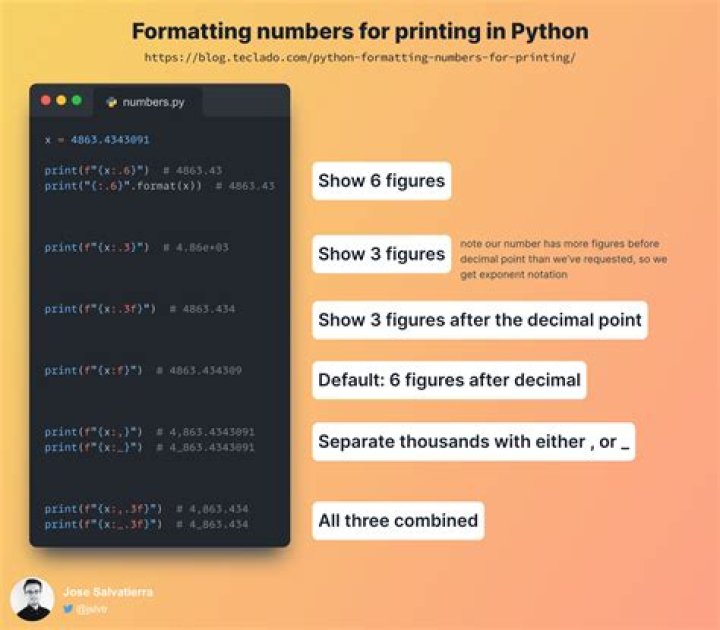
1.0 --> 1 1.2 --> 1.2 1.23 --> 1.23 1.234 --> 1.23 1.2345 --> 1.23 Using Python 3.6 or newer, you could use f-strings:
In [40]: num = 1.234; f'{num:.3g}' Out[40]: '1.23' Only first part of Justin's answer is correct. Using "%.3g" will not work for all cases as .3 is not the precision, but total number of digits. Try it for numbers like 1000.123 and it breaks.
So, I would use what Justin is suggesting:
>>> ('%.4f' % 12340.123456).rstrip('0').rstrip('.') '12340.1235' >>> ('%.4f' % -400).rstrip('0').rstrip('.') '-400' >>> ('%.4f' % 0).rstrip('0').rstrip('.') '0' >>> ('%.4f' % .1).rstrip('0').rstrip('.') '0.1' Here's a function that will do the trick:
def myformat(x): return ('%.2f' % x).rstrip('0').rstrip('.') And here are your examples:
>>> myformat(1.00) '1' >>> myformat(1.20) '1.2' >>> myformat(1.23) '1.23' >>> myformat(1.234) '1.23' >>> myformat(1.2345) '1.23' Edit:
From looking at other people's answers and experimenting, I found that g does all of the stripping stuff for you. So,
'%.3g' % x works splendidly too and is slightly different from what other people are suggesting (using '{0:.3}'.format() stuff). I guess take your pick.
2Just use Python's standard string formatting methods:
>>> "{0:.2}".format(1.234232) '1.2' >>> "{0:.3}".format(1.234232) '1.23' If you are using a Python version under 2.6, use
>>> "%f" % 1.32423 '1.324230' >>> "%.2f" % 1.32423 '1.32' >>> "%d" % 1.32423 '1' If using 3.6 or newer, just use f-Strings
print(f'{my_var:.1f}') You can use "f-strings" (f for "formatted string literals"), the short format style from Python v3.6 on:
f'{1.234:.1f}' Out: '1.2' Or, as a test:
f'{1.234:.1f}' == '1.2' Out: True By the way, you can also use this with variables.
x = 1.234 f'{x:.1f} and {x:.2f} and {x}' Out: '1.2 and 1.23 and 1.234' If you need to use quotes in the text, embed the text with f'''...''' instead for f'...'.




