I'm trying to change the following code so I get this output for radius 2:
***** *** *** ** ** *** *** ***** Any help will be appreciated as I'm about to go crazy!
public class Main { public static void main(String[] args) { // dist represents distance to the center double dist; double radius = 2; // for horizontal movement for (int i = 0; i <= 2 * radius; i++) { // for vertical movement for (int j = 0; j <= 2 * radius; j++) { dist = Math.sqrt( (i - radius) * (i - radius) + (j - radius) * (j - radius)); // dist should be in the range (radius - 0.5) // and (radius + 0.5) to print stars(*) if (dist > radius - 0.5 && dist < radius + 0.5) System.out.print("*"); else System.out.print(" "); } System.out.println(""); } } } 2 Answers
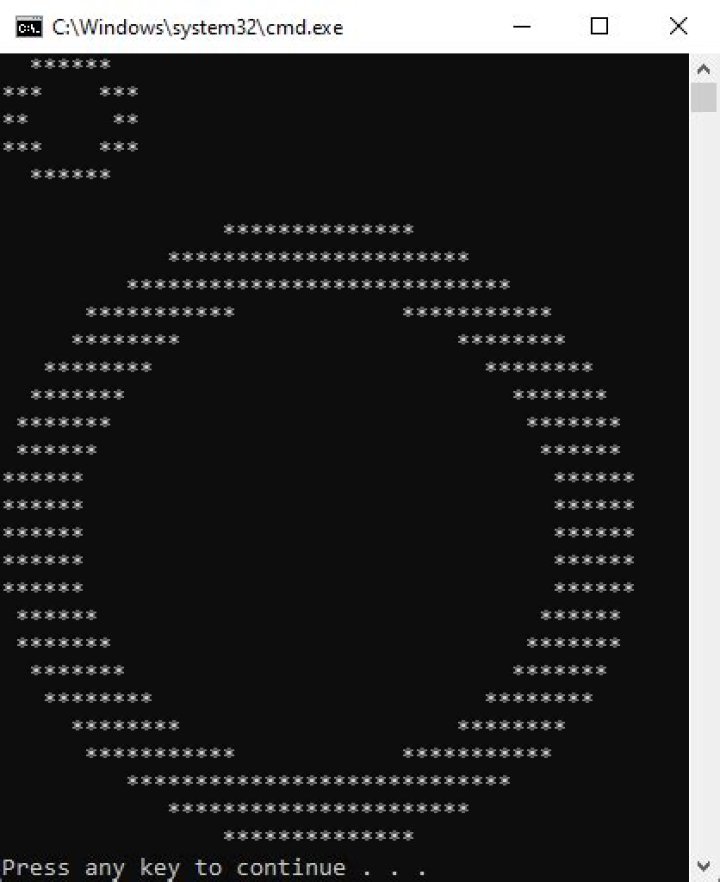
The output looks oval because characters do not have same width and height. Think of an image that its pixels are not square, but vertical rectangles. I borrowed the c# version of the code linked by @Prasanth Rajendran, and made some modifications:
- added
lineWidthargument - added
xScaleargument, now every1/xScalecharacters in a row are equivalent to1data points - moved character position to its center, by adding a [0.5, 0.5] offset
// function to print circle pattern static void printPattern(int radius, int lineWidth, double xScale) { double hUnitsPerChar = 1 / xScale; double hChars = (2 * radius + lineWidth) / hUnitsPerChar; double vChars = 2 * radius + lineWidth; // dist represents distance to the center double dist; double lineWidth_2 = (double)lineWidth / 2; double center = radius + lineWidth_2; // for vertical movement for (int j = 0; j <= vChars - 1; j++) { double y = j + 0.5; // for horizontal movement for (int i = 0; i <= hChars - 1; i++) { double x = (i + 0.5) * hUnitsPerChar; dist = Math.Sqrt( (x - center) * (x - center) + (y - center) * (y - center)); // dist should be in the range // (radius - lineWidth/2) and (radius + lineWidth/2) // to print stars(*) if (dist > radius - lineWidth_2 && dist < radius + lineWidth_2) Console.Write("*"); else Console.Write(" "); } Console.WriteLine(""); } } static void Main(string[] args) { printPattern(2, 1, 2); printPattern(10, 3, 2); } Now the results are like this:
printPattern(2, 1, 2): ****** *** *** ** ** *** *** ****** printPattern(10, 3, 2): ************** ********************** **************************** *********** *********** ******** ******** ******** ******** ******* ******* ******* ******* ****** ****** ****** ****** ****** ****** ****** ****** ****** ****** ****** ****** ****** ****** ******* ******* ******* ******* ******** ******** ******** ******** *********** *********** **************************** ********************** ************** They look better in CMD:

Hope you can translate it to java.
0You can draw the edge of a circle inside of itself and represent the Equation of a circle as:
double edge = (x*x + y*y) / (double) r - r; If the radius r=2 and the line width w=1, then the circle looks like this:
****** **** **** ** ** **** **** ****** r=2,w=1.0 Assume that the width of two characters is equal to the height of one character.
// radius int r = 12; // line width double w = 3; // assume that the width of two characters // is equal to the height of one character for (int y = -r; y <= r; y++) { for (int x = -r; x <= r; x++) { double edge = (x*x + y*y) / (double) r - r; // edge is inside the circle if (edge > - w*4/3 && edge < 1) { System.out.print("**"); } else { System.out.print(" "); } } System.out.println(); } System.out.println("r="+r+",w="+w); Output:
************** ********************** ****************************** ********** ********** ******** ******** ******** ******** ****** ****** ****** ****** ****** ****** ****** ****** ****** ****** ****** ****** ****** ****** ****** ****** ****** ****** ****** ****** ****** ****** ****** ****** ****** ****** ******** ******** ******** ******** ********** ********** ****************************** ********************** ************** r=12,w=3.0 See also:
• Print out an ASCII circle and axes with characters
• Printing multiline ASCII animation in the console




