I'm trying to use PiXhost's api to upload images. Every time I request something from it always returns 400 Bad request. Their API documentation uses python unirest package, but I can't install it as it seems to use too old code.
Am I doing something wrong here?
my code:
import requests headers = { "Content-Type": "multipart/form-data; charset=utf-8", "Accept": "application/json" } params = { "content_type": "0", "max_th_size": "420" } files = { "img": open("image.jpg", mode="rb") } response = requests.post("", headers=headers, params=params, files=files) 2 Answers
import requests url = "" payload={'content_type': '0', 'max_th_size': '420'} files={ 'img': ('1.JPG', open('C:/Users/prave/Desktop/1.JPG', 'rb')), 'content_type': '0', 'max_th_size': '420' } headers = { } response = requests.request("POST", url, data=payload, files=files) print(response) Here you go
output :
Response 200
Issue with your code:
THe endpoint expects formdata , you are passing query parameter
So how did i figure it out

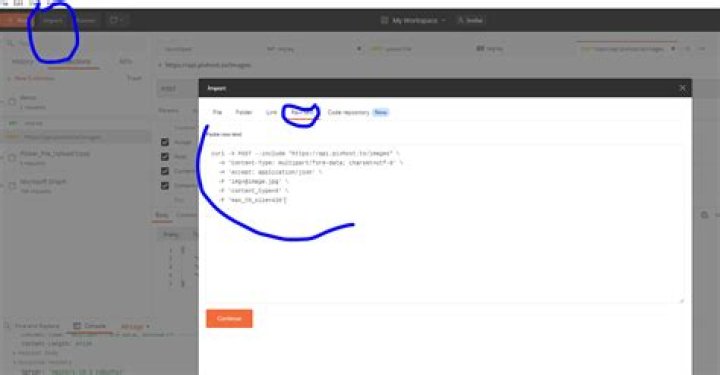
goto documentation and click curl tab to get curl equalent code:
Now goto postman and click import>Raw text > paste the curl , and click continue and then import
This creates the request for you
Now goto body and select img type as file and upload the file:
Now click code and generate equalent curl and python request code:
THe generated python code had few isseus one was to remove header completely and then to remove one slash from the file name.
4Just a quick test, I managed to get it done via cURL
curl -X POST --include "" \ -H 'Content-Type: multipart/form-data; charset=utf-8' \ -H 'Accept: application/json' \ -F '[email protected]' \ -F 'content_type=0' \ -F 'max_th_size=420' Note: the test1 image is in the same folder when I running the script
I also receive 400 status code without a body when removing the @ before the URL (so check you URL again)
HTTP/1.1 400 Bad Request Server: nginx/1.10.3 (Ubuntu) 



