This is hard to describe accurately by words so I'll use figures instead. Normally, Outlook email list looks like the picture on the left (source). Now, my email inbox looks very messy (picture on the right). Something is clearly wrong with the layout, and I have no clue how to fix it.

What I have tried?
- Online Repair (appwiz.cpl -> Microsoft Office 365 ProPlus -> Right Click -> Change -> Online repair)
- Reinstall (appwiz.cpl -> Remove Microsoft Office 365 -> Restart computer -> Reinstall by running
OfficeSetup.exewith admin rights, downloaded from office.com)
The problem might have started because of an Online repair, which repaired a non-working search functionality. The Outlook version is Microsoft Outlook for Office 365 MSO (16.0.12527.21296) 64-bit. Version 2002 (Build 12527.21330 Click-to-Run), on Windows 10.
What should I do to get the view from the current (right) back to normal (left)?
2 Answers
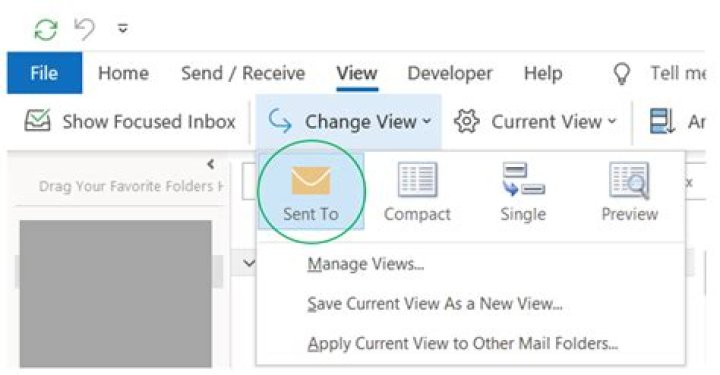
Got it solved but will leave this here, if someone else faces the same problem. I had to select "View -> Change View -> Send To" or Compact. I think I tried all the possible view settings but somehow missed it.
Also Clicking the Reset View (on View tab, when visible) button has provided a quick fix.
I had the same problem. After running after my own tail for a couple of days, I discover a solution very similar to the accepted one but slightly different. Actually, I clicked on the compact view, and then I reset the view. That worked very well.




