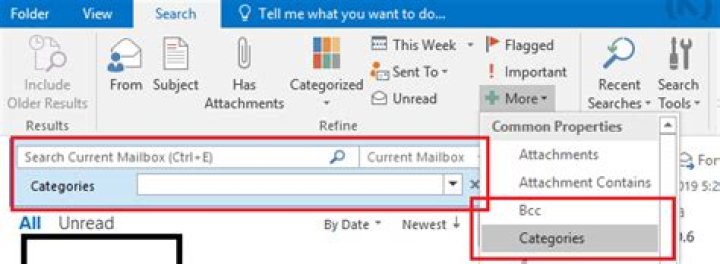
This is the issue with Outlook categories drop down menu(in the picture). Problem is that not all categories are appearing. I'm assuming that drop down has a fix number of categories that it can display. I have 5 more categories that are not appearing in the drop down menu. I can select all categories and assign category to random mail and then that category will appear in drop down menu, but after some time it will be gone from it. Also I'm able to type category:"category name" is search box and it will find it and display mails with that category.
I would like for all categories to appear in drop down menu. Is there any way that you can change the number of items in it(to increase it).

2 Answers
- Click in the search box
- Then in the “Search” tab, click “More”
- Choose “Categories”
- You will see another box underneath the search box where you can have full list of your categories.
Screenshot: