Summary
I was building an app in flutter where I was trying to keep 3 functions linked to one build function, so I have a navigation bar to navigate between these 3 functions (containing the layout).
Issue
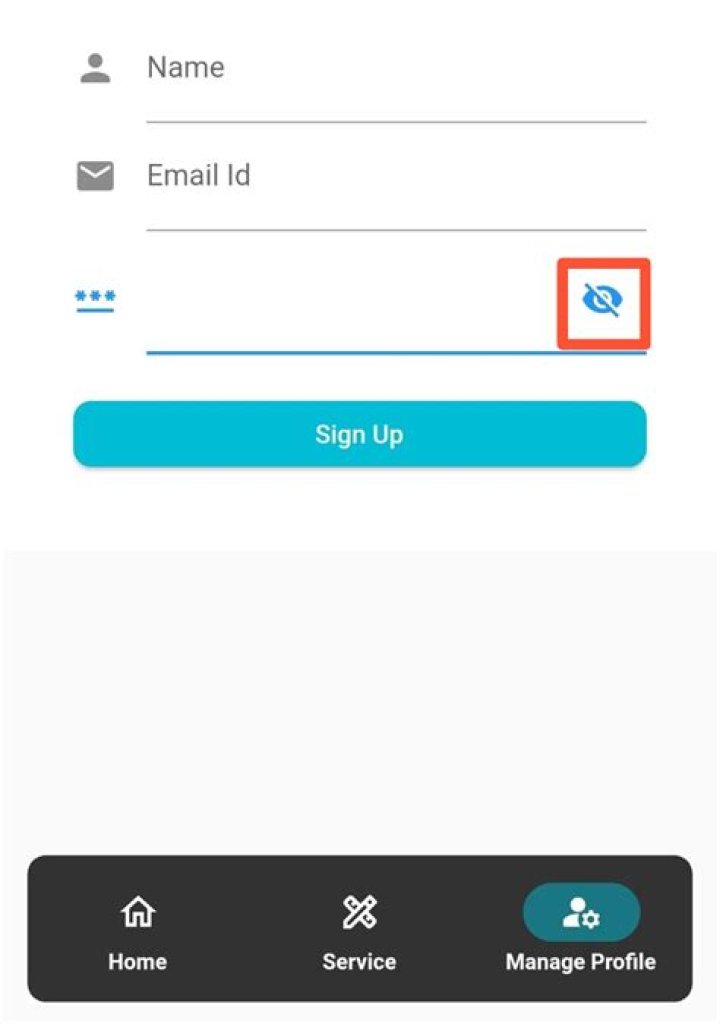
While developing the 3rd layout which is basically a form, where I am unable to change the icon wrapped with GestureDetector(Function:- to toggle the visibility of password, hence changing the icon 👁).
Complete Code
class _MyHomePageState extends State<MyHomePage> { final globalKey = GlobalKey<ScaffoldState>(); final _passwordTextController = TextEditingController(); bool _hidePassword = true; //initial assigning value List<Widget>? pages; int _currentIndex = 0; void initState() { super.initState(); _hidePassword = true; //calling at the starting of the app pages = <Widget>[ homeNavPage(context), servicePage(), manageUser(context), //function I am facing ]; } void _onItemTapped(int index) { setState(() { MyHomePage._selectedIndex = index; }); } @override Widget build(BuildContext context) { var _keyboardVisible = MediaQuery.of(context).viewInsets.bottom != 0; return Scaffold( body: pages![_currentIndex], //navigation bar floatingActionButtonLocation: FloatingActionButtonLocation.miniCenterFloat, floatingActionButton: (!_keyboardVisible) ? Container( clipBehavior: Clip.hardEdge, decoration: BoxDecoration( borderRadius: BorderRadius.all(Radius.circular(10))), margin: EdgeInsets.only(left: 15.0, right: 15.0), child: NavigationBarTheme( data: NavigationBarThemeData( indicatorColor: Colors.cyan.withOpacity(0.5), labelTextStyle: MaterialStateProperty.all(const TextStyle( fontSize: 12, fontWeight: FontWeight.bold, color: Colors.white, ))), child: NavigationBar( backgroundColor: Colors.black.withOpacity(0.8), selectedIndex: _currentIndex, animationDuration: const Duration(seconds: 1), labelBehavior: NavigationDestinationLabelBehavior.alwaysShow, onDestinationSelected: (int newIndex) { setState(() { _currentIndex = newIndex; }); }, destinations: [ NavigationDestination( selectedIcon: Icon(Icons.home_rounded, color: Colors.white), icon: Icon(Icons.home_outlined, color: Colors.white), label: 'Home', ), NavigationDestination( selectedIcon: Icon(Icons.design_services, color: Colors.white), icon: Icon(Icons.design_services_outlined, color: Colors.white), label: 'Service', ), NavigationDestination( selectedIcon: Icon(Icons.manage_accounts_rounded, color: Colors.white), icon: Icon(Icons.manage_accounts_outlined, color: Colors.white), label: 'Manage Profile', ), ], ), ), ) : Container(), ); } //1 Stack homeNavPage(BuildContext context) { //Some codes... } //2 servicePage() { //some codes... } //3 function which is creating issue manageUser(BuildContext context) { void _togglePasswordView() { setState(() { _hidePassword = !_hidePassword; }); } // while testing this only runs at the starting print('outside $_hidePassword'); final _formkey = GlobalKey<FormState>(); return Scaffold( body: SingleChildScrollView( child: Container( color: Colors.white, child: Column( children: [ Padding( padding: const EdgeInsets.all(40.0), child: Form( key: _formkey, child: Column( children: [ // some extra codes TextFormField( keyboardType: TextInputType.text, decoration: InputDecoration( floatingLabelBehavior: FloatingLabelBehavior.never, icon: Icon(Icons.password), // hintText: 'Enter your password', labelText: 'Password', suffixIcon: GestureDetector( //works as usual whenever toggle happens onTap: () { print('1. $_hidePassword'); _togglePasswordView(); print('2. $_hidePassword'); }, //icon doesn't change child: Icon(_hidePassword == true ? Icons.visibility_off : Icons.visibility), ), ), controller: _passwordTextController, // focusNode: _focusPassword, //no changes happens obscureText: _hidePassword, validator: (value) => Validator.validatePassword(password: value!), ), ], ), ), ), ], ), ), ), ); } } Code Specific Having Issue
TextFormField( //some codes suffixIcon: GestureDetector( //works as usual whenever toggle happens onTap: () { print('1. $_hidePassword'); _togglePasswordView(); print('2. $_hidePassword'); }, //icon doesn't change child: Icon(_hidePassword == true ? Icons.visibility_off : Icons.visibility), ), ), //no changes happens obscureText: _hidePassword, ), Testing
I have performed testing by using the 3 print statement where,
print('outside $_hidePassword');= runs once during initialization.- other 2 print statements present inside the onTap: () of GestureDetector works as usual changing the values.
- But there is no change found in the icon and obscureText state.
Screenshot

Already specified all the details, if required please ask, and I will furnish you with other details.
Thank you.
3 Answers
You need to update state to change icon but calling setState is to expensive.So use StatefulBuilder like this:
StatefulBuilder(builder: (context, innerSetState) { return TextFormField( //some codes decoration: InputDecoration( suffixIcon: GestureDetector( onTap: () { print('1. $_hidePassword'); innerSetState(() { _hidePassword = !_hidePassword; }); print('2. $_hidePassword'); }, child: Icon(_hidePassword == true ? Icons.visibility_off : Icons.visibility), ), ), obscureText: _hidePassword, ); }), You are breaking the context chain by creating variables on initState.
pages = <Widget>[ manageUser(context), ..] So the page initially get setup. While you are not reassign the page, the pages stay the same. You can reassign the page, on _togglePasswordView, that will update the visibility.
So it can be
void _togglePasswordView() { setState(() { _hidePassword = !_hidePassword; }); pages = <Widget>[ // assinging pages again after chaning visibilty manageUser(context), ]; } But it would be nice to convert pages variable to method. So whenever state changes, build method will trigger and widgets will rebuild with update value.
List<Widget> setUpPages() { return <Widget>[ manageUser(context), ]; } .... body: setUpPages()[_currentIndex], class _MyHomePageState extends State<MyHomePage> { final globalKey = GlobalKey<ScaffoldState>(); final _passwordTextController = TextEditingController(); bool _hidePassword = true; //initial assigning value int _currentIndex = 0; @override void initState() { super.initState(); _hidePassword = true; //calling at the starting of the app } List<Widget> setUpPages() { return <Widget>[ manageUser(context), ]; } @override Widget build(BuildContext context) { return Scaffold( body: setUpPages()[_currentIndex], //navigation bar floatingActionButtonLocation: FloatingActionButtonLocation.miniCenterFloat, floatingActionButton: Container( child: NavigationBarTheme( data: NavigationBarThemeData( indicatorColor: Colors.cyan.withOpacity(0.5), labelTextStyle: MaterialStateProperty.all(const TextStyle( fontSize: 12, fontWeight: FontWeight.bold, color: Colors.white, ))), child: SizedBox()), )); } //3 function which is creating issue manageUser(BuildContext context) { void _togglePasswordView() { setState(() { _hidePassword = !_hidePassword; }); } // while testing this only runs at the starting print('outside $_hidePassword'); final _formkey = GlobalKey<FormState>(); return Scaffold( body: SingleChildScrollView( child: Container( color: Colors.white, child: Column( children: [ Padding( padding: const EdgeInsets.all(40.0), child: Form( key: _formkey, child: Column( children: [ // some extra codes TextFormField( keyboardType: TextInputType.text, decoration: InputDecoration( floatingLabelBehavior: FloatingLabelBehavior.never, icon: Icon(Icons.password), // hintText: 'Enter your password', labelText: 'Password', suffixIcon: GestureDetector( //works as usual whenever toggle happens onTap: () { print('1. $_hidePassword'); _togglePasswordView(); print('2. $_hidePassword'); }, //icon doesn't change child: Icon(_hidePassword == true ? Icons.visibility_off : Icons.visibility), ), ), controller: _passwordTextController, // focusNode: _focusPassword, //no changes happens obscureText: _hidePassword, ), ], ), ), ), ], ), ), ), ); } } Try below code
bool variable:
bool passObscureText = true; Your Toggle function:
void passToggle() { setState(() { passObscureText = !passObscureText; }); } Your Widget.
TextFormField( obscureText: passObscureText, decoration: InputDecoration( isDense: true, border: const OutlineInputBorder(), suffixIcon: IconButton( onPressed: passToggle, icon: Icon( passObscureText ? Icons.visibility_off_outlined : Icons.visibility, ), ), hintText: 'Password', ), ), Result Screen before button press-> 
Result Screen after button press->




