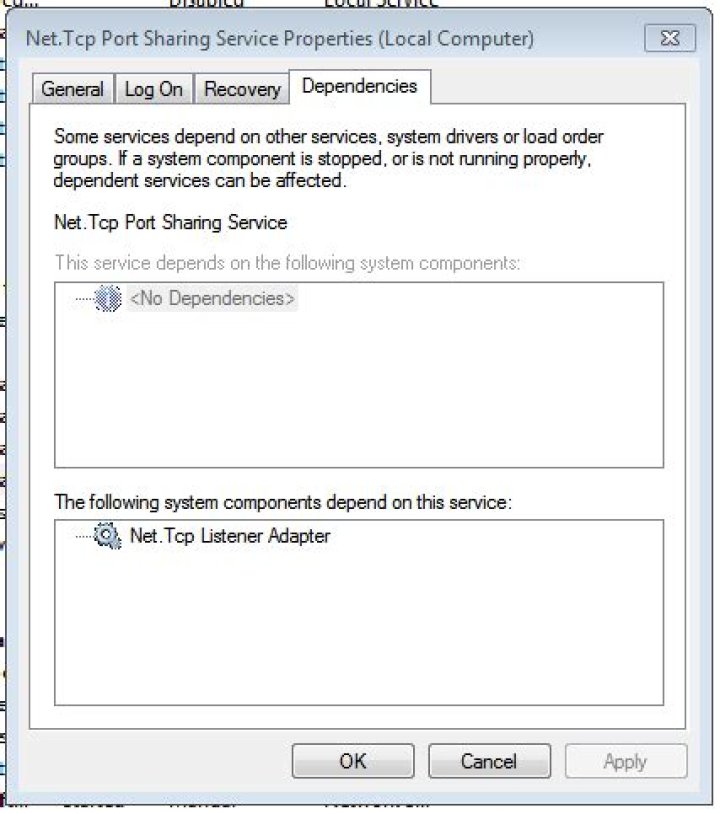
I am using the net.tcp protocol for various web services. When I reboot my Windows 7 Ultimate (64-bit) macbook pro, the service never restarts automatically, even though that is how they are set:

The only relevant events I can see are in the System Event Log:
Error 6/9/2011 19:47 Service Control Manager 7001 None The Net.Tcp Listener Adapter service depends on the Net.Tcp Port Sharing Service service > which failed to start because of the following error: The service did not respond to the start or control request in a timely fashion."
Error 6/9/2011 19:47 Service Control Manager 7000 None The Net.Tcp Port Sharing Service service failed to start due to the following error: The service did not respond to the start or control request in a timely fashion."
Error 6/9/2011 19:47 Service Control Manager 7009 None
A timeout was reached (30000 milliseconds) while waiting for the Net.Tcp Port Sharing Service service to connect.
This post suggests that it's something else blocking the port (in the post it's SCCM 2007 R3 Client which I don't use).
What else could be the problem? If it's something else blocking the port, how do I figure out what? When I manually start the services, they start correctly.
Dependencies are:
Net.Tcp Port Sharing Service
Net.Tcp Listener Adapter
Still no luck, but I think the problem might be that my network connection takes too long to come up. I put in a custom view of the event log, and found these items:
The first in the series says:
3A timeout was reached (30000 milliseconds) while waiting for the Net.Tcp Port Sharing Service service to connect.
7 Answers
You could try to turn off IPv6 as first step.
Other repair commands that you can try are :
netsh int ip reset c:\resetlog.txt (reset TCP/IP stack) netsh winsock reset c:\winsock.txt (reset winsock) netsh int ipv4 reset reset.log (reset IPv4 TCP/IP stack) See also reset Internet Protocol (TCP/IP) that provides a fix-me.
Before starting, better create a system restore point, just in case.
3If you go to Server Manager | Features and Add the ".Net Framework 3.5.1 Features" with the "WCF Activation" subfeature in it, you should get this problem resolved.
@Jay Int32 is correct in his resolution above but you may want to simply enable the WCF activation feature in .net 3.5 instead of going about the hard core way of installing each framework separately and starting from scratch.
I had the .NET Framework 3.5.1 Features already installed and the Listener Adapter still hung. Worked after also installing Microsoft .NET Framework 3.5.1 WCF HTTP and Non-HTTP Activation.
2I was experiencing a similar issue on a Win 2008 server. The Net.Tcp Listener Adapter and the Net.Pipe Listener Adapter would hang in the "starting" state. I ultimately found that it was due to the fact that the system had been setup with .NET 2.0 Framework and .NET 4.0 Framework, but not 3.5 which is required for the Windows Process Activation Service Listener Adapter to function properly. We re-imaged the virtual server with a clean OS, installed the .Net Framework packages in order and that resolved the issue.
I doubt the port is being blocked or it probably would not start later. I suspect that some other service is not starting soon enough for it to start, in other words, a dependency.
Check you dependencies against these documents:
You can check you dependencies by double clicking the service, and going to the dependency tab. If it turns out that they do not match, reply to this and I wil add more information on how to add them to the registry.
6In my case, the start failure was caused by missing permissions on machine.config file inside folder C:\Windows\Microsoft.NET\Framework64\v4.0.30319\Config.
In fact, that file had a lock icon:
And I solved adding read and execute permissions to local Users group (from right click > Properties > Security).
Reference: Net.Tcp Port Sharing Service fails to start
I had the same problem. I traced it to a failed installation of the .NET 3.5.1 Frameworks package that's bundled with the Windows Server 2008 R2 Application Role. I fixed the problem by uninstalling, rebooting and reinstalling the .NET 3.5.1 Application Role feature.




