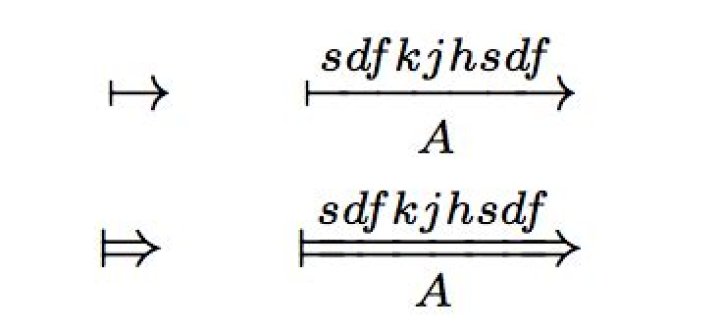
I am trying to reproduce the following in MS Word 2016. That is, letters above and below an arrow. Does anyone know how I can achieve this?
3 Answers
Type -> in the equation editor. It will give you an arrow. Then type \above. Then when you press the space bar, the equation editor will give you the space to write on above the arrow. Similarly, when you type \below followed by a press on the space bar, you will find the slot to write under the arrow.
I don't know a direct solution, but there is a workaround with some drawbacks.
Insert empty matrix with 1 column and 2 rows. Then in the upper field insert one text and in the lower field insert arrow with placeholder for text below it. This workaround may involve putting some spaces around the text below arrow to make it longer. The drawback is that the arrow is not in the middle of the line and the text below the arrow is smaller than above.
The last drawback can be fixed by using 3x1 matrix and inserting arrow with only spaces as a text in the middle.
1This question is fairly old, but for anyone looking for the actual solution, type (in word):->\above(qwerty) \below(QWERTY)
EDIT: su doesn't seem to display spaces correctly, so to clarify - you need a space before and after the whole string
1



