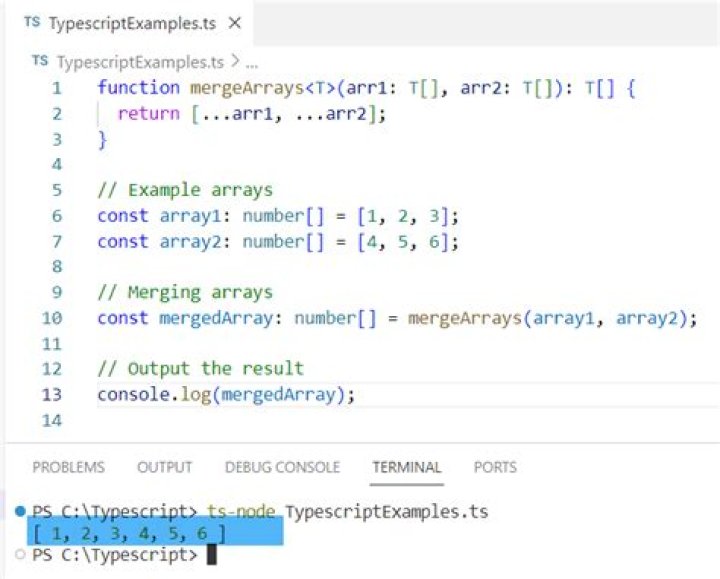
Lets have a look at an example.
var arr1 = new Array({name: "lang", value: "English"}, {name: "age", value: "18"}); var arr2 = new Array({name : "childs", value: '5'}, {name: "lang", value: "German"}); I need to merge those 2 arrays of objects and create the following array:
var arr3 = new Array({name: "lang", value: "German"}, {name: "age", value: "18"}, {name : "childs", value: '5'}); Is there any JavaScript or jQuery function to do this?
$.extend doesn't suit me. It returns
var arr4 = new Array({name : "childs", value: '5'}, {name: "lang", value: "German"}); 43 Answers
If you want to merge 2 arrays of objects in JavaScript. You can use this one line trick
Array.prototype.push.apply(arr1,arr2);
For Example
var arr1 = [{name: "lang", value: "English"},{name: "age", value: "18"}]; var arr2 = [{name : "childs", value: '5'}, {name: "lang", value: "German"}]; Array.prototype.push.apply(arr1,arr2); console.log(arr1); // final merged result will be in arr1 Output:
[{"name":"lang","value":"English"}, {"name":"age","value":"18"}, {"name":"childs","value":"5"}, {"name":"lang","value":"German"}] With ES6 you can do it very easy as below:
var arr1 = new Array({name: "lang", value: "German"}, {name: "age", value: "18"}); var arr2 = new Array({name : "childs", value: '5'}, {name: "lang", value: "German"}); var arr3 = [...arr1, ...arr2]; Output:
arr3 = [ {"name":"lang","value":"German"}, {"name":"age","value":"18"}, {"name":"childs","value":"5"}, {"name":"lang","value":"German"} ] For those who are experimenting with modern things:
var odd = [{ name: "1", arr: "in odd" }, { name: "3", arr: "in odd" } ]; var even = [{ name: "1", arr: "in even" }, { name: "2", arr: "in even" }, { name: "4", arr: "in even" } ]; // ---- // ES5 using Array.filter and Array.find function merge(a, b, prop) { var reduced = a.filter(function(aitem) { return !b.find(function(bitem) { return aitem[prop] === bitem[prop]; }); }); return reduced.concat(b); } console.log("ES5", merge(odd, even, "name")); // ---- // ES6 arrow functions function merge(a, b, prop) { var reduced = a.filter(aitem => !b.find(bitem => aitem[prop] === bitem[prop])) return reduced.concat(b); } console.log("ES6", merge(odd, even, "name")); // ---- // ES6 one-liner var merge = (a, b, p) => a.filter(aa => !b.find(bb => aa[p] === bb[p])).concat(b); console.log("ES6 one-liner", merge(odd, even, "name")); // Results // ( stuff in the "b" array replaces things in the "a" array ) // [ // { // "name": "3", // "arr": "in odd" // }, // { // "name": "1", // "arr": "in even" // }, // { // "name": "2", // "arr": "in even" // }, // { // "name": "4", // "arr": "in even" // } // ] // for posterity, here's the old skool version function merge(a, b, prop) { var reduced = []; for (var i = 0; i < a.length; i++) { var aitem = a[i]; var found = false; for (var ii = 0; ii < b.length; ii++) { if (aitem[prop] === b[ii][prop]) { found = true; break; } } if (!found) { reduced.push(aitem); } } return reduced.concat(b); }Update 12 Oct 2019
New version based only on newer Javascript and without the need of any 3rd party library.
const mergeByProperty = (target, source, prop) => { source.forEach(sourceElement => { let targetElement = target.find(targetElement => { return sourceElement[prop] === targetElement[prop]; }) targetElement ? Object.assign(targetElement, sourceElement) : target.push(sourceElement); }) } var target /* arr1 */ = [{name: "lang", value: "English"}, {name: "age", value: "18"}]; var source /* arr2 */ = [{name : "childs", value: '5'}, {name: "lang", value: "German"}]; mergeByProperty(target, source, 'name'); console.log(target)This answer was getting old, libs like lodash and underscore are much less needed these days. In this new version, the target (arr1) array is the one we’re working with and want to keep up to date. The source (arr2) array is where the new data is coming from, and we want it merged into our target array.
We loop over the source array looking for new data, and for every object that is not yet found in our target array we simply add that object using target.push(sourceElement) If, based on our key property ('name'), an object is already in our target array - we update its properties and values using Object.assign(targetElement, sourceElement). Our “target” will always be the same array and with updated content.
Old answer using underscore or lodash
I always arrive here from google and I'm always not satisfy from the answers. YOU answer is good but it'll be easier and neater using underscore.js
Here is a more general function that will merge 2 arrays using a property of their objects. In this case the property is 'name'
var arr1 = [{name: "lang", value: "English"}, {name: "age", value: "18"}]; var arr2 = [{name : "childs", value: '5'}, {name: "lang", value: "German"}]; function mergeByProperty(arr1, arr2, prop) { _.each(arr2, function(arr2obj) { var arr1obj = _.find(arr1, function(arr1obj) { return arr1obj[prop] === arr2obj[prop]; }); arr1obj ? _.extend(arr1obj, arr2obj) : arr1.push(arr2obj); }); } mergeByProperty(arr1, arr2, 'name'); console.log(arr1);<script src=""></script>[{name: "lang", value: "German"}, {name: "age", value: "18"}, {name : "childs", value: '5'}] Very simple using ES6 spread operator:
const array1 = [{a: 'HI!'}, {b: 'HOW'}] const array2 = [{c: 'ARE'}, {d: 'YOU?'}] const mergedArray = [ ...array1, ...array2 ] console.log('Merged Array: ', mergedArray)<script src=""></script> <script src=""></script>Merged Array: [ {a: 'HI!'}, {b: 'HOW'} {c: 'ARE'}, {d: 'YOU?'} ]
Note: The above solution is to just merge two arrays using ES6 spread operator.
Edit on 07 January 2020 by @bh4r4th : As the context changed due to edits after my initial solution. I would like to update my solution to match current criteria. i.e.,
Merger array objects without creating duplicate objects and,
update the
valueif thenameproperty already exists in the prior array
const arr1 = [ { name: "lang", value: "English" }, { name: "age", value: "18" } ] const arr2 = [ { name: "childs", value: '2' }, { name: "lang", value: "German" } ] const arr3 = [ { name: "lang", value: "German" }, { name: "age", value: "28" }, { name: "childs", value: '5' } ] // Convert to key value dictionary or object const convertToKeyValueDict = arrayObj => { const val = {} arrayObj.forEach(ob => { val[ob.name] = ob.value }) return val } // update or merge array const updateOrMerge = (a1, a2) => { const ob1 = convertToKeyValueDict(a1) const ob2 = convertToKeyValueDict(a2) // Note: Spread operator with objects used here const merged_obj = {...ob1, ...ob2} const val = Object.entries(merged_obj) return val.map(obj => ({ name: obj[0], value: obj[1] })) } const v1 = updateOrMerge(arr1, arr2) const v2 = updateOrMerge(v1, arr3) console.log(`Merged array1 and array2: ${JSON.stringify(v1)} \n\n`) console.log(`Merged above response and array3: ${JSON.stringify(v2)} \n\n`)<script src=""></script> <script src=""></script>var arr3 = []; for(var i in arr1){ var shared = false; for (var j in arr2) if (arr2[j].name == arr1[i].name) { shared = true; break; } if(!shared) arr3.push(arr1[i]) } arr3 = arr3.concat(arr2); 
Merging two arrays:
var arr1 = new Array({name: "lang", value: "English"}, {name: "age", value: "18"}); var arr2 = new Array({name : "childs", value: '5'}, {name: "lang", value: "German"}); var result=arr1.concat(arr2); // result: [{name: "lang", value: "English"}, {name: "age", value: "18"}, {name : "childs", value: '5'}, {name: "lang", value: "German"}] Merging two arrays without duplicated values for 'name':
var arr1 = new Array({name: "lang", value: "English"}, {name: "age", value: "18"}); var arr2 = new Array({name : "childs", value: '5'}, {name: "lang", value: "German"}); var i,p,obj={},result=[]; for(i=0;i<arr1.length;i++)obj[arr1[i].name]=arr1[i].value; for(i=0;i<arr2.length;i++)obj[arr2[i].name]=arr2[i].value; for(p in obj)if(obj.hasOwnProperty(p))result.push({name:p,value:obj[p]}); // result: [{name: "lang", value: "German"}, {name: "age", value: "18"}, {name : "childs", value: '5'}] The easiest way is with some ES6 magic:
Merge two with duplicates:
const a = [{a: 1}, {b: 2}] const b = [{a: 1}] const result = a.concat(b) // [{a: 1}, {b: 2}, {a: 1}] Without duplicates it is same as the above plus:
const distinct = [...new Set(result.map(item => item.YOUR_PROP_HERE))]
I'd merge two arrays with duplicates and then use my this answer to remove duplicates. This looks like shortest way.
const arr1 = [{ name: "lang", value: "English" }, { name: "age", value: "18" } ]; const arr2 = [{ name: "childs", value: '5' }, { name: "lang", value: "German" } ]; const mergedArray = [...arr1, ...arr2]; const uniqueData = [...mergedArray.reduce((map, obj) => map.set(obj.name, obj), new Map()).values()]; console.log(uniqueData)With lodash:
_.uniqBy([...arr1, ...arr2], 'name') Yet another version using reduce() method:
var arr1 = new Array({name: "lang", value: "English"}, {name: "age", value: "18"}); var arr2 = new Array({name : "childs", value: '5'}, {name: "lang", value: "German"}); var arr = arr1.concat(arr2).reduce(function(prev, current, index, array){ if(!(current.name in prev.keys)) { prev.keys[current.name] = index; prev.result.push(current); } else{ prev.result[prev.keys[current.name]] = current; } return prev; },{result: [], keys: {}}).result; document.getElementById("output").innerHTML = JSON.stringify(arr,null,2); <pre/>This is how I've tackled a similar issue in an ES6 context:
function merge(array1, array2, prop) { return array2.map(function (item2) { var item1 = array1.find(function (item1) { return item1[prop] === item2[prop]; }); return Object.assign({}, item1, item2); }); } Note: This approach will not return any items from array1 that don't appear in array2.
EDIT: I have some scenarios where I want to preserve items that don't appear in the second array so I came up with another method.
function mergeArrays(arrays, prop) { const merged = {}; arrays.forEach(arr => { arr.forEach(item => { merged[item[prop]] = Object.assign({}, merged[item[prop]], item); }); }); return Object.values(merged); } var arr1 = [ { name: 'Bob', age: 11 }, { name: 'Ben', age: 12 }, { name: 'Bill', age: 13 }, ]; var arr2 = [ { name: 'Bob', age: 22 }, { name: 'Fred', age: 24 }, { name: 'Jack', age: 25 }, { name: 'Ben' }, ]; console.log(mergeArrays([arr1, arr2], 'name')); jsut using vanilla js (ES6 version)
// no need new Array constructor, just using an array literal const arr1 = [{name: "lang", value: "English"}, {name: "age", value: "18"}]; const arr2 = [{name: "childs", value: '5'}, {name: "lang", value: "German"}]; // 1. create a map const map = new Map(); // 2. concat array // arr1.concat(arr2) === [...arr1, ...arr2] const arr3 = [...arr1, ...arr2]; // 3. for ... of, iterator array for(const obj of arr3) { if(!map.has(obj.name)) { // add map.set(obj.name, obj); } else { // update map.set(obj.name, { ...map.get(obj.name), ...obj, }); } } // 4. get new merged unqiue array const arr4 = [...map.values()]; console.log(`result array =`, JSON.stringify(arr4, null, 4)); /* result array = [ { "name": "lang", "value": "German" }, { "name": "age", "value": "18" }, { "name": "childs", "value": "5" } ] */test ✅ (Chrome)
refs
1Simple solution
var tx = [{"id":1},{"id":2}]; var tx1 = [{"id":3},{"id":4}]; var txHistory = tx.concat(tx1) console.log(txHistory); // output // [{"id":1},{"id":2},{"id":3},{"id":4}]; You could use an object to collect up your properties while replacing duplicates and then expand/flatten that object back to an array. Something like this:
function merge(args) { args = Array.prototype.slice.call(arguments); var o = { }; for(var i = 0; i < args.length; ++i) for(var j = 0; j < args[i].length; ++j) o[args[i][j].name] = args[i][j].value; return o; } function expand(o) { var a = [ ]; for(var p in o) if(o.hasOwnProperty(p)) a.push({ name: p, value: o[p]}); return a; } var arr1 = new Array({name: "lang", value: "English"}, {name: "age", value: "18"}); var arr2 = new Array({name : "childs", value: '5'}, {name: "lang", value: "German"}); var arr3 = expand(merge(arr1, arr2)); I don't know if this is the fastest way but it works for any number of input arrays; for example, this:
var a = expand( merge( [{name: "lang", value: "English"}, {name: "age", value: "18"}], [{name: "childs", value: '5'}, {name: "lang", value: "German"}], [{name: 'lang', value: 'Pancakes'}] ) ); Gives you the same thing in a that was in arr3 with "German" replaced by "Pancakes".
This approach does assume that your objects all have the same {name: ..., value: ...} form of course.
You can see it working here (open your console please):
you could use following function
const merge = (a, b, key = "id") => a.filter(elem => !b.find(subElem => subElem[key] === elem[key])) .concat(b); and try
merge(arr1, arr2, 'name'); Solution utilizing JS Map:
const merge = (arr1, arr2, prop) => { const resultMap = new Map(arr1.map((item) => [item[prop], item])); arr2.forEach((item) => { const mapItem = resultMap.get(item[prop]); if (mapItem) Object.assign(mapItem, item); else resultMap.set(item[prop], item); }); return [...resultMap.values()]; }; const arr1 = new Array({name: "lang", value: "English"}, {name: "age", value: "18"}); const arr2 = new Array({name : "childs", value: '5'}, {name: "lang", value: "German"}); console.log(merge(arr1, arr2, "name")); Which produces:

What about jQuery Merge?
3I was facing the same problem and based on guya answer I have extended the underscore library and also added a bit more of functionality that I was requiring. Here's the Gist.
/** * Merges two object-like arrays based on a key property and also merges its array-like attributes specified in objectPropertiesToMerge. * It also removes falsy values after merging object properties. * * @param firstArray The original object-like array. * @param secondArray An object-like array to add to the firstArray. * @param keyProperty The object property that will be used to check if objects from different arrays are the same or not. * @param objectPropertiesToMerge The list of object properties that you want to merge. It all must be arrays. * @returns The updated original array. */ function merge(firstArray, secondArray, keyProperty, objectPropertiesToMerge) { function mergeObjectProperties(object, otherObject, objectPropertiesToMerge) { _.each(objectPropertiesToMerge, function (eachProperty) { object[eachProperty] = _.chain(object[eachProperty]).union(otherObject[eachProperty]).compact().value(); }); } if (firstArray.length === 0) { _.each(secondArray, function (each) { firstArray.push(each); }); } else { _.each(secondArray, function (itemFromSecond) { var itemFromFirst = _.find(firstArray, function (item) { return item[keyProperty] === itemFromSecond[keyProperty]; }); if (itemFromFirst) { mergeObjectProperties(itemFromFirst, itemFromSecond, objectPropertiesToMerge); } else { firstArray.push(itemFromSecond); } }); } return firstArray; } _.mixin({ merge: merge }); Hope it to be useful! Regards!
I was recently stumped with this problem and I came here with the hope to have an answer but the accepted answer uses 2 for in loops which I wouldn't prefer. I finally managed to make my own. Doesn't depend on any library whatsoever:
function find(objArr, keyToFind){ var foundPos = objArr.map(function(ob){ return ob.type; }).indexOf(keyToFind); return foundPos; } function update(arr1,arr2){ for(var i = 0, len = arr2.length, current; i< len; i++){ var pos = find(arr1, arr2[i].name); current = arr2[i]; if(pos !== -1) for(var key in arr2) arr1[pos][key] = arr2[key]; else arr1[arr1.length] = current; } } This also maintains the order of arr1.
Here I first filter arr1 based on element present in arr2 or not. If it's present then don't add it to resulting array otherwise do add. And then I append arr2 to the result.
arr1.filter(item => { if (!arr2.some(item1=>item.name==item1.name)) { return item } }).concat(arr2) let mergeArray = arrA.filter(aItem => !arrB.find(bItem => aItem.name === bItem.name)) Posting this because unlike the previous answers this one is generic, no external libraries, O(n), actually filters out the duplicate and keeps the order the OP is asking for (by placing the last matching element in place of first appearance):
function unique(array, keyfunc) { return array.reduce((result, entry) => { const key = keyfunc(entry) if(key in result.seen) { result.array[result.seen[key]] = entry } else { result.seen[key] = result.array.length result.array.push(entry) } return result }, { array: [], seen: {}}).array } Usage:
var arr1 = new Array({name: "lang", value: "English"}, {name: "age", value: "18"}) var arr2 = new Array({name : "childs", value: '5'}, {name: "lang", value: "German"}) var arr3 = unique([...arr1, ...arr2], x => x.name) /* arr3 == [ {name: "lang", value: "German"}, {name: "age", value: "18"}, {name: "childs", value: "5"} ]*/ var arr1 = [{ name: "lang", value: "English" }, { name: "age", value: "18" }]; var arr2 = [{ name: "childs", value: '5' }, { name: "lang", value: "German" }]; function mergeArrayByProperty(arr1, arr2, prop) { var newArray = arr1.map(item => { if (typeof (item[prop]) !== "undefined") { var nItems = arr2.filter(ni => { if (typeof (ni[prop]) !== "undefined" && ni[prop] === item[prop]) return ni; }); if (nItems.length > 0) { item = Object.assign({}, item, nItems[0]); } return item; } }); var arr2nd = arr2.flatMap(item => { return item[prop] }); var arr1nd = arr1.flatMap(item => { return item[prop] }); var nonDupArr = arr2nd.map(p => { if (arr1nd.includes(p) === false) return arr2.filter(i2 => { if (i2[prop] === p) return Object.assign({}, i2) })[0]; }); return newArray.concat(nonDupArr).filter(i=>{if(i !== null)return i}) } var arr = mergeArrayByProperty(arr1, arr2, 'name'); console.log(arr)I know this has been answered a lot, but I thought I would share.
This finds the duplicate key in the first array and merges the second arrays object having the same key value. If no value is found in the second array, it uses the original object. As you can see, lang is only found once in the result set; having german for the value.
const arr1 = [{ name: "lang", value: "English" }, { name: "age", value: "18" }]; const arr2 = [{ name: "childs", value: '5' }, { name: "lang", value: "German" }]; const mergeArrOfObjects = (dataset1, dataset2) => { const map1 = new Map(); dataset1.map((d1, i) => { map1.set(d1.name, i); }) for (let d2 of dataset2) { if (d2 && map1.has(d2.name)) { dataset1[map1.get(d2.name)] = d2; } else if(d2){ dataset1.push(d2); } } return dataset1; }; const arr3 = mergeArrOfObjects(arr1, arr2); console.log(arr3); Just use helprjs
const arr1 = [{ id: 1, name: 'Jack'}, { id: 2, name: 'Jack'}]; const arr2 = [{ id: 2, name: 'Jane'}, { id: 3, name: 'Rod'}]; mergeArrays(arr1, arr2, "name"); // [{ id: 1, name: 'Jack'}, { id: 2, name: 'Jane'}, { id: 3, name: 'Rod'}]; mergeArrays(arr1, arr2, "id"); // [{ id: 1, name: 'Jack'}, { id: 2, name: 'Jack'}, { id: 3, name: 'Rod'}]; Check out the demo
Based on the question, I understand that there is a key that you want to use to override other attributes, not to merge them.
interface Foo { name: string; value: string; } var arr1: Foo[] = [ { name: "lang", value: "English" }, { name: "age", value: "18" }, ]; var arr2: Foo[] = [ { name: "childs", value: "5" }, { name: "lang", value: "German" }, ]; We can use combination of Map with Reduce to select the key that will be used to overwrite the record.
const merged: Foo[] = Array.from( [...arr1, ...arr2].reduce( (acc, curr) => acc.set(curr.name, curr), new Map<Foo["name"], Foo>(), ) .values(), ); // [ // { name: "lang", value: "German" }, // { name: "age", value: "18" }, // { name: "childs", value: "5" }, // ]; Off the top of my head - try jquery extend
var arr3 = jQuery.extend(arr1,arr2....) var newArray = yourArray.concat(otherArray); console.log('Concatenated newArray: ', newArray);
Based on @YOU's answer but keeping the order:
var arr3 = []; for(var i in arr1){ var shared = false; for (var j in arr2) if (arr2[j].name == arr1[i].name) { arr3.push(arr1[j] shared = true; break; } if(!shared) arr3.push(arr1[i]) } for(var j in arr2){ var shared = false; for (var i in arr1) if (arr2[j].name == arr1[i].name) { shared = true; break; } if(!shared) arr3.push(arr2[j]) } arr3 I know this solution is less efficient, but it's necessary if you want to keep the order and still update the objects.




