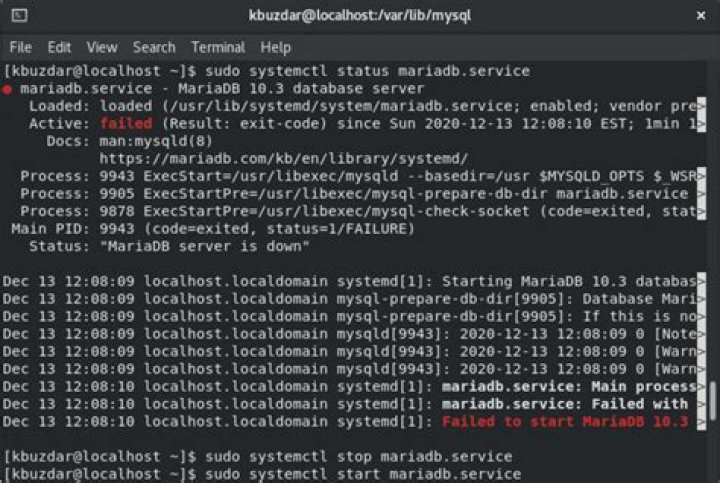

I am trying to install maria db and getting the following issue.
[root@localhost ~]# service mysqld start Redirecting to /bin/systemctl start mysqld.service Job for mariadb.service failed. See 'systemctl status mariadb.service' and 'journalctl -xn' for details. I tried 'systemctl status mariadb.service' and 'journalctl -xn' and follows the details.
[root@localhost ~]# systemctl status mariadb.service mariadb.service - MariaDB database server Loaded: loaded (/usr/lib/systemd/system/mariadb.service; enabled) Active: failed (Result: exit-code) since Sun 2014-09-21 17:19:44 IST; 23s ago Process: 2712 ExecStartPost=/usr/libexec/mariadb-wait-ready $MAINPID (code=exited, status=1/FAILURE) Process: 2711 ExecStart=/usr/bin/mysqld_safe --basedir=/usr (code=exited, status=0/SUCCESS) Process: 2683 ExecStartPre=/usr/libexec/mariadb-prepare-db-dir %n (code=exited, status=0/SUCCESS) Main PID: 2711 (code=exited, status=0/SUCCESS) Sep 21 17:19:42 localhost.localdomain mysqld_safe[2711]: 140921 17:19:42 mysqld_safe Logging to '/var/lib/mysql/localhost.localdomain.err'. Sep 21 17:19:42 localhost.localdomain mysqld_safe[2711]: 140921 17:19:42 mysqld_safe Starting mysqld daemon with databases from /var/lib/mysql Sep 21 17:19:43 localhost.localdomain mysqld_safe[2711]: 140921 17:19:43 mysqld_safe mysqld from pid file /var/lib/mysql/localhost.localdoma...d ended Sep 21 17:19:44 localhost.localdomain systemd[1]: mariadb.service: control process exited, code=exited status=1 Sep 21 17:19:44 localhost.localdomain systemd[1]: Failed to start MariaDB database server. Sep 21 17:19:44 localhost.localdomain systemd[1]: Unit mariadb.service entered failed state. [root@localhost ~]# journalctl -xn -- Logs begin at Sun 2014-09-21 02:33:29 IST, end at Sun 2014-09-21 17:20:11 IST. -- Sep 21 17:16:26 localhost.localdomain systemd[1]: Started dnf makecache. -- Subject: Unit dnf-makecache.service has finished start-up -- Defined-By: systemd -- Support: -- -- Unit dnf-makecache.service has finished starting up. -- -- The start-up result is done. Sep 21 17:18:11 localhost.localdomain NetworkManager[683]: <warn> nl_recvmsgs() error: (-33) Dump inconsistency detected, interrupted Sep 21 17:19:42 localhost.localdomain systemd[1]: Starting MariaDB database server... -- Subject: Unit mariadb.service has begun with start-up -- Defined-By: systemd -- Support: -- -- Unit mariadb.service has begun starting up. Sep 21 17:19:42 localhost.localdomain mysqld_safe[2711]: 140921 17:19:42 mysqld_safe Logging to '/var/lib/mysql/localhost.localdomain.err'. Sep 21 17:19:42 localhost.localdomain mysqld_safe[2711]: 140921 17:19:42 mysqld_safe Starting mysqld daemon with databases from /var/lib/mysql Sep 21 17:19:43 localhost.localdomain mysqld_safe[2711]: 140921 17:19:43 mysqld_safe mysqld from pid file /var/lib/mysql/localhost.localdomain.pid end Sep 21 17:19:44 localhost.localdomain systemd[1]: mariadb.service: control process exited, code=exited status=1 Sep 21 17:19:44 localhost.localdomain systemd[1]: Failed to start MariaDB database server. -- Subject: Unit mariadb.service has failed -- Defined-By: systemd -- Support: -- -- Unit mariadb.service has failed. -- -- The result is failed. Sep 21 17:19:44 localhost.localdomain systemd[1]: Unit mariadb.service entered failed state. Sep 21 17:20:11 localhost.localdomain NetworkManager[683]: <warn> nl_recvmsgs() error: (-33) Dump inconsistency detected, interrupted Can any one please help?
I have tried uninstalling and installing many a times but received the same error.
Thanks in advance.
4 Answers
Most of the time if the system journal (journalctl) doesn't show what the problem was, the MariaDB error log (located in /var/lib/mysql/localhost.localdomain.err) does. Looking into that file you usually see what the problem is.
Most commonly errors that do not disappear after a reinstallation mean that your data directory (by default /var/lib/mysql/) is corrupted and the database needs to be reinstalled with mysql_install_db. To make sure you do a clean installation, remove all files located in the data directory and then run sudo mysql_install_db --user=mysql.
I solved as follows:
After installing
Run: > mysql_install_db --user=mysql --basedir=/usr --datadir=/var/lib/ Then: > mysql_secure_installation And then: systemctl start mariadb with this this, I can resolved.
A quick update for anyone coming here through a Web search.
I had a "failed to start" message following a Debian 9 -> Debian 10 (Buster) in-place server upgrade, and after a bit of digging I found that the following line in /etc/mysql/my.cnf needed updating:
From:
[mysqld] : (other stuff) : innodb_large_prefix To:
[mysqld] : (other stuff) : innodb_large_prefix = "ON" The clue was the following lines in /var/log/mysql/error.log
2020-06-06 16:41:24 0 [ERROR] /usr/sbin/mysqld: option '--innodb-large-prefix' requires an argument 2020-06-06 16:41:24 0 [ERROR] Parsing options for plugin 'InnoDB' failed. Not sure about your case, But u can check if mariadb/mysql client is deleted accidentally, Since in my case, I had deleted the mariadb client repo from shared file,So reinstalled the client as,
sudo apt-get install libmariadb-dev Note: But before installing client do one thing, for rails app just change the mysql version in gemfile and try to install as bundle install mysql2, If its mariadb client issue then it will throw error mentioning that need to install mariadb client or mysql2 client as,
sudo apt-get install libmariadb-dev OR
sudo apt-get install libmysqlclient-dev Please refer other answers in case its not mariadb client issue 😊 😜




