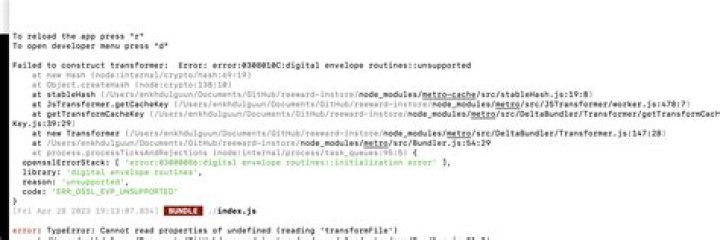
I tried to archive my react native project using Product > Archive on XCode9.2. But Xcode produce this error:
File /Users/louis/Library/Developer/Xcode/DerivedData/Scavenger-evyvzocndqoghkclcbwewolywniz/Build/Products/Release-iphoneos/ does not exist. This must be a bug with My Environment: OS: macOS Sierra 10.12.6 Node: 9.3.0 npm: 5.5.1 Watchman: 4.7.0 Xcode: Xcode 9.2 Build version 9C40b Android Studio: 3.0 AI-171.4443003 Packages: (wanted => installed) react: ^16.0.0 => 16.2.0 react-native: ^0.50.3 => 0.50.4 I also tried to run on terminal
react-native bundle --entry-file='index.ios.js' --bundle-output='./ios/Scavenger/main.jsbundle' --dev=false --platform='ios' --assets-dest='./ios'but ended up with error Loading dependency graph... Unexpected end of JSON input
XCode error.
18 Answers
This issue take me some days to fixed. I got this issue when run the build on travis-ci. Here is my fix:
Add this line to scripts in your package.json file.
"build:ios": "react-native bundle --entry-file='index.js' --bundle-output='./ios/main.jsbundle' --dev=false --platform='ios'" Now your can run the command to generate main.jsbundle. yarn build:ios or npm run build:ios
Open the Xcode > Select project target > add main.jsbundle to Copy Bundle Resource in Build Phases. (image below).
Comment this line in AppDelegate.m
jsCodeLocation = [[RCTBundleURLProvider sharedSettings] jsBundleURLForBundleRoot:@"index" fallbackResource:nil]; Use this line:-
jsCodeLocation = [[NSBundle mainBundle] URLForResource:@"main" withExtension:@"jsbundle"]; After that run this to make jsbundle:-
react-native bundle --entry-file index.js --platform ios --dev false --bundle-output ios/main.jsbundle --assets-dest ios Run after this command in xcode . Hope it will make bundle and there is no such error after that ... Thanx
4This happens when there is no offline bundle file in your project, I had the same problem and this worked for me.
I have added the below line to my package.json file, under scripts section, so I don't have to type it every time I want to generate an offline bundle.
"build:ios": "react-native bundle --entry-file='index.ios.js' --bundle-output='./ios/YourAppName/main.jsbundle' --dev=false --platform='ios' --assets-dest='./ios'" And then run this command in your application projects folder:
npm run build:ios
After running the above command, new main.jsbundle will be generated in your ios/YourAppName directory.
Next, open your project using XCode, right click on your project name then click Add Files to "YourProjectName", choose the main.jsbundle file that was generated, and then build again.
Now it might be working well.
I am using:
"react": "16.0.0-alpha.12", "react-native": "^0.48.3", You need to run the following command:
react-native bundle --entry-file ./index.js --platform ios --bundle-output ios/main.jsbundle After that, the app with the static bundle is installed on the real device. But because the nature of the static file, whenever I modify the source code, I need to run that command again to reflect the changes. (You can see next error in command)
0if you update the xcode and get this error then solution is
in terminal of your root project fire following commands
1. sudo xcode-select --reset 2. npx react-native bundle --entry-file ./index.js --platform ios --bundle-output ios/main.jsbundle during second command if you found any error relative to JS then fix it After successfully running second command this error will be gone
1I was facing this issue after I ejected from the expo to add in-app purchases. I did the following to get it to work
cd <your repo> npx react-native bundle --entry-file ./index.js --dev false --reset-cache --platform ios --bundle-output ios/main.jsbundle --assets-dest ./ios After the above commands are run you have to drag and drop the main.jsbundle and the assets into your Xcode and link it by reference and not group
Recommend to use the latest Xcode and React Native versions. My React Native Version: 0.56 and Xcode 10
Step 1: Change AppDelegate.m file
// jsCodeLocation = [[RCTBundleURLProvider sharedSettings] jsBundleURLForBundleRoot:@"index" fallbackResource:nil]; #ifdef DEBUG jsCodeLocation = [[RCTBundleURLProvider sharedSettings] jsBundleURLForBundleRoot:@"index" fallbackResource:nil]; #else jsCodeLocation = [[NSBundle mainBundle] URLForResource:@"main" withExtension:@"jsbundle"]; #endif Step 2: Change Xcode Build Configuration to "Release"
Goto Products> Scheme> Edit Scheme> change Debug to release
if you are using Xcode 10+ please change Build system to Legacy Build System under File> ProjectWorkSpace Settings> Build System
Step 3: Upgrade your "babel-preset-react-native" to 5.0.1, if it does not exist in your package.json file please add it.
Remove NodeModules and package.lock file and add it (npm install or yarn install).
Step 4: Change ".babelrc.js" file
Add " presets: ["module:metro-react-native-babel-preset"]
Step 5: Open Terminal
Open the terminal and navigate to your project directory run this command
"react-native bundle --entry-file index.js --platform ios --dev false --bundle-output ios/main.jsbundle --assets-dest ios/assets" this will generate a "main.jsbundle" file in iOS folder
Step 6: Add "main.jsbundle" file into Xcode.
Open Xcode and navigate to "Build Phase" under "Copy Bundle Resource" add "main.jsbundle" file.
Clean your project also clear your derived data in Xcode. This will build your project in Release mode.
For "Archive" error
Add this dependency into your "pod file"
pod 'React', :path => '../node_modules/react-native', :subspecs => [ 'CxxBridge' ] pod 'yoga', :path => '../node_modules/react-native/ReactCommon/yoga' pod 'DoubleConversion', :podspec => '../node_modules/react-native/third-party-podspecs/DoubleConversion.podspec' pod 'glog', :podspec => '../node_modules/react-native/third-party-podspecs/glog.podspec' pod 'Folly', :podspec => '../node_modules/react-native/third-party-podspecs/Folly.podspec' Remove pod and pod.lock and add again. (pod install)
Happy Coding :)
5This commnad works for me.
react-native bundle --entry-file ./index.ios.js --platform ios --bundle-output ios/main.jsbundle Problem solved after I rewrite shell script. Project > Build Phases > Bundle React Native code and images. There was blank space character in the script.
3In my case I got this error at archive after updating from RN 0.53.3 to 0.55.4
/Users/<myuser>/Desktop/projects/<myProjectName>mobileapp/index.ios.js: Plugin 0 specified in "/Users/<myUserName>/Desktop/projects/<myProjectName>mobileapp/node_modules/babel-preset-react-native/index.js" provided an invalid property of "default" (While processing preset: "/Users/<myUserName>/Desktop/projects/<myProjectName>mobileapp/node_modules/babel-preset-react-native/index.js") + [[ false != true ]] + [[ ! -f /Users/<myUserName>/Library/Developer/Xcode/DerivedData/<myProjectName>Mobile-ghzbbftkebcwlvayfocqahvzifbe/Build/ ]] + echo 'error: File /Users/<myUserName>/Library/Developer/Xcode/DerivedData/<myProjectName>Mobile-ghzbbftkebcwlvayfocqahvzifbe/Build/ does not exist. This must be a bug with' error: File /Users/<myUserName>/Library/Developer/Xcode/DerivedData/<myProjectName>Mobile-ghzbbftkebcwlvayfocqahvzifbe/Build/ does not exist. This must be a bug with + echo 'React Native, please report it here: React Native, please report it here: + exit 2 A big importance to fix this had the line above the error related to babel-preset-react-native
After many hours of trying several workarounds I found a solution by downgrading babel-preset-react-native from ^5.0.2 to ^4.0.0 to make the archive process work.
In my case, it was caused by the javascript code. The error showed at the Metro Bundler(Command Line). Check the Metro Bundler, Does it have an Error or not.
For some people like me this is simply an indication of an error in the JavaScript code. I discovered this to be the case after entering the following command: npx react-native bundle --entry-file index.js --bundle-output "bundle.bundle". Android users would need to specify the platform like so: npx react-native bundle --entry-file --platform "ios" index.js --bundle-output "bundle.bundle".
The bundle failed and the syntax error was shown. Any attempt to open the offending code in a simulator would show the error too.
You can just run:
react-native bundle --entry-file index.js --platform ios --dev false --bundle-output ios/main.jsbundle --assets-dest ios In my case this was caused by a space character in my project path: /users/USER/Projects/Project HousePlants/
That space in Project Houseplants the bundle can not handle and therefore can not find your main.jsbundle
Make sure that you have no whitespace characters in your path and try again.
If properties of config file are changing at run time then make sure there is no error in that as well, if property is not set properly then main.bundlejs would not be generated.
For Example :
isSent:false, isShow:false this two properties were setting at run time and found that for a particular record isSent and isShow were not set which made it
isSent:, isShow: at run time and caused error.
PFB the command I ran, which resolves the issue.
- npm i
- cd ios
- pod install
Please Make sure you are using same node version in project and xcode
For me i had installed 2 different nodejs versions. when delete one nodejs it was working fine
Simply cleaning the project in Xcode helped me
2



