
What are the best ways to calculate LTO write speed?
I recently went from writing to LTO 6 from a single 3TB 5400 rpm drive to 3x3TB 5400 rpm drives in RAID zero and want to test the speed difference. I don't think it is a much as I was hoping for but I'm not sure of the best way to test it other than with a stopwatch, which isn't practical.
I'm transferring hundreds of thousand of .dpx files and even with the 9TB RAID my LTO drive still slows down and rewinds ("shoeshining"?) occasionally.
52 Answers
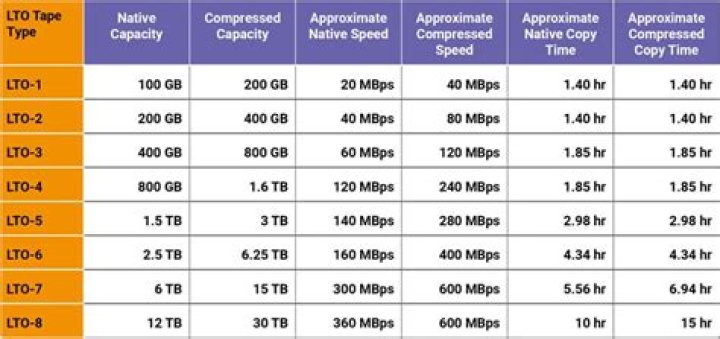
The maximum LTO tape drive speed is well documented in Wikipedia, for LTO 6 it is 160 MB/s. The minimum speed for Tandberg LTO-6 drive is 54 MB/s (tandberg.com). Others are similar. An 5400 RPM hard drive is faster than than 54 MB/s, but only in case of sequential read. You have many small files, so your read pattern is more like random reads. That means a much much lower actual hard disk read performance. In such cases it is better to configure a several gigabytes long buffer on a second hard disk. This caches several small files together. For example the Bacula/Bareos backup programs have a feature for this. This minimalizes shoeshining if your network/disk performance is not enough to feed the tape.
1Essential is the minimal drive speed which is 54 MB/s for uncompressed data for HP drives. (afaik HP produces for Tandberg)
You can also try to disable the compression. This can be done with mt-st Verify that you run mt-st with mt --version.
# mt -f /dev/st0 compression 0 # off # mt -f /dev/st0 compression 1 # on You can use mbuffer to analyze your problem. The commandline would be something like
dump -0u -f - /data/ | mbuffer -R 80M -P 90 -m 4G > /dev/nst0 if you have some data to backup in /data. I use a very fast SSD and still have shoeshining effects with LOT-6 which I do not understand yet and need more tests. Perhaps it is rewinding and not shoeshining? (see How often does an LTO tape brake and return for a full write?)




