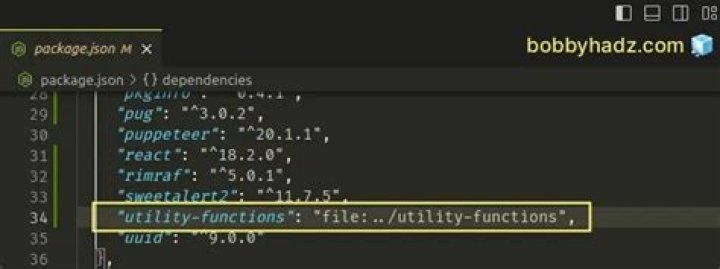

I want to do something like this, so npm install also installs the package.json of ../somelocallib or more importantly its dependencies.
"dependencies": { "express": "*", "../somelocallib": "*" } 16 Answers
npm >= 2.0.0
This feature was implemented in the version 2.0.0 of npm. Local paths can be saved using npm install -S or npm install --save, using any of these forms:
../foo/bar ~/foo/bar ./foo/bar /foo/bar Example package.json:
{ "name": "baz", "dependencies": { "bar": "file:../foo/bar" } } npm ls:
app@0.0.1 /private/tmp/app └── somelocallib@0.0.1 -> /private/tmp/somelocallib npm < 2.0.0
Put somelocallib as dependency in your package.json as normal:
"dependencies": { "somelocallib": "0.0.x" } Then run npm link ../somelocallib and npm will install the version you're working on as a symlink.
Reference: link(1)
17It is now possible to specify local Node module installation paths in your package.json directly. From the docs:
7Local Paths
As of version 2.0.0 you can provide a path to a local directory that contains a package. Local paths can be saved using
npm install -Sornpm install --save, using any of these forms:../foo/bar ~/foo/bar ./foo/bar /foo/barin which case they will be normalized to a relative path and added to your
package.json. For example:{ "name": "baz", "dependencies": { "bar": "file:../foo/bar" } }This feature is helpful for local offline development and creating tests that require npm installing where you don't want to hit an external server, but should not be used when publishing packages to the public registry.
This works for me.
Place the following in your package.json file
"scripts": { "preinstall": "npm install ../my-own-module/" } This is how you will add local dependencies:
npm install file:src/assets/js/FILE_NAME
Add it to package.json from NPM:
npm install --save file:src/assets/js/FILE_NAME
Directly add to package.json like this:
.... "angular2-autosize": "1.0.1", "angular2-text-mask": "8.0.2", "animate.css": "3.5.2", "LIBRARY_NAME": "file:src/assets/js/FILE_NAME" .... If you want to further automate this, because you are checking your module into version control, and don't want to rely upon devs remembering to npm link, you can add this to your package.json "scripts" section:
"scripts": { "postinstall": "npm link ../somelocallib", "postupdate": "npm link ../somelocallib" } This feels beyond hacky, but it seems to "work". Got the tip from this npm issue:
2Master project
Here is the package.json you will use for the master project:
"dependencies": { "express": "*", "somelocallib": "file:./somelocallib" } There, ./somelocallib is the reference to the library folder as relative to the master project package.json.
Sub project
Handle your library dependencies.
In addition to running npm install, you will need to run (cd node_modules/somelocallib && npm install).
This is a known bug with NPM.
Reference: (seeking a more up-to-date reference)
Notes for Docker
Check in your master package.lock and your somelocallib/package.lock into your source code manager.
Then in your Dockerfile use:
FROM node:10 WORKDIR /app # ... COPY ./package.json ./package-lock.json ./ COPY somelocallib somelocallib RUN npm ci RUN (cd node_modules/zkp-utils/ && npm ci) # ... I use parenthesis in my (cd A && B) constructs to make the operation idempotent.
Two steps for a complete local development:
{ "name": "baz", "dependencies": { "bar": "file:../foo/bar" } }
-
cd ~/projects/node-redis # go into the package directory npm link # creates global link cd ~/projects/node-bloggy # go into some other package directory. npm link redis # link-install the package
Here in 2020, working on a Windows 10, I tried with
"dependencies": { "some-local-lib": "file:../../folderY/some-local-lib" ... } Then doing a npm install. The result is that a shortcut to the folder is created in node-modules. This doesn't work. You need a hard link - which windows support, but you have to do something extra in windows to create a hard symlink.
Since I don't really want a hard link, I tried using an url instead:
"dependencies": { "some-local-lib": "file:///D:\\folderX\\folderY\\some-local-lib.tar" .... } And this works nicely.
The tar (you have to tar the stuff in the library's build / dist folder) gets extracted to a real folder in node-modules, and you can import like everything else.
Obviously the tar part is a bit annoying, but since 'some-local-lib' is a library (which has to be build anyway), I prefer this solution to creating a hard link or installing a local npm.
I know that npm install ../somelocallib works.
However, I don't know whether or not the syntax you show in the question will work from package.json...
Unfortunately, doc seems to only mention URL as a dependency.
Try file:///.../...tar.gz, pointing to a zipped local lib... and tell us if it works.
Curious.....at least on Windows (my npm is 3.something) I needed to do:
"dependencies": { "body-parser": "^1.17.1", "module1": "../module1", "module2": "../module2", When I did an npm install ../module1 --save it resulted in absolute paths and not relative per the documentation.
I messed around a little more and determined that ../xxx was sufficient.
Specifically, I have the local node modules checked out to say d:\build\module1, d:\build\module2 and my node project (application) in d:\build\nodeApp.
To 'install', I:
d:\build\module1> rmdir "./node_modules" /q /s && npm install d:\build\module2> rmdir "./node_modules" /q /s && npm install d:\build\nodeApp> rmdir "./node_modules" /q /s && npm install module1's package.json has a dependency of "module2": "../module2"; module2 has no local dependency; nodeApp has dependencies "module1": "../module1" and "module2": "../module2".
Not sure if this only works for me since all 3 folders (module1, module2 and nodeApp) sit on that same level.......
This worked for me: first, make sure the npm directories have the right user
sudo chown -R myuser ~/.npm sudo chown -R myuser /usr/local/lib/node_modules Then your in your package.json link the directory
"scripts": { "preinstall": "npm ln mylib ../../path/to/mylib" }, "dependencies": { "mylib" : "*" } With yarn it can be done as
yarn add file:../somelocallib
Actually, as of npm 2.0, there is support now local paths (see here).
1There is great yalc that helps to manage local packages. It helped me with local lib that I later deploy. Just pack project with .yalc directory (with or without /node_modules). So just do:
npm install -g yalc in directory lib/$ yalc publish in project:
project/$ yalc add lib project/$ npm install that's it.
When You want to update stuff:
lib/$ yalc push //this will updated all projects that use your "lib" project/$ npm install Pack and deploy with Docker
tar -czvf <compresedFile> <directories and files...> tar -czvf app.tar .yalc/ build/ src/ package.json package-lock.json Note: Remember to add .yalc directory.
inDocker:
FROM node:lts-alpine3.9 ADD app.tar /app WORKDIR /app RUN npm install CMD [ "node", "src/index.js" ] I wanted to use a set of local dependencies written in TypeScript, and none of the answers here worked for me. npm install would simply refuse to build the dependencies.
I had to resort to using tsconfig.json to add the packages to my project without marking them as dependencies. My usecase is further complicated by the fact that some dependencies depend on each other, and I wanted all of them to come from the local folder.
Here is my solution:
// tsconfig.json { "compilerOptions": { "baseUrl": "./", "paths": { "@tiptap/*": [ "tiptap/packages/*/src" ] } } } In the example above, I have a local project subfolder named tiptap/ and there are many packages in tiptap/packages/*. The "paths" option will rewrite all @tiptap/foo imports into ./tiptap/packages/foo/src, across both my own files and the files in tiptap/.
It's not a good solution, but it is the only thing that worked for me.
In 2021 you need to use it like:
npm i my-pkg@file:./path-to-my-pkg.js # To remove it later npm un my-pkg Use .js in the end if its file OR path to folder if its complete package with package.json.
Usage
const myPkg = require('my-pkg') That works like charm!




