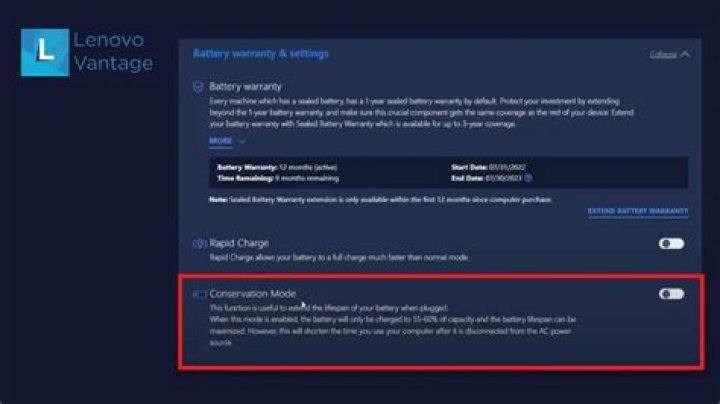

I've been trying to get battery conservation mode to work by doing the below, but ultimately I have been unable to get the setting to change from 0 to 1
Running kernel 5.11.0-37
Tried previous posted solutions of
echo 1 > /sys/bus/platform/drivers/ideapad_acpi/VPC2004:00/conservation_mode
however, when I look at the file ...
cat /sys/bus/platform/drivers/ideapad_acpi/VPC2004:00/conservation_mode 0 Trying this using sudo su also had no effect.
Also tried editing the file manually as root, but when reopening the file it is once again set to 0
Tried: TLP, which seems to confirm I can set an upper threshold for my Lenovo 7i, but it also references conservation_mode being set as 0 (100%)
sudo tlp setcharge 80 1 Setting temporary charge threshold for all batteries: conservation mode = 1 sudo tlp-stat -s -b --cdiff --- TLP 1.4.0 -------------------------------------------- +++ Configured Settings (only differences to defaults): /etc/tlp.conf L0514: RESTORE_THRESHOLDS_ON_BAT="1" /etc/tlp.conf L0508: START_CHARGE_THRESH_BAT1="70" /etc/tlp.conf L0509: STOP_CHARGE_THRESH_BAT1="80" +++ System Info System = LENOVO Lenovo Legion 7 15IMHg05 81YU BIOS = E9CN62WW(V4.07) OS Release = Linux Mint 20.1 Kernel = 5.11.0-37-generic #41~20.04.2-Ubuntu SMP Fri Sep 24 09:06:38 UTC 2021 x86_64 /proc/cmdline = BOOT_IMAGE=/boot/vmlinuz-5.11.0-37-generic root=UUID=0e11e314-e8c7-4281-b1d0-a2e48e32244b ro nomodeset quiet splash nomodeset acpi_osi=! "acpi_osi=Windows 2020" Init system = systemd v245 (245.4-4ubuntu3.13) Boot mode = UEFI +++ TLP Status State = enabled RDW state = enabled Last run = 18:07:12, 20084 sec(s) ago Mode = AC Power source = AC +++ Battery Care Plugin: lenovo Supported features: charge threshold Driver usage: * vendor (ideapad_laptop) = active (charge threshold) Parameter value range: * STOP_CHARGE_THRESH_BAT0: 0(off), 1(on) -- battery conservation mode /sys/bus/platform/drivers/ideapad_acpi/VPC2004:00/conservation_mode = 0 (100%) +++ Battery Status: BAT1 /sys/class/power_supply/BAT1/manufacturer = 0x53 0x4D 0x50 0x00 0x32 0x30 0x /sys/class/power_supply/BAT1/model_name = 0x4C 0x31 0x39 0x4D 0x34 0x50 0x8000 /sys/class/power_supply/BAT1/cycle_count = 22 /sys/class/power_supply/BAT1/energy_full_design = 80000 [mWh] /sys/class/power_supply/BAT1/energy_full = 77870 [mWh] /sys/class/power_supply/BAT1/energy_now = 77370 [mWh] /sys/class/power_supply/BAT1/power_now = 0 [mW] /sys/class/power_supply/BAT1/status = Idle Charge = 99.4 [%] Capacity = 97.3 [%] If anyone has any possible solutions, explanations on why I cant seem to edit the conservation_mode file, it'd be much appreciated.
32 Answers
Unfortunately, the configuration of TLP is not quite intuitive in this case.
The crucial information is in the output of tlp-stat -b.
* STOP_CHARGE_THRESH_BAT0: 0(off), 1(on) -- battery conservation mode BAT0 because conservation mode applies to all batteries regardless of their name.
For conservation mode you must configure:
STOP_CHARGE_THRESH_BAT0=1 Then use the terminal command
sudo tlp setcharge Check
sudo tlp-stat -b Your existing lines may be commented afterwards
/etc/tlp.conf L0508: START_CHARGE_THRESH_BAT1="70" /etc/tlp.conf L0509: STOP_CHARGE_THRESH_BAT1="80" A direct and simple solution to your problem would be this:
- Check if Ideapad_laptop kernel module is loaded (You don't need to repeat this)
lsmod | grep ideapad_laptop
- To know the current status of conservation mode:
(If Output is 1 - conservation mode ON, 0 - conservation mode OFF)
cat /sys/bus/platform/drivers/ideapad_acpi/VPC2004:00/conservation_mode
(You may have different name for "VPC2004:00" so check that by going to the folder "ideapad-acpi" by cd command and running ls there)
- Use following command to turn on/off the conservation mode : (1 - conservation ON, 0 -conservation OFF)
echo 1 | sudo tee /sys/bus/platform/drivers/ideapad_acpi/VPC2004:00/conservation_mode
1echo 0 | sudo tee /sys/bus/platform/drivers/ideapad_acpi/VPC2004:00/conservation_mode