I'm using TailwindCSS and AlpineJS in my project and, when loading the login page, for a brief moment there is a flash of the header dropdowns opening. For this, I try to use x-cloak, but it is not working properly and I cannot understand why, since I used it on other pages and it worked perfectly.
This is my code snippet:
<!-- Header --> <nav x-data="{ showMenu: false, resourcesOpen: false, learnOpen: false }"> <div> <div> <!-- Mobile menu button --> <!-- Left Side --> <div> <!-- Logo --> <a href="#"> <img src="/img/logo/angel-white-lg.png" alt="Angel Logo"> <img src="/img/logo/angel-white-sm.png" alt="Angel Logo"> </a> <!-- Dropdowns --> <div> <!-- Resources --> <div x-cloak @mouseleave="resourcesOpen = false" aria-labelledby="nav-heading" x-cloak :aria-expanded="resourcesOpen"> <button type="button" :aria-expanded="resourcesOpen" aria-controls="nav-list" @mouseenter="resourcesOpen = !resourcesOpen" @click.away="resourcesOpen = false"> Recursos </button> <div x-show.transition.in.duration.300ms.origin.top.left.opacity.scale.10.out.duration.300ms.origin.top.left.opacity.scale.10="resourcesOpen === true"> <!-- Trade dropdown panel, show/hide based on dropdown state. --> <div aria-orientation="vertical" aria-labelledby="user-menu"> <div> <a href="#"> Security </a> <a href="#"> Estrutura de Taxas </a> <a href="#"> Founding Options </a> <a href="#"> Staking </a> <a href="#"> 24/7 Support </a> <a href="#"> Liquidity </a> </div> <div> <a href="#"> Margin Trading </a> <a href="#"> Índices </a> <a href="#"> Futures </a> <a href="#"> OTC </a> <a href="#"> Account Management </a> <a href="#"> Cryptowatch </a> </div> </div> </div> </div> <!-- Prices --> <div> <button type="button"> Preços </button> </div> <!-- Learn --> <div x-cloak @mouseleave="learnOpen = false" aria-labelledby="nav-heading" x-cloak :aria-expanded="learnOpen"> <button type="button" :aria-expanded="learnOpen" aria-controls="nav-list" @mouseenter="learnOpen = !learnOpen" @click.away="learnOpen = false"> Learn </button> <div x-show.transition.in.duration.300ms.origin.top.left.opacity.scale.10.out.duration.300ms.origin.top.left.opacity.scale.10="learnOpen === true"> <!-- Trade dropdown panel, show/hide based on dropdown state. --> <div aria-orientation="vertical" aria-labelledby="user-menu"> <div> <a href="#"> Crypto Guides </a> <a href="#"> Videos </a> <a href="#"> Podcast </a> </div> </div> </div> </div> <!-- Support --> <div> <button type="button"> Support </button> </div> <!-- Futures --> <div> <button type="button"> Futures </button> </div> <!-- Institutions --> <div> <button type="button"> Institutions </button> </div> </div> </div> </div> </div> <style> [x-cloak] { display: none; } </style> And here's a screenshot of the flashes occurring when the page loads. 
2 Answers
put the x-cloack on the outside nav
<nav x-data="{ showMenu: false, resourcesOpen: false, learnOpen: false }" x-cloak > notice that i put the x-cloak on the outside nav so it does not show the navigation at all before alpine initialize
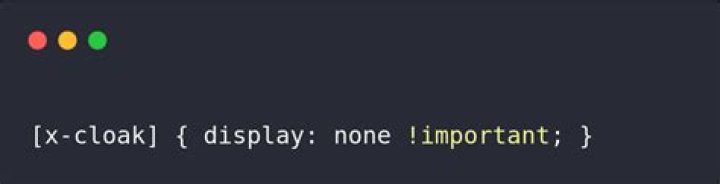
We also need to add the following CSS on the relevant page. I just ran into this issue and found the CSS to add on the page from the official docs.
[x-cloak] { display: none !important; } so the complete solution is adding x-cloak to the tag
<div x-cloak></div> 



