Our summer house is in a place where we can only get about a 50 mbps connection and since there are often 10 people in the house all using the same wifi network I was wondering whether it is possible to get another line from the ISP and merge the two into one single wifi network by connecting two modems to a single router? I have a ubiquity unify network with a router and a whole bunch of access points to cover the whole house.
13 Answers
The answer to this is a classic "yes and no".
It is not possible without the active participation of your ISP to make the two 50Mbps lines appear as a single 100Mbps line, but it definitly is possible to load-balance between two lines in a way, that the sum of all internet consumption reaches (close to) 100Mbps.
Basically what load balancing does, is make use of the fact, that most Internet usage is not a big Download of many Megabytes (which would be limited to a single line), but a lot of smaller requests. By channeling those through different lines, they appear to be much faster.
If you want a Firewall/Router that makes this easy, check out pfSense.
3You may combine two lines into one by using a Dual Wan Router.
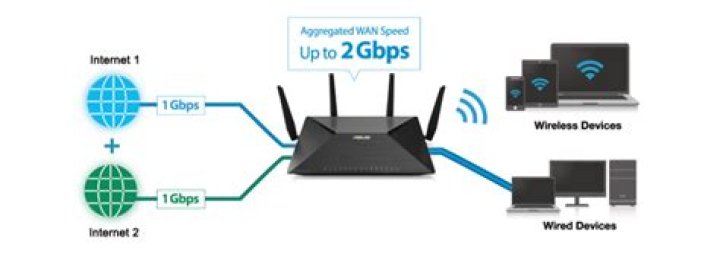
A Dual WAN router is a router that is equipped with 2 Internet ports and can be utilized to connect to 2 internet connections. A Dual WAN Router can be used for doing Load Balancing to equally supply traffic over two WAN connections.
This will look like this:

I cannot advise a particular router because I don't know your parameters (and anyway hardware recommendations are not allowed here). But see for example the article
Top 7 Best Dual Wan Routers (Load Balancing Business Firewall Routers) For Multiple Internet Connections.
You can easily create two networks by purchasing a second router, and have each fed with its own line from the ISP. Run one network on one side of the house, and the other network on the other side. Both should use distinct and separate frequencies to avoid conflict and the resulting performance hit. That's the easy way.
I don't know if your model of Ubiquiti device supports bonding multiple channels, which would be required for an integrated network. Some devices do, some devices don't. Your ISP would also have to support bonding.




