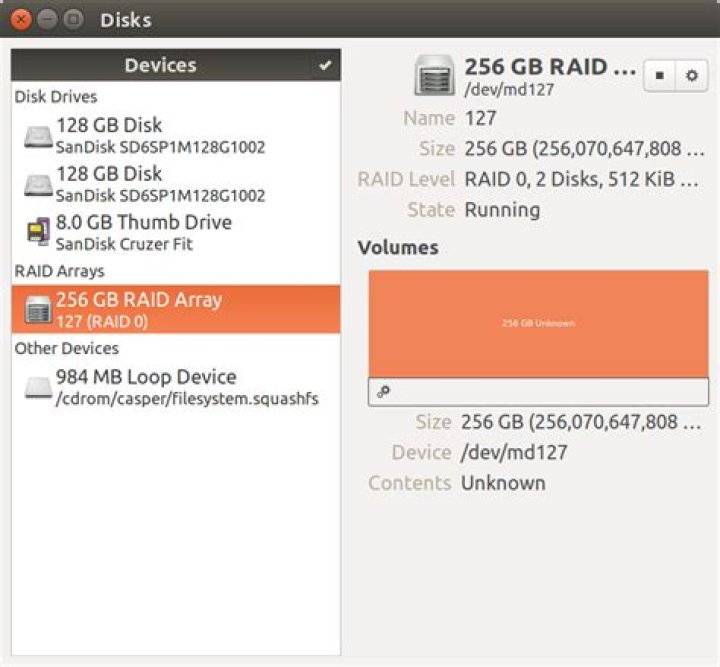
This machine have 2 128 GB SSD drives ().
I managed to install Ubuntu with no problems on one SSD drive, but I am having following troubles with RAID setup. Here is the details:
- I boot from live USB (try Ubuntu option).
- Install mdadm:
sudo apt-get install mdadm. - Create RAID:

- Run installer:
- It fails to install GRUB:
I also tried to install grub manually after installer failed:
- I looked how RAID is partinitioned:
- Added BIOS Boot partinition:
Tried to install GRUB:
$ sudo mount /dev/md127p4 /mnt$ sudo mount /dev/md127p1 /mnt/boot$ sudo grub-install --root-directory=/mnt /dev/md/127Installing for i386-pc platform.grub-install: error: diskfilter writes are not supported.Tried solutions proposed in Diskfilter writes are not supported > What triggers this error? but still same error.
UPDATE:
I tried with alternate install image, following this video , but, after reboot there are no boot options, BIOS opens without any boot option. I had a boot partition on /dev/sda, GRUB was installed on it, but was unable to boot for some reason.
3 Answers
The BIOS boot partition(s) must be created on the disk(s) not the RAID device.
One BIOS boot partition is enough for you as your system won't boot with one disk only.
Linux soft RAID works on partitions, not drives. So you'll have to create one partition for the BIOS boot and one for the RAID.
You could have to create a third partition. /boot can be on RAID 1, can't be on RAID 5, and I'm not sure about RAID 0 but it probably can't.
5Did you try Lubuntu installer which still provide alternate ISO image to properly setup RAID ?
I guess you already wiped all Windows related partitions to start clean right ?
5Finally managed to install Ubuntu on RAID 0 and UEFI/GPT system, steps below:
sudo -s apt-get -y install mdadm apt-get -y install grub-efi-amd64 sgdisk -z /dev/sda sgdisk -z /dev/sdb sgdisk -n 1:0:+100M -t 1:ef00 -c 1:"EFI System" /dev/sda sgdisk -n 2:0:+8G -t 2:fd00 -c 2:"Linux RAID" /dev/sda sgdisk -n 3:0:0 -t 3:fd00 -c 3:"Linux RAID" /dev/sda sgdisk /dev/sda -R /dev/sdb -G mkfs.fat -F 32 /dev/sda1 mkdir /tmp/sda1 mount /dev/sda1 /tmp/sda1 mkdir /tmp/sda1/EFI umount /dev/sda1 mdadm --create /dev/md0 --level=0 --raid-disks=2 /dev/sd[ab]2 mdadm --create /dev/md1 --level=0 --raid-disks=2 /dev/sd[ab]3 sgdisk -z /dev/md0 sgdisk -z /dev/md1 sgdisk -N 1 -t 1:8200 -c 1:"Linux swap" /dev/md0 sgdisk -N 1 -t 1:8300 -c 1:"Linux filesystem" /dev/md1 ubiquity -b mount /dev/md1p1 /mnt mount -o bind /dev /mnt/dev mount -o bind /dev/pts /mnt/dev/pts mount -o bind /sys /mnt/sys mount -o bind /proc /mnt/proc cat /etc/resolv.conf >> /mnt/etc/resolv.conf chroot /mnt nano /etc/grub.d/10_linux # change quick_boot and quiet_boot to 0 apt-get install -y grub-efi-amd64 apt-get install -y mdadm nano /etc/mdadm/mdadm.conf # remove metadata and name update-grub mount /dev/sda1 /boot/efi grub-install --boot-directory=/boot --bootloader-id=Ubuntu --target=x86_64-efi --efi-directory=/boot/efi --recheck update-grub umount /dev/sda1 dd if=/dev/sda1 of=/dev/sdb1 efibootmgr -c -g -d /dev/sdb -p 1 -L "Ubuntu #2" -l '\EFI\Ubuntu\grubx64.efi' exit # from chroot exit # from sudo -s reboot Credits:
- How to Install Ubuntu 14.04 with RAID 1 using desktop installer?
- How to install Ubuntu 14.04 64-bit with a dual-boot RAID 1 partition on an UEFI/GPT system?