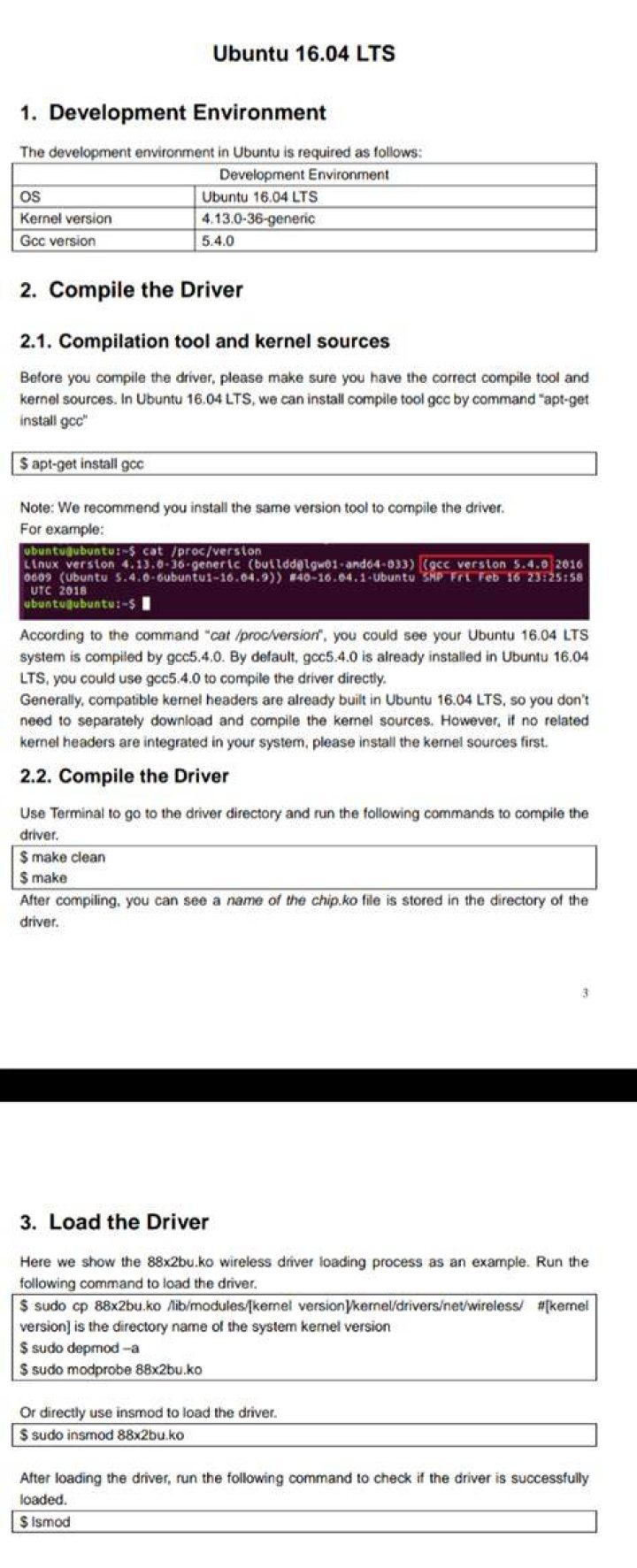
Recently bought a WiFi booster to combat patchy WiFi in my uni dorm, works perfectly with Windows as driver installation was easy to follow, yet I can't seem to figure out how to install the Ubuntu drivers. The picture attached is the guide to installing with Ubuntu but I can't follow it, could someone really spell it out step by step like I'm 5 years old please
in my /lib/modules directory there are 4 directories, 4.15.0-29-generic, 4.15.0-62-generic, 4.15.0-64-generic, 4.15.0-65-generic, which on of these should I enter? Additionally the guide says to enter the command "make clean" but I receive and error saying I didn't specify a target.
EDIT:
uname -r 4.15.0-65-generic lsusb Bus 002 Device 003: ID 04f2:b52d Chicony Electronics Co., Ltd Bus 002 Device 002: ID 0438:7900 Advanced Micro Devices, Inc. Bus 002 Device 001: ID 1d6b:0002 Linux Foundation 2.0 root hub Bus 001 Device 004: ID 0a5c:216d Broadcom Corp. Bus 001 Device 003: ID 2357:0106 Bus 001 Device 002: ID 0438:7900 Advanced Micro Devices, Inc. Bus 001 Device 001: ID 1d6b:0002 Linux Foundation 2.0 root hub Bus 004 Device 001: ID 1d6b:0003 Linux Foundation 3.0 root hub Bus 003 Device 001: ID 1d6b:0002 Linux Foundation 2.0 root hub dmesg | grep 88x2bu [No output] 
1 Answer
With a temporary working internet connection by ethernet, tethering or whatever means possible, open a terminal and do:
git clone sudo dkms add ./rtl8814au sudo dkms install rtl8814au/4.3.21 Reboot. Your wireless should now be working.
3