I'm in the process of embedding my image feed in my website using JSON, the URL needs my user id so I can retrieve this feed.
So, where can I find/get my user id?
328 Answers
Update in Jun-5-2022, Instagram API no longer use Bearer Token for authentication. But I find another useful API. All you need is added extra header X-IG-App-ID with "magic value".
Use can use my docker container Insta-Proxy-Server to bypass the authentication.
Demo video (I just run directly from source code):
Update in Mar-19-2022, the API is require login now. Sorry for the bad news.
But we can solve this problem in two ways.
- Using my C# lib, login using your account (without any Instagram app token stuff and graph api.)
- In case the lib failed (I'm no longer maintain it long time ago), create a proxy server with logged in instagram account.
[Your app] --> [Proxy server] --> [Instagram] --> [Proxy server] -(forward)-> [Your app]
For Proxy server, you can use Nodejs app which install Chromium headless module (Puppeteer for example), logged in with an instagram account.
Proof of concept:
Update in June-20-2019, the API is public now. No authentication required.
Update in December-11-2018, I needed to confirm that this endpoint still work.
You need to login before sending request to this site because it's not public endpoint anymore.
Update in Apr-17-2018, it's look like this endpoint still working (but its not public endpoint anymore), you must send a request with extra information to that endpoint. (Press F12 to open developer toolbar, then click to Network Tab and trace the request.)
Update in Apr-12-2018, cameronjonesweb said that this endpoint doesn't work anymore. When he/she trying to access this endpoint, 403 status code return.
You can get user info when a request is made with the url below:
E.g:
This url will get all information about a user whose username is therock
Enter this url in your browser with the users name you want to find and your access token
TOKEN] Easily Get USER ID and User Details
USER NAME ]&client_id=[ YOU APP Client ID ]
For Example:
Result:
12{"meta":{"code":200},"data":[{"username":"zeeshanakhter2009","bio":"","website":"","profile_picture":"","full_name":"Zeeshan Akhter","id":"202090411"}]}
Most of the methods are obsolete since June, 1/2016 api changes
Below worked for me,
- access instagram on your browser say chrome, safari or firefox.
- Launch developer tools, go to console option.
on command prompt enter below command and hit enter:
window._sharedData.entry_data.ProfilePage[0].user.id
If you are lucky, you will get at first attempt, if not, be patient, refresh the page and try again. keep doing until you see user-id. Good luck!!
1Instead of using the API, one can examine the Instagram userpage to get the id. Example code in PHP:
$html = file_get_contents(""); $doc = new DOMDocument(); $doc->loadHTML($html); $xpath = new DOMXPath($doc); $js = $xpath->query('//body/script[@type="text/javascript"]')->item(1)->nodeValue; $start = strpos($js, '{'); $end = strrpos($js, ';'); $json = substr($js, $start, $end - $start); $data = json_decode($json, true); $data = $data["entry_data"]["UserProfile"][0]; # The "userMedia" entry of $data now has the same structure as the "data" field # in Instagram API responses to user endpoints queries echo $data["user"]["id"]; Of course, this code has to be adapted if Instagram changes its page format.
2Working solution without access token as of October-14-2018:
Search for the username:
Example:
This is a search query. Find the exact matched entry in the reply and get user ID from the entry.
4Currently there is no direct Instagram API to get user id from user name. You need to call the GET /users/search API and then iterate the results and check if the username field value is equal to your username or not, then you grab the id.
I wrote this tool for retrieving Instagram IDs by username: Instagram User ID Lookup.
It utilizes the python-instagram library to access the API and includes a link to the source code (written on Django), which illustrates various implementations of the Instagram API.
Update: Added source code for port to Ruby on Rails.
2I tried all the aforementioned solutions and none works. I guess Instagram has accelerated their changes. I tried, however, the browser console method and played around a bit and found this command that gave me the user ID.
window._sharedData.entry_data.ProfilePage[0].graphql.user.id You just visit a profile's page and enter this command in the console. You might need to refresh the page for this to work though. (I had to post this as an answer, because of my low reputation)
You need to use Instagrams API to convert your username to id.
If I remember correctly you use users/search to find the username and get the id from there
Most of these answers are invalid after the 6/1/2016 Instagram API changes. The best solution now is here. Go to your feed on instagram.com, copy the link address for any of your pictures, and paste it into the textbox on that page. Worked like a charm.
1to get your id, make an authenticated request to the Instagram API users/self/feed endpoint. the response will contain, among other data, the username as well as the id of the user.
Go to the api console & copy link in text field and authenticate using your instagram id & password, you will get your id in response
This can be done through apigee.com Instagram API access here on Instagram's developer site. After loging in, click on the "/users/search" API call. From there you can search any username and retrieve its id.
{ "data": [{ "username": "jack", "first_name": "Jack", "profile_picture": "", "id": "66", "last_name": "Dorsey" }, { "username": "sammyjack", "first_name": "Sammy", "profile_picture": "", "id": "29648", "last_name": "Jack" }, { "username": "jacktiddy", "first_name": "Jack", "profile_picture": "", "id": "13096", "last_name": "Tiddy" }]}
If you already have an access code, it can also be done like this:
Well you can just call this link
1Although it's not listed on the API doc page anymore, I found a thread that mentions that you can use self in place of user-id for the users/{user-id} endpoint and it'll return the currently authenticated user's info.
So, users/self is the same as an explicit call to users/{some-user-id} and contains the user's id as part of the payload. Once you're authenticated, just make a call to users/self and the result will include the currently authenticated user's id, like so:
{ "data": { "id": "1574083", "username": "snoopdogg", "full_name": "Snoop Dogg", "profile_picture": "", "bio": "This is my bio", "website": "", "counts": { "media": 1320, "follows": 420, "followed_by": 3410 } } If you are using implicit Authentication must have the problem of not being able to find the user_id
I found a way for example:
Access Token = 1506417331.18b98f6.8a00c0d293624ded801d5c723a25d3ec the User id is 1506417331
would you do a split single seperated by . obtenies to acces token and the first element
I think the best, simplest and securest method is to open your instagram profile in a browser, view source code and look for user variable (ctrl+f "user":{") inside main javascript code. The id number inside user variable should be your id.
This is the code how it looked in the moment of writing this answer (it can, and probably will be changed in future):
"user":{"username":"...","profile_picture":"...","id":"..........","full_name":"..."}}, Here is how you can retrieve your user id from a username:
$url = ""; $obj = json_decode(@file_get_contents($url)); echo $obj->data[0]->id; You can do this by using Instagram API ( User Endpoints: /users/search )
how-to in php :
function Request($url) { $ch = curl_init(); curl_setopt($ch, CURLOPT_URL, $url); curl_setopt($ch, CURLOPT_RETURNTRANSFER, 1); curl_setopt($ch, CURLOPT_HEADER, 0); $result = curl_exec($ch); curl_close($ch); return $result; } function GetUserID($username, $access_token) { $url = "" . $username . "&access_token=" . $access_token; if($result = json_decode(Request($url), true)) { return $result['data'][0]['id']; } } // example: echo GetUserID('rathienth', $access_token); Here is a really easy website that works well for me:
Or you can do the following replacing 'username' with your Instagram username
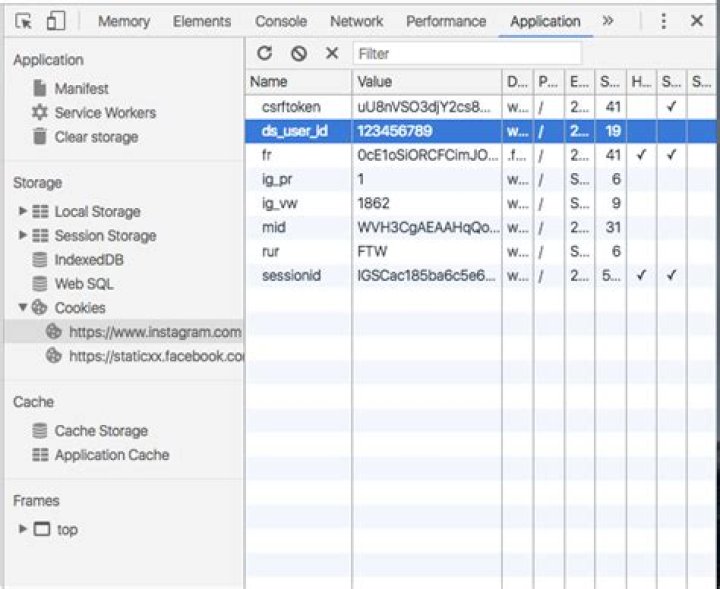
Or you can login to your Instagram account and use google dev tools and look at the cookies that have been stored. 'ds_user_id' is your user ID

Working Solution December 14, 2020
For simple usage like 3rd party tools that require an Instagram user ID (like embedding an image feed) I tend to use:
because it makes it really easy to copy and paste the Instagram user ID that I am looking for. Unlike most tools I get the results fast, it's free and there are no ads. I recommend you watch the youtube video before using it so you can see how simple it is and get an idea of how it's used:
For more advanced usage I recommend:
(replace username with the requested username)
For example to find the user ID of the username "instagram" you would use:
This is the most advanced way which returns a JSON response and it's great if you are building an app that requires the raw data. You can save it in a database or build some type of front end UI to display it. Example: for a dashboard or on a website. Also, using the url is great because you can get additional attributes about users such as their total follower count and profile bio.
"[USERNAME]"&access_token=[ACCESS TOKEN] Please notice the quotation marks.
This does not always return a valid result but more often than non-quoted one:
"self"&count=1&access_token=[ACCESS TOKEN] returns user "self" (id: 311176867)
TOKEN] returns user "super_selfie" (id: 1422944651)
Working solution ~2018
I've found that, providing you have an access token, you can perform the following request in your browser:
In fact, access token contain the User ID (the first segment of the token):
<user-id>.1677aaa.aaa042540a2345d29d11110545e2499
You can get an access token by using this tool provided by Pixel Union.
First Create an Application on Instagram and get Client Id for your application
Now just copy paste following Url into browser window by replacing your Username and your Client Id
you will get a Json Result containing General Information about your account along with your Numeric user Id
UPDATED 2021
Just go to Facebook Apps choose your app connected with Instagram and you will see your Instagram ID: ********
1Note was NOT working for me, so this is not a solution in 2021 if you want to use the Instagram Graph API
As of june 2022, you can to run or intercept a special HTTP request in order to successfully get the user data (and user ID). If you use Puppeteer, you can intercept the request that Instagram makes in the browser, and read its response. Example code:
const username = 'user.account'; const page = await browser.newPage(); const [foundResponse] = await Promise.all([ page.waitForResponse((response) => { const request = response.request(); return request.method() === 'GET' && new RegExp(`https:\\/\\/i\\.instagram\\.com\\/api\\/v1\\/users\\/web_profile_info\\/\\?username=${encodeURIComponent(username.toLowerCase())}`).test(request.url()); }), page.goto(`(username)}`), ]); const json = JSON.parse(await foundResponse.text()); console.log(json.data.user); Since adding ?__a=1 to a profile URL is not working anymore to get a user ID from a username, we can do it with cURL and jq (the new API endpoint can be found in the network requests of Instagram web version, for example with Firefox Developer Tools):
curl -s ' -H 'X-IG-App-ID: 936619743392459' | jq -r .data.user.id If you are using Instagram in a web browser, you don't need to use the command above and can check the response of the HTTP request directly.
You may also be interested in finding the username from a user ID, in case someone changes frequently the username. I added an answer here: Instagram get username from userId




