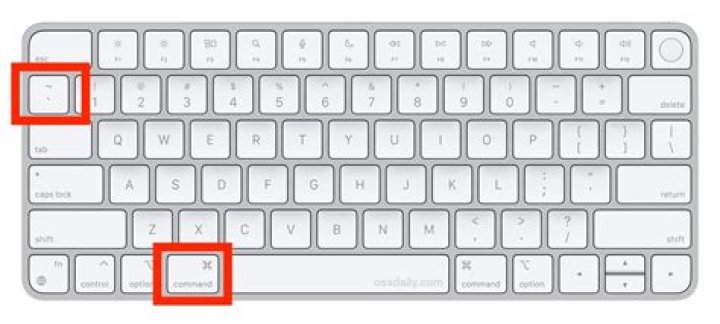
I often use the Cmd+Tab shortcut to switch between different applications (for example: Xcode and Google Chrome), but is there a shortcut to switch between different windows of the same application (for example, from one window in Google Chrome, to another)?
49 Answers
The default shortcut is Cmd` (that's a backtick).
You can always change that shortcut if the given one does not work out for you. Go to System Preferences → Keyboard → Keyboard Shortcuts.
Here, assign a custom combination to
Keyboard » Move focus to next window (under OS X 10.9 and above)
Keyboard » Move focus to the next window in application (until OS X 10.8)
This will allow you to toggle between the open windows of any application.
Note
Cmd` works only if all windows are on the same workspace (comment @thias)
23command backtick
⌘ + `
4This is what I found on my default US english keyboard setting.
Toggle between Different Apps -> Command + Tab
Toggle between Same App in Same Workspace -> Command + `
Toggle between Same App across different Workspace:
- View same App windows across All Workspaces -> Control + Down Arrow
- Then select with arrow keys or click the app window you want.
I'm on Mavericks and I was looking for a keyboard shortcut to quickly switch between tabs in Chrome. Cmd +` didn't work for me, although I made sure it was correctly setup in System Preferences → Keyboard → Keyboard Shortcuts. What I found is that Ctrl + Tab works! So for me it's Cmd + Tab to switch between applications, and Ctrl + Tab to switch between the same application's windows, try this if other suggested solutions don't work.
3So I have found that sometimes certain applications do not want to cycle through the different open windows using Cmd+Tab or Cmd+' - VMware is one example, especially when one of the windows has been minimized to the dock. So what I have found is using expose to view all windows helps - there is a mouse gesture for this which is a four finger clinch I think - or F3.
Then you can select which window you want to view.
Hope this helps!
I believe command + option + ` change the tab between one app windows
On my Macbook Air, with OSX Lion, to switch application windows:
press
CMD+FN+F6
Funnily enough, the option 'Move focus to next window in application' has gone from System Prefs → Keyboard → Keyboard and text input. I just played around with various keys until I found the right one!
2Press ^ + ↑ to show all open applications
Press ^ + ↓ to show all open instances of the current applciation
(it's not perfect but I found this better than the cmd + ` way, also if you have apps open full screen use ^ + left or right)
On my Macbook Pro with a german keyboard layout and language setting it's
CMD< by default to "Move focus to the next window in application"
1



