Example
09::08:00
09:09:01
I want to add semicolon like this
09::08:00;
09:09:01;
52 Answers
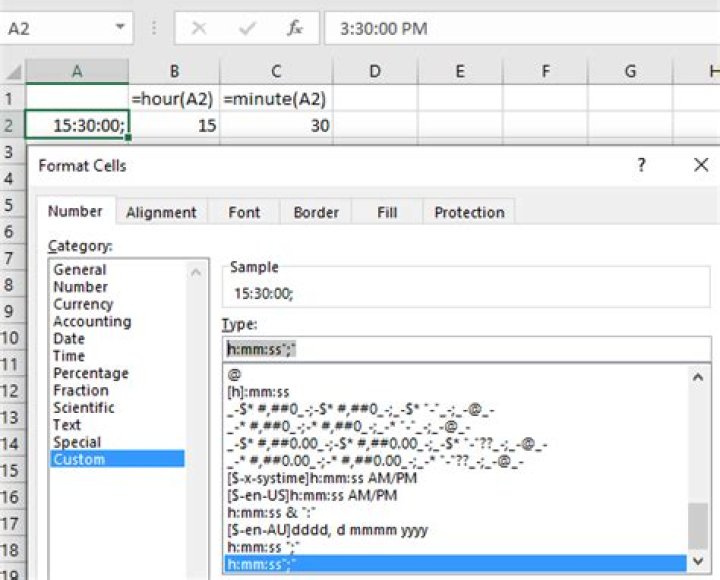
Change the format in custom format:

Also you could point to a cell with the time you want using the formula: =HOUR(A2)&":"&MINUTE(A2)&":"& SECOND(A2)&";"
2:Caveat:
- The NUMBER, MILITARY TIME or even TIME written in correct format could have TWO COLON between Hours, Minutes and Seconds, and does have SEMI COLON at end also.
- But Excel doesn't considers the TIME entered as you have at top with the question
09::08:00as a TIME value, also if you apply any formula then get#VALUEerror.
Below are methods, applies TWO COLON in between & SEMI COLON at end.
To convert Number or Military Time, into desire format the Formula in cell
L101andM101:=(TIME(LEFT(K101,LEN(K101)-2),RIGHT(K101,2),0))
N.B. This works if & when cell has 4 digits.
Formula in cell
L106andM106:=(INT(K106/10000)&":"&INT(MOD(K106,10000)/100)&":"&MOD(K106,100))+0
N.B. This works with more than 4 digits.
Cell format applied for SEMI COLON at end.
h:mm\;This may be
h:mm:ss\;Cell format for 2 COLON in between & SEMI COLON at end.
h:\:mm:ss\;Cell
K110has TIME value and cell format applied on cellM110is,h:\:mm:\:ss\;
You may adjust cell references in the formula as needed.




