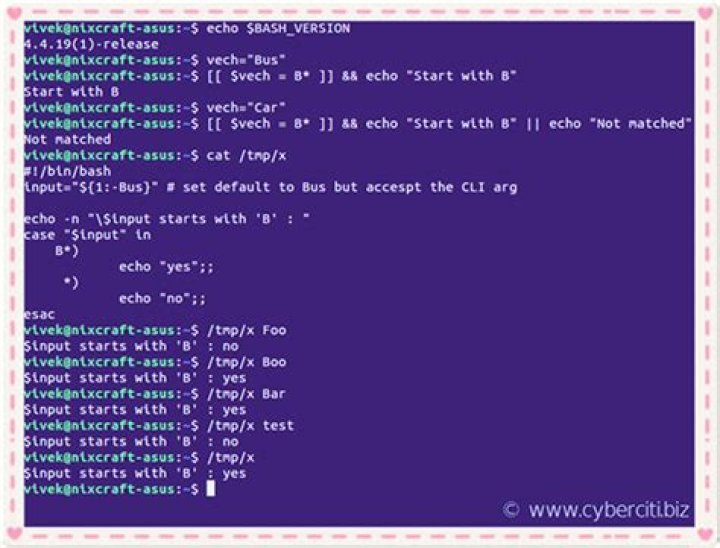

I would like to check if a string begins with "node" e.g. "node001". Something like
if [ $HOST == user* ] then echo yes fi How can I do it correctly?
I further need to combine expressions to check if HOST is either "user1" or begins with "node"
if [ [[ $HOST == user1 ]] -o [[ $HOST == node* ]] ]; then echo yes fi > > > -bash: [: too many arguments How can I do it correctly?
112 Answers
This snippet on the Advanced Bash Scripting Guide says:
# The == comparison operator behaves differently within a double-brackets # test than within single brackets. [[ $a == z* ]] # True if $a starts with a "z" (wildcard matching). [[ $a == "z*" ]] # True if $a is equal to z* (literal matching). So you had it nearly correct; you needed double brackets, not single brackets.
With regards to your second question, you can write it this way:
HOST=user1 if [[ $HOST == user1 ]] || [[ $HOST == node* ]] ; then echo yes1 fi HOST=node001 if [[ $HOST == user1 ]] || [[ $HOST == node* ]] ; then echo yes2 fi Which will echo
yes1 yes2 Bash's if syntax is hard to get used to (IMO).
If you're using a recent version of Bash (v3+), I suggest the Bash regex comparison operator =~, for example,
if [[ "$HOST" =~ ^user.* ]]; then echo "yes" fi To match this or that in a regex, use |, for example,
if [[ "$HOST" =~ ^user.*|^host1 ]]; then echo "yes" fi Note - this is 'proper' regular expression syntax.
user*meansuseand zero-or-more occurrences ofr, souseanduserrrrwill match.user.*meansuserand zero-or-more occurrences of any character, souser1,userXwill match.^user.*means match the patternuser.*at the begin of $HOST.
If you're not familiar with regular expression syntax, try referring to this resource.
Note that the Bash =~ operator only does regular expression matching when the right hand side is UNQUOTED. If you do quote the right hand side, "any part of the pattern may be quoted to force it to be matched as a string.". You should not quote the right hand side even when doing parameter expansion.
I always try to stick with POSIX sh instead of using Bash extensions, since one of the major points of scripting is portability (besides connecting programs, not replacing them).
In sh, there is an easy way to check for an "is-prefix" condition.
case $HOST in node*) # Your code here esac Given how old, arcane and crufty sh is (and Bash is not the cure: It's more complicated, less consistent and less portable), I'd like to point out a very nice functional aspect: While some syntax elements like case are built-in, the resulting constructs are no different than any other job. They can be composed in the same way:
if case $HOST in node*) true;; *) false;; esac; then # Your code here fi Or even shorter
if case $HOST in node*) ;; *) false;; esac; then # Your code here fi Or even shorter (just to present ! as a language element -- but this is bad style now)
if ! case $HOST in node*) false;; esac; then # Your code here fi If you like being explicit, build your own language element:
beginswith() { case $2 in "$1"*) true;; *) false;; esac; } Isn't this actually quite nice?
if beginswith node "$HOST"; then # Your code here fi And since sh is basically only jobs and string-lists (and internally processes, out of which jobs are composed), we can now even do some light functional programming:
beginswith() { case $2 in "$1"*) true;; *) false;; esac; } checkresult() { if [ $? = 0 ]; then echo TRUE; else echo FALSE; fi; } all() { test=$1; shift for i in "$@"; do $test "$i" || return done } all "beginswith x" x xy xyz ; checkresult # Prints TRUE all "beginswith x" x xy abc ; checkresult # Prints FALSE This is elegant. Not that I'd advocate using sh for anything serious -- it breaks all too quickly on real world requirements (no lambdas, so we must use strings. But nesting function calls with strings is not possible, pipes are not possible, etc.)
You can select just the part of the string you want to check:
if [ "${HOST:0:4}" = user ] For your follow-up question, you could use an OR:
if [[ "$HOST" == user1 || "$HOST" == node* ]] I prefer the other methods already posted, but some people like to use:
case "$HOST" in user1|node*) echo "yes";; *) echo "no";; esac Edit:
I've added your alternates to the case statement above
In your edited version you have too many brackets. It should look like this:
if [[ $HOST == user1 || $HOST == node* ]]; While I find most answers here quite correct, many of them contain unnecessary Bashisms. POSIX parameter expansion gives you all you need:
[ "${host#user}" != "${host}" ] and
[ "${host#node}" != "${host}" ] ${var#expr} strips the smallest prefix matching expr from ${var} and returns that. Hence if ${host} does not start with user (node), ${host#user} (${host#node}) is the same as ${host}.
expr allows fnmatch() wildcards, thus ${host#node??} and friends also work.
Since # has a meaning in Bash, I got to the following solution.
In addition I like better to pack strings with "" to overcome spaces, etc.
A="#sdfs" if [[ "$A" == "#"* ]];then echo "Skip comment line" fi Adding a tiny bit more syntax detail to Mark Rushakoff's highest rank answer.
The expression
$HOST == node* Can also be written as
$HOST == "node"* The effect is the same. Just make sure the wildcard is outside the quoted text. If the wildcard is inside the quotes it will be interpreted literally (i.e. not as a wildcard).
@OP, for both your questions you can use case/esac:
string="node001" case "$string" in node*) echo "found";; * ) echo "no node";; esac Second question
case "$HOST" in node*) echo "ok";; user) echo "ok";; esac case "$HOST" in node*|user) echo "ok";; esac Or Bash 4.0
case "$HOST" in user) ;& node*) echo "ok";; esac if [ [[ $HOST == user1 ]] -o [[ $HOST == node* ]] ]; then echo yes fi doesn't work, because all of [, [[, and test recognize the same nonrecursive grammar. See section CONDITIONAL EXPRESSIONS on your Bash man page.
As an aside, the SUSv3 says
The KornShell-derived conditional command (double bracket [[]]) was removed from the shell command language description in an early proposal. Objections were raised that the real problem is misuse of the test command ([), and putting it into the shell is the wrong way to fix the problem. Instead, proper documentation and a new shell reserved word (!) are sufficient.
Tests that require multiple test operations can be done at the shell level using individual invocations of the test command and shell logicals, rather than using the error-prone -o flag of test.
You'd need to write it this way, but test doesn't support it:
if [ $HOST == user1 -o $HOST == node* ]; then echo yes fi test uses = for string equality, and more importantly it doesn't support pattern matching.
case / esac has good support for pattern matching:
case $HOST in user1|node*) echo yes ;; esac It has the added benefit that it doesn't depend on Bash, and the syntax is portable. From the Single Unix Specification, The Shell Command Language:
case word in [(]pattern1) compound-list;; [[(]pattern[ | pattern] ... ) compound-list;;] ... [[(]pattern[ | pattern] ... ) compound-list] esac grep
Forgetting performance, this is POSIX and looks nicer than case solutions:
mystr="abcd" if printf '%s' "$mystr" | grep -Eq '^ab'; then echo matches fi Explanation:
printf '%s'to preventprintffrom expanding backslash escapes: Bash printf literal verbatim stringgrep -qprevents echo of matches to stdout: How to check if a file contains a specific string using Bashgrep -Eenables extended regular expressions, which we need for the^
I tweaked @markrushakoff's answer to make it a callable function:
function yesNo { # Prompts user with $1, returns true if response starts with y or Y or is empty string read -e -p " $1 [Y/n] " YN [[ "$YN" == y* || "$YN" == Y* || "$YN" == "" ]] } Use it like this:
$ if yesNo "asfd"; then echo "true"; else echo "false"; fi asfd [Y/n] y true $ if yesNo "asfd"; then echo "true"; else echo "false"; fi asfd [Y/n] Y true $ if yesNo "asfd"; then echo "true"; else echo "false"; fi asfd [Y/n] yes true $ if yesNo "asfd"; then echo "true"; else echo "false"; fi asfd [Y/n] true $ if yesNo "asfd"; then echo "true"; else echo "false"; fi asfd [Y/n] n false $ if yesNo "asfd"; then echo "true"; else echo "false"; fi asfd [Y/n] ddddd false Here is a more complex version that provides for a specified default value:
function toLowerCase { echo "$1" | tr '[:upper:]' '[:lower:]' } function yesNo { # $1: user prompt # $2: default value (assumed to be Y if not specified) # Prompts user with $1, using default value of $2, returns true if response starts with y or Y or is empty string local DEFAULT=yes if [ "$2" ]; then local DEFAULT="$( toLowerCase "$2" )"; fi if [[ "$DEFAULT" == y* ]]; then local PROMPT="[Y/n]" else local PROMPT="[y/N]" fi read -e -p " $1 $PROMPT " YN YN="$( toLowerCase "$YN" )" { [ "$YN" == "" ] && [[ "$PROMPT" = *Y* ]]; } || [[ "$YN" = y* ]] } Use it like this:
$ if yesNo "asfd" n; then echo "true"; else echo "false"; fi asfd [y/N] false $ if yesNo "asfd" n; then echo "true"; else echo "false"; fi asfd [y/N] y true $ if yesNo "asfd" y; then echo "true"; else echo "false"; fi asfd [Y/n] n false 



