
Alpaca backtrader plot issue: I ran into this import issue and found this article, so I applied the code, but same issue not resolved. any one can help please?
My installed matplotlib version is 3.3.1 backtrader 1.9.76.123 python 3.8.5
the entire code posted below:
from matplotlib.dates import (HOURS_PER_DAY, MIN_PER_HOUR, SEC_PER_MIN,MONTHS_PER_YEAR, DAYS_PER_WEEK,SEC_PER_HOUR, SEC_PER_DAY,num2date, rrulewrapper, YearLocator,MicrosecondLocator) import alpaca_backtrader_api import backtrader as bt from datetime import datetime #import matplotlib ALPACA_API_KEY = "XXXXX" ALPACA_SECRET_KEY = "XXXX" ALPACA_PAPER = True class SmaCross(bt.SignalStrategy): def init(self): sma1, sma2 = bt.ind.SMA(period=10), bt.ind.SMA(period=30) crossover = bt.ind.CrossOver(sma1, sma2) self.signal_add(bt.SIGNAL_LONG, crossover) cerebro = bt.Cerebro() cerebro.addstrategy(SmaCross) store = alpaca_backtrader_api.AlpacaStore( key_id=ALPACA_API_KEY,secret_key=ALPACA_SECRET_KEY,paper=ALPACA_PAPER) if not ALPACA_PAPER: broker = store.getbroker() # or just alpaca_backtrader_api.AlpacaBroker() cerebro.setbroker(broker) DataFactory = store.getdata # or use alpaca_backtrader_api.AlpacaData data0 = DataFactory(dataname='AAPL', historical=True, fromdate=datetime(2015, 1, 1), timeframe=bt.TimeFrame.Days) cerebro.adddata(data0) print('Starting Portfolio Value: %.2f' % cerebro.broker.getvalue()) cerebro.run() print('Final Portfolio Value: %.2f' % cerebro.broker.getvalue()) cerebro.plot() 12 Answers
Downgrade to matplotlib 3.2.2 until the bug in backtrader is fixed.
Here is the fix pull request: .
pip uninstall matplotlib # or conda pip install matplotlib==3.2.2 I suffered the same problem like you did, your link provided has the perfect solution. just get rid of warnings from locator.py
I couldn't install matplotlib==3.2.2 nor the patch without uninstalling backtrader first.
So, this worked for me in the end:
Uninstall
backtrader:pip uninstall backtraderInstall the patch provided in the above solution:
pip install git+If necessary, install
matplotlibagain:pip install matplotlib
As pointed out above, the issue is addressed in this pull request and the patch is the latest commit to master, but there hasn't been a release since 2019-05.
You can install the patched version like so:
pip install git+ You could alternatively specify the required commit in requirements.txt like so:
-e git+ …then pip install -r requirements.txt
After installing with either method, you can confirm the versions installed with pip freeze:
... backtrader==1.9.76.123 ... Mac Big Sur for me it only worked if: Downgrade python3.9 to python 3.8 then I downgraded matplotlib==3.2.2
For both python 3.8.x and 3.9.x, I solved the problem by using specific version of matplotlib==3.2.2
pip install matplotlib==3.2.2 By default, I used matplotlib==3.4.x version and the problem occured.
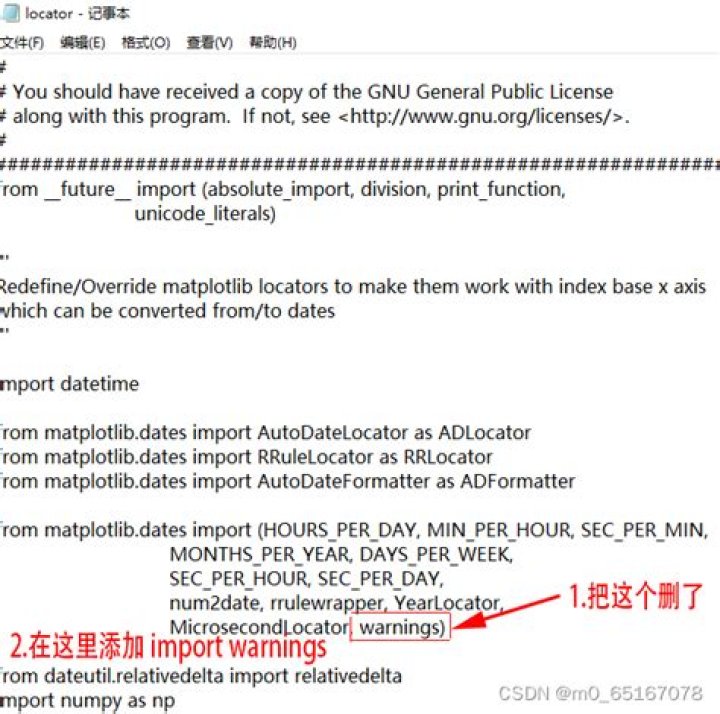
All of the above answers are fine. The problem is not with Matplotlib though. The Backtrader library hasn't kept up with the Matplotlib updates. You can do the off-label Backtrader update suggested by Joel Brigate above...or you can make a simple mod to locator.py file (backtrader.plot):
Just change:
from matplotlib.dates import (HOURS_PER_DAY, MIN_PER_HOUR, SEC_PER_MIN, MONTHS_PER_YEAR, DAYS_PER_WEEK, SEC_PER_HOUR, SEC_PER_DAY, num2date, rrulewrapper, YearLocator, MicrosecondLocator, warnings) to:
from matplotlib import warnings from matplotlib.dates import (HOURS_PER_DAY, MIN_PER_HOUR, SEC_PER_MIN, MONTHS_PER_YEAR, DAYS_PER_WEEK, SEC_PER_HOUR, SEC_PER_DAY, num2date, rrulewrapper, YearLocator, MicrosecondLocator) You'll note that the warnings import now comes directly out of matplotlib rather than matplotlib.dates. This is the offending issue within locator.py.
Here is my solution:
python -m pip uninstall matplotlib python -m pip uninstall backtrader python -m pip install backtrader python -m pip install matplotlib==3.2.2 Enjoy!
I could not install matplotlib==3.2.2 with python 3.9 .
Here is how did I fix this issue:
$ pip uninstall backtrader $ pip install git+ Reference: Github: Fix ImportError from matplotlib.dates #418
Mac Big Sur. I did the same: python 3.8.5, uninstall matplotlib, install matplotlib==3.2.2
I'm new at this so I first tried the easy way, through anaconda.org, but could not find version 3.2.2. Then tried it from the Jupyter notebook with conda install... didn't work. I finally did it straight through terminal, which worked fine.
2@laffuste solution of downgrading to version 3.2.2 of matplotlib solved the issue for me. PR to fix the issue is still open, you can also follow this forum for more info on the problem:
I was able to install matplotlib==3.2.2 after installing freetype in a Mac with Apple silicon CPU.
brew install freetype # then pip install matplotlib==3.2.2 # finally pip install backtrader 



