
In my project, I'm reading a picture like this:
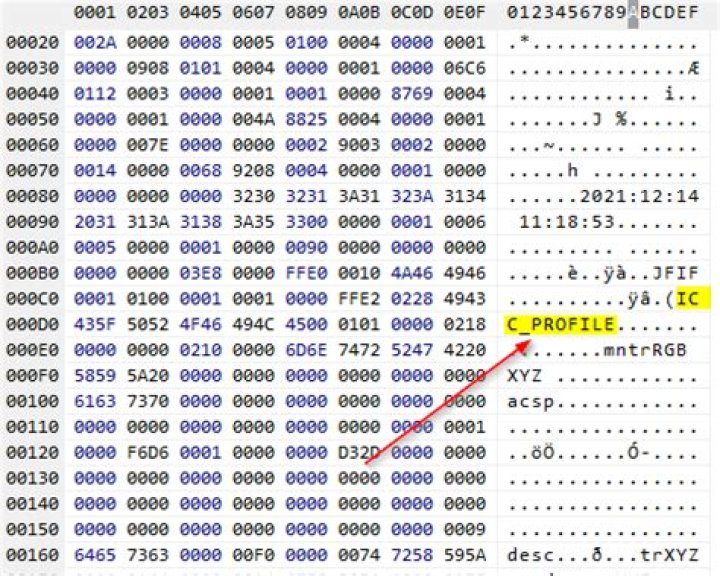
BufferedImage originalImage = ImageIO.read(inputStream); But from time to time, this method throwing exception Invalid icc profile data error. When I checked the imported image, I found out that image bytes field contains text ICC_PROFILE Here is example. But the funny thing is that when I change the bytes to 0000 in the position where this text is, everything works.
And here is the picture where the exception occures. For testing.
Please help with the solution.
71 Answer
What you see in your hex editor, is the JPEG APP2 segment, containing an embedded ICC color profile. This profile says something about how the colors in the image are to be interpreted.
As this is a normal (YCC encoded) RGB image, you can skip this segment, and the image will still look "okay", but the colors may be a little off. When you change the "identifier" of the APP2 segment from exactly "ICC_PROFILE" (and a 0-terminator) in the editor, you make this a different segment and the decoder will ignore (skip) it when reading.
Regarding the exception, it is possible that the software that wrote the JPEG (or the ICC profile embedded in it) wrote an incorrect ICC profile. But this doesn't seem to be the case after looking at the file. The other likely option is that this particular ICC profile is not supported by the Java runtime environment you are running on. If you are running on Java 5 (!) I suggest you just upgrade right away, as this version was end-of-life'd years ago. If you are on Java 8, there might be reasons for that, but I still suggest upgrading to Java 11 or 17, if you can.
If you still experience problems reading JPEGs due to ICC profile issues, you could try using my TwelveMonkeys ImageIO JPEG plugin, which does some tricks to hot-fix bad ICC profiles, or just ignore them (with a warning) if they can't be fixed. It does require Java 8 though... 😉
1



