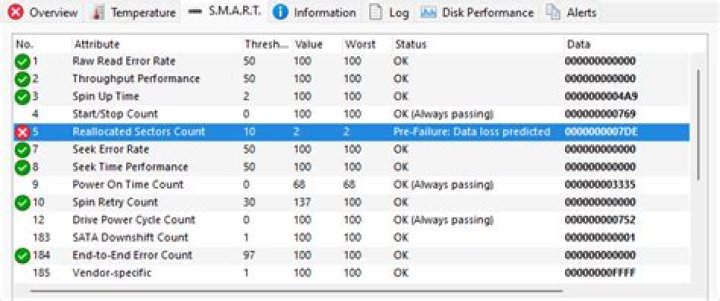

Copyright (C) 2002-19, Bruce Allen, Christian Franke, === START OF INFORMATION SECTION === Model Family: Toshiba 2.5" HDD MQ01ABF... Device Model: TOSHIBA MQ01ABF050 Serial Number: 563TT0VST LU WWN Device Id: 5 000039 701e00efc Firmware Version: AM0P2D User Capacity: 500,107,862,016 bytes [500 GB] Sector Sizes: 512 bytes logical, 4096 bytes physical Rotation Rate: 5400 rpm Form Factor: 2.5 inches Device is: In smartctl database [for details use: -P show] ATA Version is: ATA8-ACS (minor revision not indicated) SATA Version is: SATA 3.0, 6.0 Gb/s (current: 6.0 Gb/s) Local Time is: Tue Dec 1 20:52:46 2020 CET SMART support is: Available - device has SMART capability. SMART support is: Enabled === START OF READ SMART DATA SECTION === SMART overall-health self-assessment test result: PASSED General SMART Values: Offline data collection status: (0x00) Offline data collection activity was never started. Auto Offline Data Collection: Disabled. Self-test execution status: ( 0) The previous self-test routine completed without error or no self-test has ever been run. Total time to complete Offline data collection: ( 120) seconds. Offline data collection capabilities: (0x5b) SMART execute Offline immediate. Auto Offline data collection on/off support. Suspend Offline collection upon new command. Offline surface scan supported. Self-test supported. No Conveyance Self-test supported. Selective Self-test supported. SMART capabilities: (0x0003) Saves SMART data before entering power-saving mode. Supports SMART auto save timer. Error logging capability: (0x01) Error logging supported. General Purpose Logging supported. Short self-test routine recommended polling time: ( 2) minutes. Extended self-test routine recommended polling time: ( 120) minutes. SCT capabilities: (0x003d) SCT Status supported. SCT Error Recovery Control supported. SCT Feature Control supported. SCT Data Table supported. SMART Attributes Data Structure revision number: 128 Vendor Specific SMART Attributes with Thresholds: ID# ATTRIBUTE_NAME FLAG VALUE WORST THRESH TYPE UPDATED WHEN_FAILED RAW_VALUE 1 Raw_Read_Error_Rate 0x000b 100 099 050 Pre-fail Always - 0 3 Spin_Up_Time 0x0027 100 100 001 Pre-fail Always - 593 5 Reallocated_Sector_Ct 0x0033 100 100 050 Pre-fail Always - 120 9 Power_On_Hours 0x0032 060 060 000 Old_age Always - 16114 12 Power_Cycle_Count 0x0032 100 100 000 Old_age Always - 3715 191 G-Sense_Error_Rate 0x0032 100 100 000 Old_age Always - 1252 192 Power-Off_Retract_Count 0x0032 100 100 000 Old_age Always - 262 193 Load_Cycle_Count 0x0032 084 084 000 Old_age Always - 160450 194 Temperature_Celsius 0x0022 100 100 000 Old_age Always - 32 (Min/Max 11/51) 199 UDMA_CRC_Error_Count 0x0032 200 200 000 Old_age Always - 0 240 Head_Flying_Hours 0x0032 062 062 000 Old_age Always - 15578 241 Total_LBAs_Written 0x0032 100 100 000 Old_age Always - 34624675632 242 Total_LBAs_Read 0x0032 100 100 000 Old_age Always - 27836621543 254 Free_Fall_Sensor 0x0032 100 100 000 Old_age Always - 0 SMART Error Log Version: 1 ATA Error Count: 46937 (device log contains only the most recent five errors) CR = Command Register [HEX] FR = Features Register [HEX] SC = Sector Count Register [HEX] SN = Sector Number Register [HEX] CL = Cylinder Low Register [HEX] CH = Cylinder High Register [HEX] DH = Device/Head Register [HEX] DC = Device Command Register [HEX] ER = Error register [HEX] ST = Status register [HEX] Powered_Up_Time is measured from power on, and printed as DDd+hh:mm:SS.sss where DD=days, hh=hours, mm=minutes, SS=sec, and sss=millisec. It "wraps" after 49.710 days. Error 46937 occurred at disk power-on lifetime: 16104 hours (671 days + 0 hours) When the command that caused the error occurred, the device was active or idle. After command completion occurred, registers were: ER ST SC SN CL CH DH -- -- -- -- -- -- -- 40 41 00 08 58 2e 40 Error: UNC at LBA = 0x002e5808 = 3037192 Commands leading to the command that caused the error were: CR FR SC SN CL CH DH DC Powered_Up_Time Command/Feature_Name -- -- -- -- -- -- -- -- ---------------- -------------------- 60 08 00 08 58 2e 40 00 01:55:31.055 READ FPDMA QUEUED 60 18 f0 f2 61 6a 40 00 01:55:31.055 READ FPDMA QUEUED 60 20 e8 4a 62 6a 40 00 01:55:31.055 READ FPDMA QUEUED 60 00 e0 7a cb 2a 40 00 01:55:31.055 READ FPDMA QUEUED 60 08 d8 ea bd 1a 40 00 01:55:31.055 READ FPDMA QUEUED Error 46936 occurred at disk power-on lifetime: 16104 hours (671 days + 0 hours) When the command that caused the error occurred, the device was active or idle. After command completion occurred, registers were: ER ST SC SN CL CH DH -- -- -- -- -- -- -- 40 41 50 08 58 2e 40 Error: UNC at LBA = 0x002e5808 = 3037192 Commands leading to the command that caused the error were: CR FR SC SN CL CH DH DC Powered_Up_Time Command/Feature_Name -- -- -- -- -- -- -- -- ---------------- -------------------- 60 00 b8 7a cb 2a 40 00 01:55:26.911 READ FPDMA QUEUED 60 20 b0 4a 62 6a 40 00 01:55:26.906 READ FPDMA QUEUED 60 18 a8 f2 61 6a 40 00 01:55:26.906 READ FPDMA QUEUED 60 08 50 08 58 2e 40 00 01:55:26.890 READ FPDMA QUEUED 60 08 28 2a 66 11 40 00 01:55:26.889 READ FPDMA QUEUED Error 46935 occurred at disk power-on lifetime: 16104 hours (671 days + 0 hours) When the command that caused the error occurred, the device was active or idle. After command completion occurred, registers were: ER ST SC SN CL CH DH -- -- -- -- -- -- -- 40 41 b0 08 58 2e 40 Error: WP at LBA = 0x002e5808 = 3037192 Commands leading to the command that caused the error were: CR FR SC SN CL CH DH DC Powered_Up_Time Command/Feature_Name -- -- -- -- -- -- -- -- ---------------- -------------------- 61 08 10 f2 0b 51 40 00 01:55:22.635 WRITE FPDMA QUEUED 61 08 f0 ea 09 50 40 00 01:55:22.635 WRITE FPDMA QUEUED 61 08 e8 92 09 50 40 00 01:55:22.634 WRITE FPDMA QUEUED 61 08 08 32 09 50 40 00 01:55:22.633 WRITE FPDMA QUEUED 61 08 00 6a 08 50 40 00 01:55:22.633 WRITE FPDMA QUEUED Error 46934 occurred at disk power-on lifetime: 16104 hours (671 days + 0 hours) When the command that caused the error occurred, the device was active or idle. After command completion occurred, registers were: ER ST SC SN CL CH DH -- -- -- -- -- -- -- 40 41 a8 08 58 2e 40 Error: WP at LBA = 0x002e5808 = 3037192 Commands leading to the command that caused the error were: CR FR SC SN CL CH DH DC Powered_Up_Time Command/Feature_Name -- -- -- -- -- -- -- -- ---------------- -------------------- 61 08 d8 f2 07 10 40 00 01:55:22.178 WRITE FPDMA QUEUED 60 08 a8 08 58 2e 40 00 01:55:18.477 READ FPDMA QUEUED 60 28 d0 0a 66 11 40 00 01:55:18.459 READ FPDMA QUEUED 60 08 38 00 58 2e 40 00 01:55:18.444 READ FPDMA QUEUED 60 98 28 e2 03 aa 40 00 01:55:18.444 READ FPDMA QUEUED Error 46933 occurred at disk power-on lifetime: 16104 hours (671 days + 0 hours) When the command that caused the error occurred, the device was active or idle. After command completion occurred, registers were: ER ST SC SN CL CH DH -- -- -- -- -- -- -- 40 41 a0 08 58 2e 40 Error: UNC at LBA = 0x002e5808 = 3037192 Commands leading to the command that caused the error were: CR FR SC SN CL CH DH DC Powered_Up_Time Command/Feature_Name -- -- -- -- -- -- -- -- ---------------- -------------------- 60 80 a0 00 58 2e 40 00 01:55:14.288 READ FPDMA QUEUED 60 80 98 80 57 2e 40 00 01:55:14.287 READ FPDMA QUEUED 60 80 90 00 57 2e 40 00 01:55:14.286 READ FPDMA QUEUED 60 80 88 80 56 2e 40 00 01:55:14.286 READ FPDMA QUEUED 60 80 80 00 56 2e 40 00 01:55:14.285 READ FPDMA QUEUED SMART Self-test log structure revision number 1 Num Test_Description Status Remaining LifeTime(hours) LBA_of_first_error # 1 Short offline Completed without error 00% 16114 - # 2 Short offline Aborted by host 90% 16088 - # 3 Short offline Completed: read failure 00% 16056 11470 # 4 Short offline Completed: read failure 00% 16055 11470 # 5 Short offline Completed: read failure 00% 16055 11470 # 6 Short offline Completed: read failure 00% 16055 11470 # 7 Short offline Completed: read failure 00% 16055 11470 # 8 Short offline Completed: read failure 00% 16054 11470 # 9 Short offline Aborted by host 90% 16054 - #10 Short offline Completed: read failure 00% 16052 11470 #11 Short offline Completed: read failure 00% 16052 11470 #12 Short offline Aborted by host 90% 16046 - #13 Short offline Completed: read failure 00% 15343 368296 #14 Short offline Completed without error 00% 14996 - #15 Short offline Aborted by host 50% 14996 - #16 Short offline Completed without error 00% 13750 - #17 Short offline Completed without error 00% 3162 - #18 Short offline Completed without error 00% 3161 - #19 Short offline Interrupted (host reset) 80% 3161 - #20 Short offline Completed without error 00% 3161 - #21 Short offline Completed without error 00% 3161 - SMART Selective self-test log data structure revision number 1 SPAN MIN_LBA MAX_LBA CURRENT_TEST_STATUS 1 0 0 Not_testing 2 0 0 Not_testing 3 0 0 Not_testing 4 0 0 Not_testing 5 0 0 Not_testing Selective self-test flags (0x0): After scanning selected spans, do NOT read-scan remainder of disk. If Selective self-test is pending on power-up, resume after 0 minute delay. 1 Answer
NCQ
You have NCQ disk errors.
Commands leading to the command that caused the error were: CR FR SC SN CL CH DH DC Powered_Up_Time Command/Feature_Name -- -- -- -- -- -- -- -- ---------------- -------------------- 60 08 00 08 58 2e 40 00 01:55:31.055 READ FPDMA QUEUED 60 18 f0 f2 61 6a 40 00 01:55:31.055 READ FPDMA QUEUED 60 20 e8 4a 62 6a 40 00 01:55:31.055 READ FPDMA QUEUED 60 00 e0 7a cb 2a 40 00 01:55:31.055 READ FPDMA QUEUED 60 08 d8 ea bd 1a 40 00 01:55:31.055 READ FPDMA QUEUED Native Command Queuing (NCQ) is an extension of the Serial ATA protocol allowing hard disk drives to internally optimize the order in which received read and write commands are executed.
Edit sudo -H gedit /etc/default/grub and change the following line to include this extra parameter. Then do sudo update-grub to write the changes to disk. Reboot. Monitor hangs, and watch /var/log/syslog or dmesg for continued error messages.
GRUB_CMDLINE_LINUX_DEFAULT="quiet splash libata.force=noncq" bad block
Note: do NOT abort a bad block scan!
Note: do NOT bad block a SSD
Note: backup your important files FIRST!
Note: this will take many hours
Note: you may have a pending HDD failure
Boot to a Ubuntu Live DVD/USB in “Try Ubuntu” mode.
In terminal...
sudo fdisk -l # identify all "Linux Filesystem" partitions
sudo e2fsck -fcky /dev/sdXX # read-only test
or
sudo e2fsck -fccky /dev/sdXX # non-destructive read/write test (recommended)
The -k is important, because it saves the previous bad block table, and adds any new bad blocks to that table. Without -k, you loose all of the prior bad block information.
The -fccky parameter...
-f Force checking even if the file system seems clean. -c This option causes e2fsck to use badblocks(8) program to do a read-only scan of the device in order to find any bad blocks. If any bad blocks are found, they are added to the bad block inode to prevent them from being allocated to a file or direc‐ tory. If this option is specified twice, then the bad block scan will be done using a non-destructive read-write test. -k When combined with the -c option, any existing bad blocks in the bad blocks list are preserved, and any new bad blocks found by running badblocks(8) will be added to the existing bad blocks list. -y Assume an answer of `yes' to all questions; allows e2fsck to be used non-interactively. This option may not be specified at the same time as the -n or -p options.