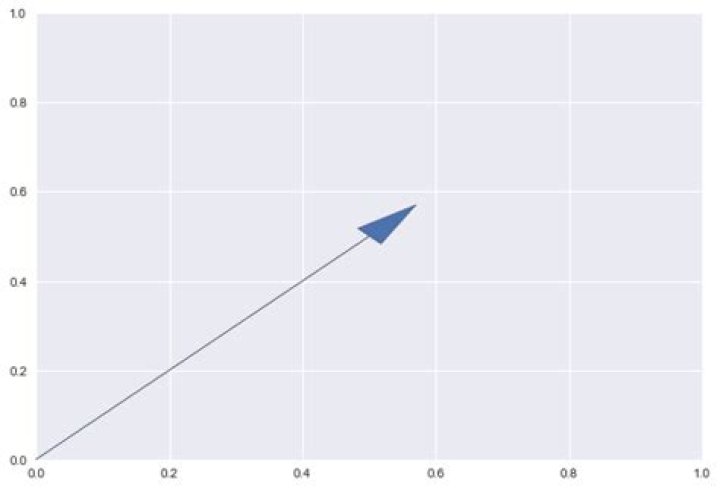
I'm working from arrow_simple_demo.py here which I have already modified to be:
import matplotlib.pyplot as plt ax = plt.axes() ax.arrow(0, 0, 0.5, 0.5, head_width=0.05, head_length=0.1) however, I want to change the line style of the arrow to dashed using a kwarg. The arrow docs suggest it is possible. arrow docs
So I tried to give arrow the **kwargs argument to import:
kwargs = {linestyle:'--'} Now my code looks like this:
import matplotlib.pyplot as plt ax = plt.axes() kwargs={linestyle:'--'} ax.arrow(0, 0, 0.5, 0.5, head_width=0.05, head_length=0.1, **kwargs) But the result is:
NameError: name 'linestyle' is not defined I'm wondering if anyone can tell me if I am using the kwargs correctly, and whether I need to import Patch from matplotlib's patches class to make this work. The statement "Other valid kwargs (inherited from :class:Patch)" which is in the arrow docs above the listing of kwargs makes me think it might be necessary. I have also been looking at the patches docs to figure that question out. here
EDIT:
Code finished when I passed linestyle key as a string, but I am not getting the dashed arrow line that I was hoping for.
import matplotlib.pyplot as plt ax = plt.axes() kwargs={'linestyle':'--'} ax.arrow(0, 0, 0.5, 0.5, head_width=0.05, head_length=0.1, **kwargs) see picture:
1 Answer
The key of your kwargs dictionary should be a string. In you code, python looks for an object called linestyle which does not exist.
kwargs = {'linestyle':'--'} unfortunately, doing is not enough to produce the desired effect. The line is dashed, but the problem is that the arrow is drawn with a closed path and the dashes are overlaid on top of one another, which cancels the effect. You can see the dashed line by plotting a thicker arrow.
ax = plt.axes() kwargs={'linestyle':'--', 'lw':2, 'width':0.05} ax.arrow(0, 0, 0.5, 0.5, head_width=0.05, head_length=0.1, **kwargs) 
If you want a simple dashed arrow, you have to use a simpler arrow, using annotate
ax = plt.axes() kwargs={'linestyle':'--', 'lw':2} ax.annotate("", xy=(0.5, 0.5), xytext=(0, 0), arrowprops=dict(arrowstyle="->", **kwargs))




