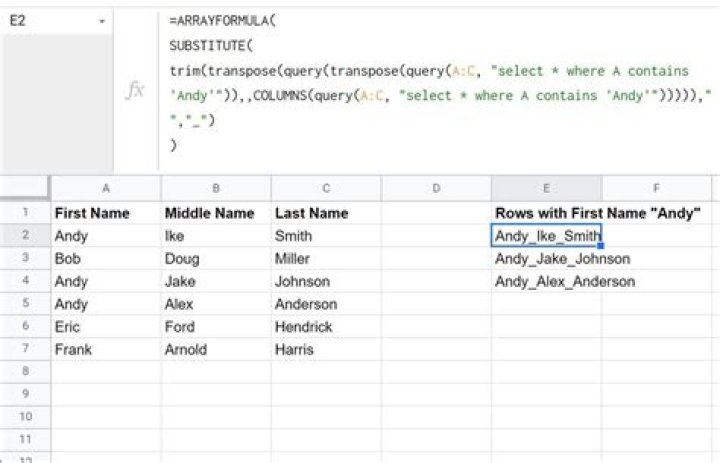

I have a table:
A | B | C BEN | MOSKOW | YES ANTON | IRKUTSK | NO VIKTOR | PARIS | YES BEN | PARIS | YES ANTON | TORONTO | NO DON | TORONTO | YES ANNA | IRKUTSK | YES BEN | MOSKOW | NO and tried a formula:
=UNIQUE(query(A:C; "Select A,B,C where A contains 'BEN' OR A contains 'ANTON' order by A")) and an arrayformula:
=arrayformula(UNIQUE(query(A:C; "Select A,B,C where A contains 'BEN' OR A contains 'ANTON' order by A"))) but the results are in columns:
ANTON | IRKUTSK | NO ANTON | TORONTO | NO BEN | MOSKOW | YES BEN | PARIS | YES BEN | MOSKOW | NO whereas I need results in only one cell per row, like so:
ANTON IRKUTSK NO ANTON TORONTO NO BEN MOSCOW YES BEN PARIS YES BEN MOSKOW NO 3 Answers
There is no concat option in Google Sheets query.
Workaround, suggested by JPV may fit you:
use formula:
=ARRAYFORMULA( SUBSTITUTE( trim(transpose(query(transpose(_your_query_here_),,COLUMNS(_your_query_here_))))," "," → ") )
Change " → " to space " " to concat the result with space.
More info about SQL in Sheets:
0Use Transpose twice.
=transpose(query(transpose(_you query_);;COLUMNS(_you query_))) For an example from my question:
=transpose(query(transpose(UNIQUE(query(A:C; "select * where A contains 'BEN' OR A contains 'ANTON' order by A")));;COLUMNS(UNIQUE(query(A:C; "select * where A contains 'BEN' OR A contains 'ANTON' order by A"))))) Result:
ANTON IRKUTSK NO ANTON TORONTO NO BEN MOSCOW YES BEN PARIS YES BEN MOSKOW NO Unfortunately enough my issue is the opposite, Sheets concatenates my string while I use regular query.
=QUERY('Co-voiturage'!D21:F24;"select D, E Where F <> 0") 



