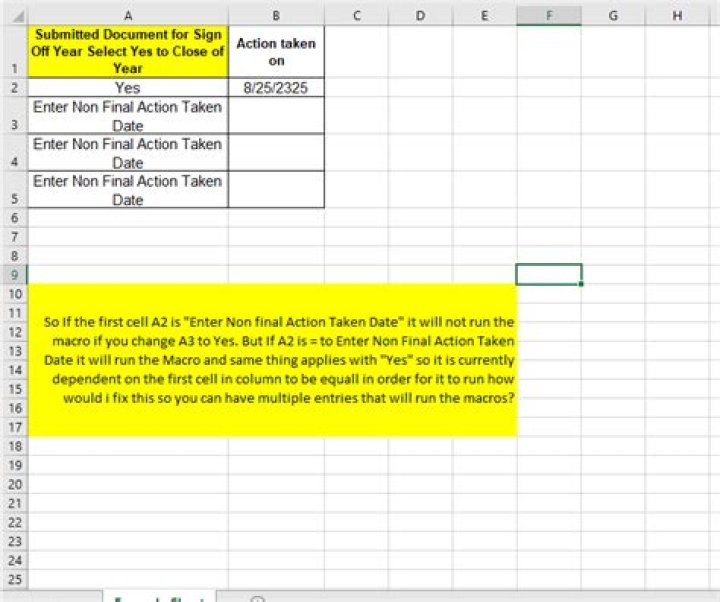
The objective of this code is so every time cell E6:E36 changes from "Yes" or to "Enter Non Final Action Taken Date" I want it to run my macro.
It works only when E6 is marked to match the next value. How do I make it so it is not dependent on the previous cells value?
I'm new with VBA so I'm a bit lost. Any help would be greatly appreciated. See current code below:
Private Sub Worksheet_Change(ByVal Target As range) Application.EnableEvents = False 'pervent triggering another change event On Error GoTo ERR_HANDLING If Not Intersect(Target, range("E6:E36")) Is Nothing Then Select Case range("E6,E7,E8,E9,E10,E11,E12,E13,E14,E15,E16,E17,E18,E19,E20,E21,E22,E23,E24,E25,E26,E27,E28,E29,E30,E31,E32,E33,E34,E35,E36") Case "Yes": EnterDate_of_last_Submission End Select End If If Not Intersect(Target, range("E6,E7,E8,E9,E10,E11,E12,E13,E14,E15,E16,E17,E18,E19,E20,E21,E22,E23,E24,E25,E26,E27,E28,E29,E30,E31,E32,E33,E34,E35,E36")) Is Nothing Then Select Case range("E6,E7,E8,E9,E10,E11,E12,E13,E14,E15,E16,E17,E18,E19,E20,E21,E22,E23,E24,E25,E26,E27,E28,E29,E30,E31,E32,E33,E34,E35,E36") Case "Enter Non Final Action Taken Date": EnterNonFinal_Date End Select End If On Error GoTo 0 ERR_HANDLING: Application.EnableEvents = True If Err.Number <> 0 Then Err.Raise Err.Number, Err.Source, Err.Description, Err.HelpFile, Err.HelpContex End If End Sub 
1 Answer
You need to loop here and compare cell-by-cell, something like the following:
Private Sub Worksheet_Change(ByVal Target As range) Dim rngToCheck as Range Set rngToCheck = Intersect(Target, Me.Range("E6:E36")) If rngToCheck Is Nothing Then Exit Sub On Error GoTo SafeExit Application.EnableEvents = False Dim rng as Range For Each rng in rngToCheck Select Case rng.Value Case "Yes" EnterDate_of_last_Submission Case "Enter Non Final Action Taken Date" EnterNonFinal_Date End Select Next SafeExit: Application.EnableEvents = True End Sub Most likely EnterDate_of_last_Submission and EnterNonFinal_Date should be rewritten to take a Range parameter, namely the cell the date is entered in (which it looks like would correspond to rng.Offset(,1) with your current setup.




