
How to terminate a window in tmux? Like the Ctrlak shortcut in screen with Ctrla being the prefix.
011 Answers
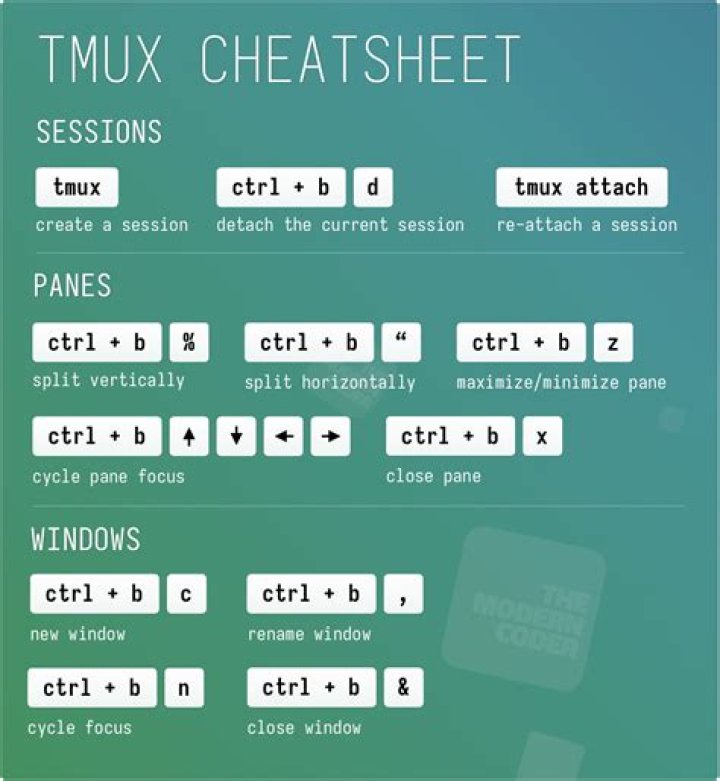
try Prefix + &
if you have
bind q killp in your .tmux.conf, you can press Prefix + q to kill the window too, only if there is only one panel in that window.
if you have multiple panes and want to kill the whole window at once use killw instead of killp in your config.
the default of Prefix above is Ctrl+b, so to terminate window by default you can use Ctrl+b &
2<Prefix> & for killing a window
<Prefix> x for killing a pane
If there is only one pane (i.e. the window is not split into multiple panes, <Prefix> x would kill the window)
As always iterated, <Prefix> is generally CTRL+b. (I think for beginner questions, we can just say CTRL+b all the time, and not talk about prefix at all, but anyway :) )
Generally:
tmux kill-window -t window-number So for example, if you are in window 1 and you want to kill window 9:
tmux kill-window -t 9 For me solution looks like:
ctrl+b qto show pane numbers.ctrl+b xto kill pane.
Killing last pane will kill window.
4Kent's response fully answered your question, however if you are looking to change tmux's configuration to be similar to GNU Screen, here's a tmux.conf that I've used to accomplish this:
# Prefix key set -g prefix C-a unbind C-b bind C-a send-prefix # Keys bind k confirm kill-window bind K confirm kill-server bind % split-window -h bind : split-window -v bind < resize-pane -L 1 bind > resize-pane -R 1 bind - resize-pane -D 1 bind + resize-pane -U 1 bind . command-prompt bind a last-window bind space command-prompt -p index "select-window" bind r source-file ~/.tmux.conf # Options set -g bell-action none set -g set-titles on set -g set-titles-string "tmux (#I:#W)" set -g base-index 1 set -g status-left "" set -g status-left-attr bold set -g status-right "tmux" set -g pane-active-border-bg black set -g pane-active-border-fg black set -g default-terminal "screen-256color" # Window options setw -g monitor-activity off setw -g automatic-rename off # Colors setw -g window-status-current-fg colour191 set -g status-bg default set -g status-fg white set -g message-bg default set -g message-fg colour191 If you just want to do it once, without adding a shortcut, you can always type
<prefix> : kill-window <enter> ctrl + d kills a window in linux terminal, also works in tmux.
This is kind of a approach.
4Lot's of different ways to do this, but my favorite is simply typing 'exit' on the bash prompt.
2While you asked how to kill a window resp. pane, I often wouldn't want to kill it but simply to get it back to a working state (the layout of panes is of importance to me, killing a pane destroys it so I must recreate it); tmux provides the respawn commands to that effect: respawn-pane resp. respawn-window. Just that people like me may find this solution here.
By default
<Prefix> & for killing a window
<Prefix> x for killing a pane
And you can add config info
vi ~/.tmux.conf bind-key X kill-session then
<Prefix> X for killing a session
I can confirm following working on tmux running in ssh via Windows Command:
Copy: Press shift, select using mouse, press Ctrl+Shift+C
Paste: Shift+Right click
No special settings were needed.




