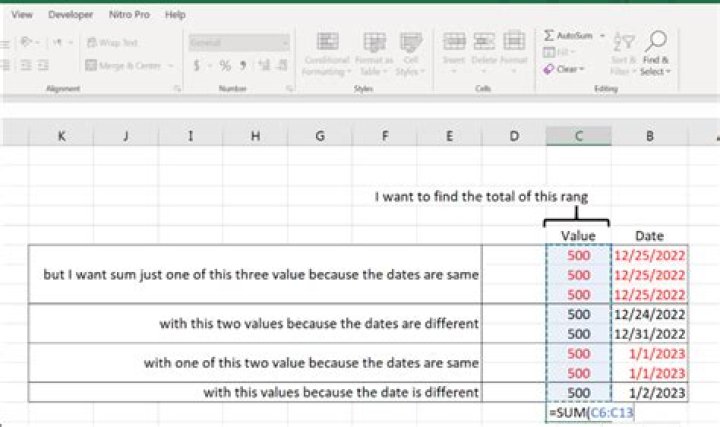
I have two columns one for date and one for value. the date columns have different dates with duplicates date and the values are different with duplicates values. Is there any way to sum just one value of duplicate dates with just one value of other duplicate dates?  I tried sumif, sumifs, countif, countifs functions...
1 Answer
In Office 365: =SUM(TAKE(UNIQUE(C6:D13),,1)) Which takes the unique rows in the range and takes the first column in the sum.
In older versions: =SUMPRODUCT((C6:C13/(COUNTIF(D6:D13,D6:D13))))
Where it sums all values but divided by the count of the dates occurring in the range. So if it occurs 3 times it sums 3*500/3 =500
For older Excel this may be calculating faster than the above: =SUMPRODUCT(C6:C14*(FREQUENCY(D6:D13,D6:D13)>0))
Note that the first range is expanded one row, since frequency results in an array followed by a 0




