
My question is how to set the pc/pg interface in Step 7? I know the PLC's IP but it seems that the program is unavailable to find the PLC in the list of available devices. I am using TCP/IP connection so it would be ideal if I could receive some steps in configuring the interface the right way.
12 Answers
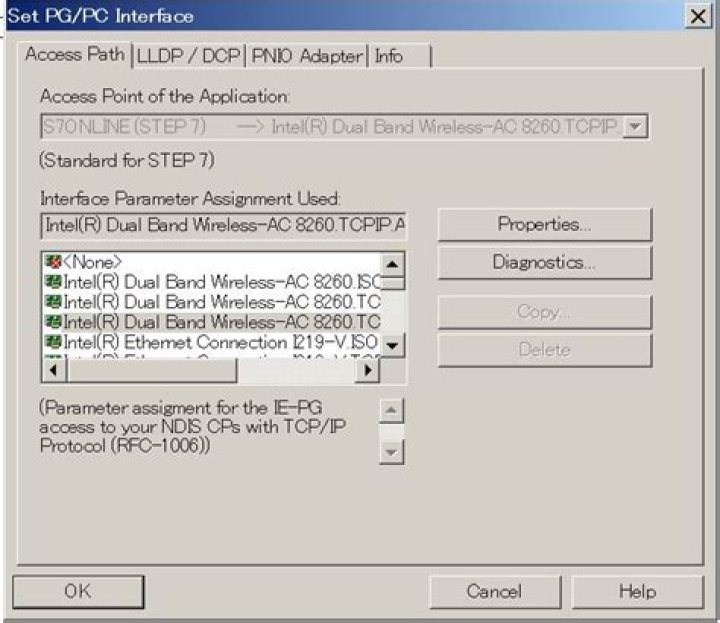
Doubleclick on "Setting PG/PC Interface" in the "Control Panel" of Windows. Set the "Access Point of Application" to "S7ONLINE." In the list "Interface parameter set used", select the required interface parameter set. If the required interface parameter set is not displayed, you must first install a module or protocol via the "Select" button. The interface parameter set is then generated automatically. On plug-and-play systems, you can not install plug and play CPs manually (CP 5611 and CP 5511). They are integrated automatically in "Setting PG/PC Interface" after you have installed the hardware in your PG/PC.
If you are using TIA Portal, you might want to look into Control Panel / Communication Settings. If you want to connect with a LAN cable to the PLC's Ethernet/Profinet port you must select your Network Card in the PG/PC Interface (or Communication Settings).
After that you should use a fixed IP address on your Network Card. If the PLC has IP 192.168.0.1 and subnet mask 255.255.255.0 you should set 192.168.0.2 and the same subnet mask. For this, go to your Network Adapters list. In Windows10 it's Control Panel\Network and Internet\Network Connections Then right click your Network Card -> Properties Go to Internet Protocol Version 4 (TCP/IPv4) Properties and enter manually your IP address.
To test the communication open Command Prompt and ping the PLC (eg. "ping 192.168.0.1"). Then probably you will be able to connect to the PLC.




