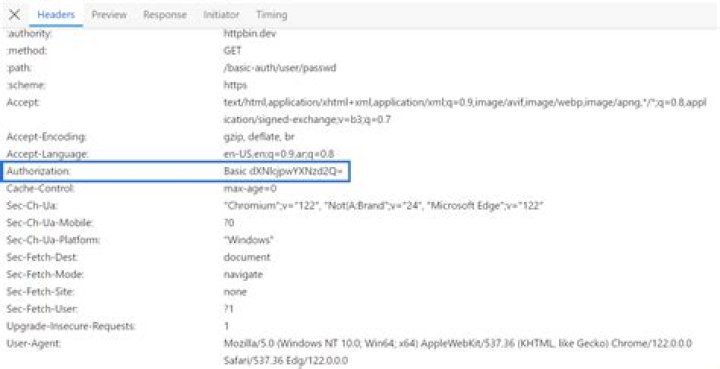

I am trying to POST data from my API but I can't pass the basic authentication.
I try:
$.ajax({ type: 'POST', url: data: {}, crossDomain: true, beforeSend: function(xhr) { xhr.setRequestHeader('Authorization', 'Basic [REDACTED]'); } }); My server configuration response is:
response["Access-Control-Allow-Origin"] = "*" response["Access-Control-Allow-Methods"] = "POST" response["Access-Control-Max-Age"] = "1000" response["Access-Control-Allow-Headers"] = "*" The headers that I get is:
Request Headers
OPTIONS /api/v1/token-auth/ HTTP/1.1 Host: theappurl.com Connection: keep-alive Access-Control-Request-Method: POST Origin: User-Agent: Mozilla/5.0 (X11; Linux x86_64) AppleWebKit/537.31 (KHTML, like Gecko) Chrome/26.0.1410.63 Safari/537.31 Access-Control-Request-Headers: origin, authorization, content-type Accept: */* Referer: Accept-Encoding: gzip,deflate,sdch Accept-Language: es,en;q=0.8 Accept-Charset: ISO-8859-1,utf-8;q=0.7,*;q=0.3 Response header
HTTP/1.1 401 Unauthorized Server: nginx/1.1.19 Date: Fri, 16 Aug 2013 01:29:21 GMT Content-Type: text/html Content-Length: 597 Connection: keep-alive WWW-Authenticate: Basic realm="Restricted" I guess the server configuration is good because I can access to API from the Advanced REST Client (Chrome Extension)
Any suggestions?
PD: The header that I get from Advanced REST client is:
User-Agent: Mozilla/5.0 (X11; Linux x86_64) AppleWebKit/537.31 (KHTML, like Gecko) Chrome/26.0.1410.63 Safari/537.31 Origin: chrome-extension://hgmloofddffdnphfgcellkdfbfbjeloo Authorization: Basic [REDACTED] Content-Type: application/x-www-form-urlencoded Accept: */* Accept-Encoding: gzip,deflate,sdch Accept-Language: es,en;q=0.8 Accept-Charset: ISO-8859-1,utf-8;q=0.7,*;q=0.3 and
Server: nginx/1.1.19 Date: Fri, 16 Aug 2013 01:07:18 GMT Content-Type: application/json; charset=utf-8 Transfer-Encoding: chunked Connection: keep-alive Vary: Accept, Cookie Allow: POST, OPTIONS X-Robots-Tag: noindex sending OPTION method
36 Answers
Per and , here is how to do Basic auth with a header instead of putting the username and password in the URL. Note that this still doesn't hide the username or password from anyone with access to the network or this JS code (e.g. a user executing it in a browser):
$.ajax({ type: 'POST', url: data: {}, crossDomain: true, beforeSend: function(xhr) { xhr.setRequestHeader('Authorization', 'Basic ' + btoa(unescape(encodeURIComponent(YOUR_USERNAME + ':' + YOUR_PASSWORD)))) } }); You can include the user and password as part of the URL:
see this URL, for more
HTTP Basic Authentication credentials passed in URL and encryption
of course, you'll need the username password, it's not 'Basic hashstring.
hope this helps...
16NodeJS answer:
In case you wanted to do it with NodeJS: make a GET to JSON endpoint with Authorization header and get a Promise back:
First
npm install --save request request-promise (see on npm) and then in your .js file:
var requestPromise = require('request-promise'); var user = 'user'; var password = 'password'; var base64encodedData = Buffer.from(user + ':' + password).toString('base64'); requestPromise.get({ uri: ' headers: { 'Authorization': 'Basic ' + base64encodedData }, json: true }) .then(function ok(jsonData) { console.dir(jsonData); }) .catch(function fail(error) { // handle error }); If you are in a browser environment you can also use btoa.
btoa is a function which takes a string as argument and produces a Base64 encoded ASCII string. Its supported by 97% of browsers.
Example:
> "Basic " + btoa("billy"+":"+"secretpassword") < "Basic YmlsbHk6c2VjcmV0cGFzc3dvcmQ=" You can then add Basic YmlsbHk6c2VjcmV0cGFzc3dvcmQ= to the authorization header.
Note that the usual caveats about HTTP BASIC auth apply, most importantly if you do not send your traffic over https an eavesdropped can simply decode the Base64 encoded string thus obtaining your password.
This security.stackexchange.com answer gives a good overview of some of the downsides.
no need to use user and password as part of the URL
you can try this
byte[] encodedBytes = Base64.encodeBase64("user:passwd".getBytes()); String USER_PASS = new String(encodedBytes); HttpUriRequest request = RequestBuilder.get(url).addHeader("Authorization", USER_PASS).build(); PHP - curl:
$username = 'myusername'; $password = 'mypassword'; ... curl_setopt($ch, CURLOPT_USERPWD, $username . ":" . $password); ... PHP - POST in WordPress:
$username = 'myusername'; $password = 'mypassword'; ... wp_remote_post(' array( 'headers' => array( 'Authorization' => 'Basic ' . base64_encode("$username:$password") ) )); ... 



