I have read this post How do I switch to Xubuntu?, but it tells me to install xubuntu-desktop.
Can I install Xfce (only)? I mean, I don't want to install any application which is not related to Xfce desktop, but becomes dependency of xubuntu-desktop, such as abiword, gthumb, etc. What package should I install?
4 Answers
Click here:
Or via command line:
sudo apt-get install xfce4 this is what you will get
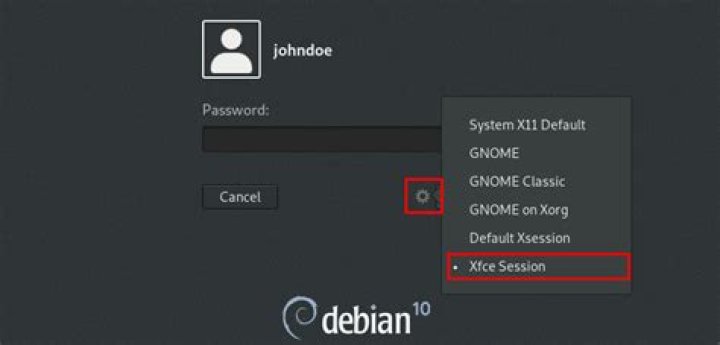
Reading package lists... Done Building dependency tree Reading state information... Done The following packages were automatically installed and are no longer required: libstdc++5 libvncserver0 libaio-dev sysstat ksh expat libelf-dev Use 'apt-get autoremove' to remove them. The following extra packages will be installed: desktop-base exo-utils gtk2-engines-xfce libexo-1-0 libexo-common libgarcon-1-0 libgarcon-common libthunarx-2-0 libxfce4ui-1-0 libxfce4util-bin libxfce4util-common libxfce4util4 libxfconf-0-2 orage thunar thunar-data thunar-volman xfce-keyboard-shortcuts xfce4-appfinder xfce4-mixer xfce4-panel xfce4-session xfce4-settings xfce4-utils xfconf xfdesktop4 xfdesktop4-data xfwm4 xfwm4-themes xscreensaver Suggested packages: thunar-archive-plugin thunar-media-tags-plugin xfprint4 xfce4-goodies fortunes-mod aumix xli xloadimage xfishtank xdaliclock qcam streamer The following NEW packages will be installed: desktop-base exo-utils gtk2-engines-xfce libexo-1-0 libexo-common libgarcon-1-0 libgarcon-common libthunarx-2-0 libxfce4ui-1-0 libxfce4util-bin libxfce4util-common libxfce4util4 libxfconf-0-2 orage thunar thunar-data thunar-volman xfce-keyboard-shortcuts xfce4 xfce4-appfinder xfce4-mixer xfce4-panel xfce4-session xfce4-settings xfce4-utils xfconf xfdesktop4 xfdesktop4-data xfwm4 xfwm4-themes xscreensaver 0 upgraded, 31 newly installed, 0 to remove and 17 not upgraded. Need to get 19.8 MB of archives. After this operation, 80.0 MB of additional disk space will be used. Do you want to continue [Y/n]? once installed log out and choose xfce desktop - log back in
4xfce can be installed from the terminal by default using the following command:
sudo apt-get install xfce4 And to install the goodies (extra programs, plugins, and artwork), the command is:
sudo apt-get install xfce4-goodies Enter your password when prompted.
Enjoy using Xfce!
1On 30/09/2015
To install latest version of Xfce 4.12 on Ubuntu 14.04 and 15.04:
Open terminal and run the following commands:
sudo add-apt-repository ppa:xubuntu-dev/xfce-4.12 sudo apt-get update && sudo apt-get dist-upgrade sudo apt-get install xfce4 Here is the output of commands,
ravan@ravan:~$ sudo apt-get install xfce4 Reading package lists... Done Building dependency tree Reading state information... Done The following packages were automatically installed and are no longer required: account-plugin-windows-live libupstart1 Use 'apt-get autoremove' to remove them. The following extra packages will be installed: desktop-base exo-utils gtk2-engines-xfce libexo-1-0 libexo-common libexo-helpers libgarcon-1-0 libgarcon-common libjpeg-progs libjpeg-turbo-progs libkeybinder0 libthunarx-2-0 libtumbler-1-0 libxfce4ui-1-0 libxfce4ui-common libxfce4ui-utils libxfce4util-bin libxfce4util-common libxfce4util7 libxfconf-0-2 orage tango-icon-theme thunar thunar-data thunar-volman tumbler tumbler-common xfce4-appfinder xfce4-mixer xfce4-notifyd xfce4-panel xfce4-session xfce4-settings xfce4-volumed xfconf xfdesktop4 xfdesktop4-data xfwm4 xscreensaver xscreensaver-data xubuntu-icon-theme Suggested packages: devhelp sox kdelibs-data thunar-archive-plugin thunar-media-tags-plugin tumbler-plugins-extra xfce4-goodies xfce4-power-manager gtk3-engines-xfce fortunes-mod menu xfwm4-themes xfishtank xdaliclock xscreensaver-gl fortune qcam streamer gdm3 kdm-gdmcompat Recommended packages: greybird-gtk-theme The following NEW packages will be installed: desktop-base exo-utils gtk2-engines-xfce libexo-1-0 libexo-common libexo-helpers libgarcon-1-0 libgarcon-common libjpeg-progs libjpeg-turbo-progs libkeybinder0 libthunarx-2-0 libtumbler-1-0 libxfce4ui-1-0 libxfce4ui-common libxfce4ui-utils libxfce4util-bin libxfce4util-common libxfce4util7 libxfconf-0-2 orage tango-icon-theme thunar thunar-data thunar-volman tumbler tumbler-common xfce4 xfce4-appfinder xfce4-mixer xfce4-notifyd xfce4-panel xfce4-session xfce4-settings xfce4-volumed xfconf xfdesktop4 xfdesktop4-data xfwm4 xscreensaver xscreensaver-data xubuntu-icon-theme 0 upgraded, 42 newly installed, 0 to remove and 6 not upgraded. Need to get 19.7 MB of archives. After this operation, 69.3 MB of additional disk space will be used. Do you want to continue? [Y/n] To uninstall PPA:
sudo apt-get install ppa-purge sudo ppa-purge ppa:xubuntu-dev/xfce-4.12 I prefer using the command-line, but you can also install Xfce from Synaptic, just type in "xfce4" in the search bar, select everything related to Xfce, and then click "Apply" to install.