
I have a Java web service client, which consumes a web service via HTTPS.
import javax.xml.ws.Service; @WebServiceClient(name = "ISomeService", targetNamespace = "", wsdlLocation = "...") public class ISomeService extends Service { public ISomeService() { super(__getWsdlLocation(), ISOMESERVICE_QNAME); } When I connect to the service URL ( ), I get the exception java.security.cert.CertificateException: No subject alternative names present.
To fix it, I first ran openssl s_client -showcerts -connect AAA.BBB.CCC.DDD:9443 > certs.txt and got following content in file certs.txt:
CONNECTED(00000003) --- Certificate chain 0 s:/CN=someSubdomain.someorganisation.com i:/CN=someSubdomain.someorganisation.com -----BEGIN CERTIFICATE----- XXXXXXXXXXXXXXXXXXXXXXXXXXXXXXXXXXXXXXXXXXXXXXXXXXXXXXXXXXXXXXXX XXXXXXXXXXXXXXXXXXXXXXXXXXXXXXXXXXXXXXXXXXXXXXXXXXXXXXXXXXXXXXXX XXXXXXXXXXXXXXXXXXXXXXXXXXXXXXXXXXXXXXXXXXXXXXXXXXXXXXXXXXXXXXXX XXXXXXXXXXXXXXXXXXXXXXXXXXXXXXXXXXXXXXXXXXXXXXXXXXXXXXXXXXXXXXXX XXXXXXXXXXXXXXXXXXXXXXXXXXXXXXXXXXXXXXXXXXXXXXXXXXXXXXXXXXXXXXXX XXXXXXXXXXXXXXXXXXXXXXXXXXXXXXXXXXXXXXXXXXXXXXXXXXXXXXXXXXXXXXXX XXXXXXXXXXXXXXXXXXXXXXXXXXXXXXXXXXXXXXXXXXXXXXXXXXXXXXXXXXXXXXXX XXXXXXXXXXXXXXXXXXXXXXXXXXXXXXXXXXXXXXXXXXXXXXXXXXXXXXXXXXXXXXXX -----END CERTIFICATE----- --- Server certificate subject=/CN=someSubdomain.someorganisation.com issuer=/CN=someSubdomain.someorganisation.com --- No client certificate CA names sent --- SSL handshake has read 489 bytes and written 236 bytes --- New, TLSv1/SSLv3, Cipher is RC4-MD5 Server public key is 512 bit Compression: NONE Expansion: NONE SSL-Session: Protocol : TLSv1 Cipher : RC4-MD5 Session-ID: XXXXXXXXXXXXXXXXXXXXXXXXXXXXXXXXXXXXXXXXXXXXXXXXXXXXXXXXXXXXXXXX Session-ID-ctx: Master-Key: XXXXXXXXXXXXXXXXXXXXXXXXXXXXXXXXXXXXXXXXXXXXXXXXXXXXXXXXXXXXXXXXXXXXXXXXXXXXXXXXXXXXXXXXXXXXXXXX Key-Arg : None Start Time: 1382521838 Timeout : 300 (sec) Verify return code: 21 (unable to verify the first certificate) --- AFAIK, now I need to
- extract the part of
certs.txtbetween-----BEGIN CERTIFICATE-----and-----END CERTIFICATE-----, - modify it so that the certificate name is equal to
AAA.BBB.CCC.DDDand - then import the result using
keytool -importcert -file fileWithModifiedCertificate(wherefileWithModifiedCertificateis the result of operations 1 and 2).
Is this correct?
If so, how exactly can I make the certificate from step 1 work with IP-based adddress (AAA.BBB.CCC.DDD) ?
Update 1 (23.10.2013 15:37 MSK): In an answer to a similar question, I read the following:
If you're not in control of that server, use its host name (provided that there is at least a CN matching that host name in the existing cert).
What exactly does "use" mean?
123 Answers
I fixed the problem by disabling HTTPS checks using the approach presented here:
I put following code into the the ISomeService class:
static { disableSslVerification(); } private static void disableSslVerification() { try { // Create a trust manager that does not validate certificate chains TrustManager[] trustAllCerts = new TrustManager[] {new X509TrustManager() { public java.security.cert.X509Certificate[] getAcceptedIssuers() { return null; } public void checkClientTrusted(X509Certificate[] certs, String authType) { } public void checkServerTrusted(X509Certificate[] certs, String authType) { } } }; // Install the all-trusting trust manager SSLContext sc = SSLContext.getInstance("SSL"); sc.init(null, trustAllCerts, new java.security.SecureRandom()); HttpsURLConnection.setDefaultSSLSocketFactory(sc.getSocketFactory()); // Create all-trusting host name verifier HostnameVerifier allHostsValid = new HostnameVerifier() { public boolean verify(String hostname, SSLSession session) { return true; } }; // Install the all-trusting host verifier HttpsURLConnection.setDefaultHostnameVerifier(allHostsValid); } catch (NoSuchAlgorithmException e) { e.printStackTrace(); } catch (KeyManagementException e) { e.printStackTrace(); } } Since I'm using the for testing purposes only, it's a good enough solution, but do not do this in production.
Note that you can also disable SSL for "one connection at a time" ex:
// don't call disableSslVerification but use its internal code: HttpURLConnection conn = (HttpURLConnection) url.openConnection(); if (conn instanceof HttpsURLConnection) { HttpsURLConnection httpsConn = (HttpsURLConnection) conn; httpsConn.setHostnameVerifier(allHostsValid); httpsConn.setSSLSocketFactory(sc.getSocketFactory()); } I've the same problem and solved with this code. I put this code before the first call to my webservices.
javax.net.ssl.HttpsURLConnection.setDefaultHostnameVerifier( new javax.net.ssl.HostnameVerifier(){ public boolean verify(String hostname, javax.net.ssl.SSLSession sslSession) { return hostname.equals("localhost"); // or return true } }); It's simple and works fine.
Here is the original source.
5This is an old question, yet I had the same problem when moving from JDK 1.8.0_144 to jdk 1.8.0_191
We found a hint in the changelog:
we added the following additional system property, which helped in our case to solve this issue:
-Dcom.sun.jndi.ldap.object.disableEndpointIdentification=true The verification of the certificate identity is performed against what the client requests.
When your client uses (where xxx.xxx.xxx.xxx is an IP address), the certificate identity is checked against this IP address (in theory, only using an IP SAN extension).
If your certificate has no IP SAN, but DNS SANs (or if no DNS SAN, a Common Name in the Subject DN), you can get this to work by making your client use a URL with that host name instead (or a host name for which the cert would be valid, if there are multiple possible values). For example, if you cert has a name for , use .
Of course, you'll need that host name to resolve to that IP address.
In addition, if there are any DNS SANs, the CN in the Subject DN will be ignored, so use a name that matches one of the DNS SANs in this case.
4To import the cert:
- Extract the cert from the server, e.g.
openssl s_client -showcerts -connect AAA.BBB.CCC.DDD:9443 > certs.txtThis will extract certs in PEM format. - Convert the cert into DER format as this is what keytool expects, e.g.
openssl x509 -in certs.txt -out certs.der -outform DER - Now you want to import this cert into the system default 'cacert' file. Locate the system default 'cacerts' file for your Java installation. Take a look at How to obtain the location of cacerts of the default java installation?
- Import the certs into that cacerts file:
sudo keytool -importcert -file certs.der -keystore <path-to-cacerts>Default cacerts password is 'changeit'.
If the cert is issued for an FQDN and you're trying to connect by IP address in your Java code, then this should probably be fixed in your code rather than messing with certificate itself. Change your code to connect by FQDN. If FQDN is not resolvable on your dev machine, simply add it to your hosts file, or configure your machine with DNS server that can resolve this FQDN.
2I fixed this issue in a right way by adding the subject alt names in certificate rather than making any changes in code or disabling SSL unlike what other answers suggest here. If you see clearly the exception says the "Subject alt names are missing" so the right way should be to add them
Please look at this link to understand step by step.
The above error means that your JKS file is missing the required domain on which you are trying to access the application.You will need to Use Open SSL and the key tool to add multiple domains
- Copy the openssl.cnf into a current directory
echo '[ subject_alt_name ]' >> openssl.cnfecho 'subjectAltName = DNS:example.mydomain1.com, DNS:example.mydomain2.com, DNS:example.mydomain3.com, DNS: localhost'>> openssl.cnfopenssl req -x509 -nodes -newkey rsa:2048 -config openssl.cnf -extensions subject_alt_name -keyout private.key -out self-signed.pem -subj '/C=gb/ST=edinburgh/L=edinburgh/O=mygroup/OU=servicing/CN= -days 365Export the public key (.pem) file to PKS12 format. This will prompt you for password
openssl pkcs12 -export -keypbe PBE-SHA1-3DES -certpbe PBE-SHA1-3DES -export -in self-signed.pem -inkey private.key -name myalias -out keystore.p12Create a.JKS from self-signed PEM (Keystore)
keytool -importkeystore -destkeystore keystore.jks -deststoretype PKCS12 -srcstoretype PKCS12 -srckeystore keystore.p12Generate a Certificate from above Keystore or JKS file
keytool -export -keystore keystore.jks -alias myalias -file selfsigned.crtSince the above certificate is Self Signed and is not validated by CA, it needs to be added in Truststore(Cacerts file in below location for MAC, for Windows, find out where your JDK is installed.)
sudo keytool -importcert -file selfsigned.crt -alias myalias -keystore /Library/Java/JavaVirtualMachines/jdk1.8.0_171.jdk/Contents/Home/jre/lib/security/cacerts
Original answer posted on this link here.
You may not want to disable all ssl Verificatication and so you can just disable the hostName verification via this which is a bit less scary than the alternative:
HttpsURLConnection.setDefaultHostnameVerifier( SSLConnectionSocketFactory.ALLOW_ALL_HOSTNAME_VERIFIER); [EDIT]
As mentioned by conapart3 SSLConnectionSocketFactory.ALLOW_ALL_HOSTNAME_VERIFIER is now deprecated, so it may be removed in a later version, so you may be forced in the future to roll your own, although I would still say I would steer away from any solutions where all verification is turned off.
my problem with getting this error was resolved by using the full URL "" instead of just "qatest/webService". Reason was that our security certificate had a wildcard i.e. "*.ourCompany.com". Once I put in the full address the exception went away. Hope this helps.
We faced a similar issue recently "No subject alternative DNS name matching found", it was a nightmare because we were able to reproduce it only in Production servers, were access to debug is near to zero. The rest of environments were just working fine. Our stack was JDK 1.8.x+, JBoss EAP 7+, Java Spring Boot app and Okta as identity provider (the SSL handshake was failing when recovering the well-known configuration from Okta, where okta is available in AWS Cloud - virtual servers).
Finally, we discover that (no one knows why) the JBoss EAP application server that we were using it was having an additional JVM System Property:
jsse.enableSNIExtension = false
This was preventing to establish TLS connection and we were able to reproduce the issue by adding that same system property/value in other environments. So the solution was simple to remove that undesired property and value.
As per Java Security Doc, this property is set by default to true for Java 7+ (refer to )
- jsse.enableSNIExtension system property. Server Name Indication (SNI) is a TLS extension, defined in RFC 4366. It enables TLS connections to virtual servers, in which multiple servers for different network names are hosted at a single underlying network address. Some very old SSL/TLS vendors may not be able handle SSL/TLS extensions. In this case, set this property to false to disable the SNI extension.
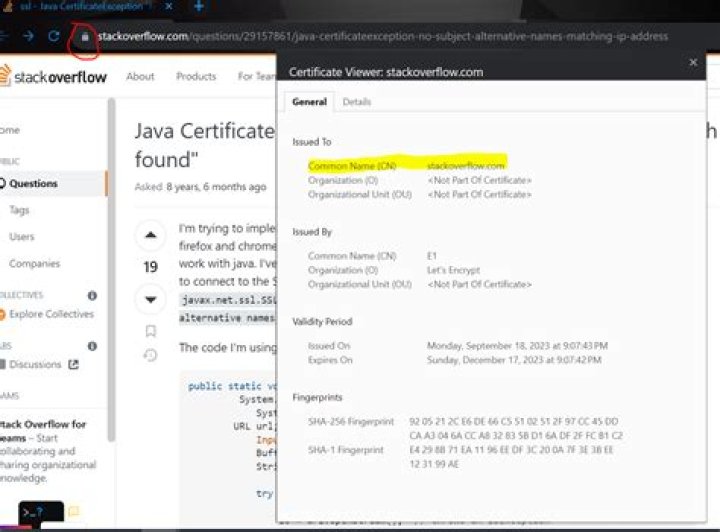
This fails because neither the certificate common name (CN in certification Subject) nor any of the alternate names (Subject Alternative Name in the certificate) match with the target hostname or IP adress.
For e.g., from a JVM, when trying to connect to an IP address (WW.XX.YY.ZZ) and not the DNS name (), the HTTPS connection will fail because the certificate stored in the java truststore cacerts expects common name (or certificate alternate name like stackexchange.com or *.stackoverflow.com etc.) to match the target address.
HttpsURLConnection urlConnection = (HttpsURLConnection) new URL("").openConnection(); urlConnection.setSSLSocketFactory(socketFactory()); urlConnection.setDoOutput(true); urlConnection.setRequestMethod("GET"); urlConnection.setUseCaches(false); urlConnection.setHostnameVerifier(new HostnameVerifier() { @Override public boolean verify(String hostname, SSLSession sslSession) { return true; } }); urlConnection.getOutputStream(); Above, passed an implemented HostnameVerifier object which is always returns true:
new HostnameVerifier() { @Override public boolean verify(String hostname, SSLSession sslSession) { return true; } } As some one pointed before, I added the following code (with lambda) just before creating the RestTemplate object, and it works fine. IT is only for my internal testing class, so I will work around with a better solution for the production code.
javax.net.ssl.HttpsURLConnection.setDefaultHostnameVerifier( (hostname, sslSession) -> true); For Spring Boot RestTemplate:
- add
org.apache.httpcomponents.httpcoredependency use
NoopHostnameVerifierfor SSL factory:SSLContext sslContext = new SSLContextBuilder() .loadTrustMaterial(new URL("file:pathToServerKeyStore"), storePassword) // .loadKeyMaterial(new URL("file:pathToClientKeyStore"), storePassword, storePassword) .build(); SSLConnectionSocketFactory socketFactory = new SSLConnectionSocketFactory(sslContext, NoopHostnameVerifier.INSTANCE); CloseableHttpClient client = HttpClients.custom().setSSLSocketFactory(socketFactory).build(); HttpComponentsClientHttpRequestFactory factory = new HttpComponentsClientHttpRequestFactory(client); RestTemplate restTemplate = new RestTemplate(factory);
This code will work like charm and use the restTemple object for rest of the code.
RestTemplate restTemplate = new RestTemplate(); TrustStrategy acceptingTrustStrategy = new TrustStrategy() { @Override public boolean isTrusted(java.security.cert.X509Certificate[] x509Certificates, String s) { return true; } }; SSLContext sslContext = null; try { sslContext = org.apache.http.ssl.SSLContexts.custom().loadTrustMaterial(null, acceptingTrustStrategy) .build(); } catch (NoSuchAlgorithmException e) { e.printStackTrace(); } catch (KeyManagementException e) { e.printStackTrace(); } catch (KeyStoreException e) { e.printStackTrace(); } SSLConnectionSocketFactory csf = new SSLConnectionSocketFactory(sslContext, new NoopHostnameVerifier()); CloseableHttpClient httpClient = HttpClients.custom().setSSLSocketFactory(csf).build(); HttpComponentsClientHttpRequestFactory requestFactory = new HttpComponentsClientHttpRequestFactory(); requestFactory.setHttpClient(httpClient); restTemplate.setRequestFactory(requestFactory); } I also faced the same issue with a self signed certificate . By referring to few of the above solutions , i tried regenerating the certificate with the correct CN i.e the IP Address of the server .But still it didn't work for me . Finally i tried regenerating the certificate by adding the SAN address to it via the below mentioned command
**keytool -genkey -keyalg RSA -keystore keystore.jks -keysize 2048 -alias <IP_ADDRESS> -ext san=ip:<IP_ADDRESS>** After that i started my server and downloaded the client certificates via the below mentioned openssl command
**openssl s_client -showcerts -connect <IP_ADDRESS>:443 < /dev/null | openssl x509 -outform PEM > myCert.pem** Then i imported this client certificate to the java default keystore file (cacerts) of my client machine by the below mentioned command
**keytool -import -trustcacerts -keystore /home/usr/lib/jvm/java-1.8.0-openjdk-1.8.0.242.b08-1.el7.x86_64/jre/lib/security/cacerts -alias <IP_ADDRESS> -file ./mycert.pem** I got to this question after if got this same error message. However in my case we had two URL's with different subdomains ( and ) which were directed to the same server. This server was having only one wildcard certificate for the *.xxx.com domain. When using the service via the second domain, the found certicate (*.xxx.com) does not match with the requested domain (*.yyy.com) and the error occurs.
In this case we should not try to fix such an errormessage by lowering SSL security, but should check the server and certificates on it.
I was going through 2 way SSL in springboot. I have made all correct configuration service tomcat server and service caller RestTemplate. but I was getting error as "java.security.cert.CertificateException: No subject alternative names present"
After going through solutions, I found, JVM needs this certificate otherwise it gives handshaking error.
Now, how to add this to JVM.
go to jre/lib/security/cacerts file. we need to add our server certificate file to this cacerts file of jvm.
Command to add server cert to cacerts file via command line in windows.
C:\Program Files\Java\jdk1.8.0_191\jre\lib\security>keytool -import -noprompt -trustcacerts -alias sslserver -file E:\spring_cloud_sachin\ssl_keys\sslserver.cer -keystore cacerts -storepass changeit
Check server cert is installed or not:
C:\Program Files\Java\jdk1.8.0_191\jre\lib\security>keytool -list -keystore cacerts
you can see list of certificates installed:
add the host entry with the ip corresponding to the CN in the certificate
CN=someSubdomain.someorganisation.com
now update the ip with the CN name where you are trying to access the url.
It worked for me.
When you have a certificate with both CN and Subject Alternative Names (SAN), if you make your request based on the CN content, then that particular content must also be present under SAN, otherwise it will fail with the error in question.
In my case CN had something, SAN had something else. I had to use SAN URL, and then it worked just fine.
I have resolved the said
MqttException (0) - javax.net.ssl.SSLHandshakeException: No subjectAltNames on the certificate match
error by adding one (can add multiple) alternative subject name in the server certificate (having CN=example.com) which after prints the part of certificate as below:
Subject Alternative Name: DNS: example.com I used KeyExplorer on windows for generating my server certificate. You can follow this link for adding alternative subject names (follow the only part for adding it).
I was referred to animo3991's answer and tweaked it to make my Bitbucket Backup Client 3.6.0 work for backing up my Bitbucket Server when before it was also hitting No subject alternative names present error.
The first command however must use alias tomcat, otherwise Bitbucket Server would not start up properly:
keytool -genkey -keyalg RSA -sigalg SHA256withRSA -keystore keystore.jks -keysize 2048 -alias tomcat -ext san=ip:<IP_ADDRESS> openssl s_client -showcerts -connect <IP_ADDRESS>:443 < /dev/null | openssl x509 -outform PEM > myCert.pem keytool -import -trustcacerts -keystore /etc/pki/ca-trust/extracted/java/cacerts -alias <IP_ADDRESS> -file ./myCert.pem public class RESTfulClientSSL { static TrustManager[] trustAllCerts = new TrustManager[]{new X509TrustManager() { @Override public void checkClientTrusted(X509Certificate[] chain, String authType) throws CertificateException { // TODO Auto-generated method stub } @Override public void checkServerTrusted(X509Certificate[] chain, String authType) throws CertificateException { // TODO Auto-generated method stub } @Override public X509Certificate[] getAcceptedIssuers() { // TODO Auto-generated method stub return null; } }}; public class NullHostNameVerifier implements HostnameVerifier { /* * (non-Javadoc) * * @see javax.net.ssl.HostnameVerifier#verify(java.lang.String, * javax.net.ssl.SSLSession) */ @Override public boolean verify(String arg0, SSLSession arg1) { // TODO Auto-generated method stub return true; } } public static void main(String[] args) { HttpURLConnection connection = null; try { HttpsURLConnection.setDefaultHostnameVerifier(new RESTfulwalkthroughCer().new NullHostNameVerifier()); SSLContext sc = SSLContext.getInstance("SSL"); sc.init(null, trustAllCerts, new SecureRandom()); HttpsURLConnection.setDefaultSSLSocketFactory(sc.getSocketFactory()); String uriString = ""; URL url = new URL(uriString); connection = (HttpURLConnection) url.openConnection(); connection.setRequestMethod("GET"); //connection.setRequestMethod("POST"); BASE64Encoder encoder = new BASE64Encoder(); String username = "admin"; String password = "admin"; String encodedCredential = encoder.encode((username + ":" + password).getBytes()); connection.setRequestProperty("Authorization", "Basic " + encodedCredential); connection.connect(); BufferedReader reader = new BufferedReader(new InputStreamReader(connection.getInputStream())); int responseCode = connection.getResponseCode(); if (responseCode == HttpURLConnection.HTTP_OK) { StringBuffer stringBuffer = new StringBuffer(); String line = ""; while ((line = reader.readLine()) != null) { stringBuffer.append(line); } String content = stringBuffer.toString(); System.out.println(content); } } catch (Exception e) { e.printStackTrace(); } finally { if (connection != null) { connection.disconnect(); } } } } Add your IP address in the hosts file.which is in the folder of C:\Windows\System32\drivers\etc. Also add IP and Domain Name of the IP address. example: aaa.bbb.ccc.ddd
I have solved the issue by the following way.
1. Creating a class . The class has some empty implementations
class MyTrustManager implements X509TrustManager { public java.security.cert.X509Certificate[] getAcceptedIssuers() { return null; } public void checkClientTrusted(X509Certificate[] certs, String authType) { } public void checkServerTrusted(X509Certificate[] certs, String authType) { } @Override public void checkClientTrusted(java.security.cert.X509Certificate[] paramArrayOfX509Certificate, String paramString) throws CertificateException { // TODO Auto-generated method stub } @Override public void checkServerTrusted(java.security.cert.X509Certificate[] paramArrayOfX509Certificate, String paramString) throws CertificateException { // TODO Auto-generated method stub } 2. Creating a method
private static void disableSSL() { try { TrustManager[] trustAllCerts = new TrustManager[] { new MyTrustManager() }; // Install the all-trusting trust manager SSLContext sc = SSLContext.getInstance("SSL"); sc.init(null, trustAllCerts, new java.security.SecureRandom()); HostnameVerifier allHostsValid = new HostnameVerifier() { public boolean verify(String hostname, SSLSession session) { return true; } }; HttpsURLConnection.setDefaultHostnameVerifier(allHostsValid); HttpsURLConnection.setDefaultSSLSocketFactory(sc.getSocketFactory()); } catch (Exception e) { e.printStackTrace(); } } - Call the disableSSL() method where the exception is thrown. It worked fine.




