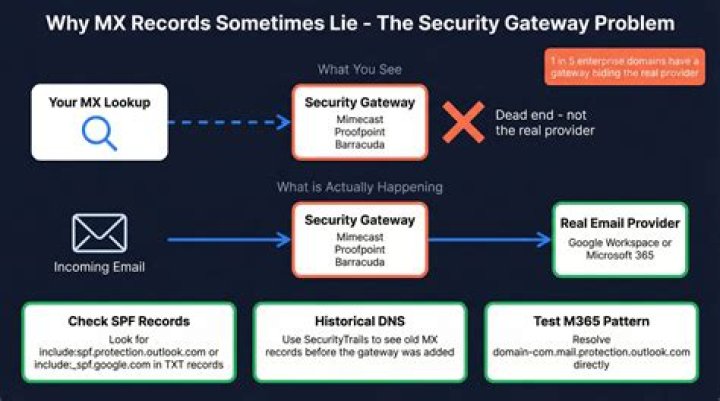

I need to find out what provider is providing emails for a domain (like ). I know I can find the provider for hosting a domain but how can I find out about emails for a domain?
3 Answers
You have two options (tested with windows ports, will check other versions when I get into work tomorrow):
Host
C:\>host google.com | grep mail google.com mail is handled by 40 alt3.aspmx.l.google.com. google.com mail is handled by 50 alt4.aspmx.l.google.com. google.com mail is handled by 10 aspmx.l.google.com. google.com mail is handled by 20 alt1.aspmx.l.google.com. google.com mail is handled by 30 alt2.aspmx.l.google.com. Dig
C:\>dig google.com mx | grep MX | awk 'FNR>1' google.com. 294 IN MX 30 alt2.aspmx.l.google.com. google.com. 294 IN MX 40 alt3.aspmx.l.google.com. google.com. 294 IN MX 50 alt4.aspmx.l.google.com. google.com. 294 IN MX 10 aspmx.l.google.com. google.com. 294 IN MX 20 alt1.aspmx.l.google.com. These will give you the domain of the servers that mail is hosted from. The numbers in front (10,20,30,40,50) are the priority of the server. The commands basically report where the DNS records that handle mail (MX) are pointed to.
First, find an address for the mail server. nslookup isn't the greatest, but it comes with most Windows versions and many other OSes:
C:\>nslookup Default Server: your.dns.server.name Address: x.x.x.x > set type=MX > google.com Non-authoritative answer: google.com MX preference = 40, mail exchanger = alt3.aspmx.l.google.com google.com MX preference = 10, mail exchanger = aspmx.l.google.com google.com MX preference = 30, mail exchanger = alt2.aspmx.l.google.com google.com MX preference = 20, mail exchanger = alt1.aspmx.l.google.com google.com MX preference = 50, mail exchanger = alt4.aspmx.l.google.com alt3.aspmx.l.google.com internet address = 74.125.113.27 aspmx.l.google.com internet address = 74.125.53.27 alt1.aspmx.l.google.com internet address = 74.125.159.27 alt2.aspmx.l.google.com internet address = 74.125.93.27 alt4.aspmx.l.google.com internet address = 209.85.143.27 > Once you know some server IP addresses, then you can pick one and look it up in a whois client, or using one of the many web-based whois services (e.g. ) to find out what netblocks the address is in and who they are registered to.
Usually you'll get many matching netblocks, as big netblocks are subdivided into smaller netblocks, and those are subdivided into even smaller netblocks, etc.; Look for the smallest one (the one with the least number of addresses in the range) to get the most specific info on who the address belongs to.
E.g.:
NetRange: 74.0.0.0 - 74.255.255.255 CIDR: 74.0.0.0/8 ...
NetType: Allocated to ARIN ... x.0.0.0 - x.255.255.255? That's a lot of addresses. And it's registered to the addressing authority itself. Doesn't tell us anything useful.
NetRange: 74.125.0.0 - 74.125.255.255 CIDR: 74.125.0.0/16 OriginAS: NetName: GOOGLE NetHandle: NET-74-125-0-0-1 Parent: NET-74-0-0-0-0 NetType: Direct Allocation RegDate: 2007-03-13 Updated: 2007-05-22 Ref: OrgName: Google Inc. OrgId: GOGL Address: 1600 Amphitheatre Parkway City: Mountain View StateProv: CA PostalCode: 94043 Country: US RegDate: 2000-03-30 Updated: 2011-04-10 Ref: OrgTechHandle: ZG39-ARIN OrgTechName: Google Inc OrgTechPhone: +1-650-253-0000 OrgTechEmail: OrgTechRef: There we go.
If you know the dns source of authority for the domain (probably the hosting provider), you can use dig with the mx flag:
dig @ns.soa.com domain.com mx




