
I have multiple accounts I access in Outlook, I would like to automatically add a signature to one of them (not the default one). Normally to send an email from one of the other accounts I click new email, then change the from account, however that doesn't add the associated signature. How does one accomplish this?
3 Answers
Insert a signature automatically
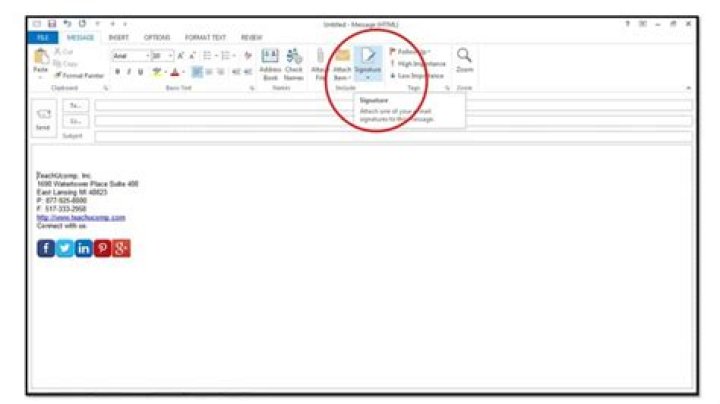
On the Message tab, in the Include group, click Signature, and then click Signatures.
Under Choose default signature, in the E-mail account list, click an email account with which you want to associate the signature.
In the New messages list, select the signature that you want to include.
If you want a signature to be included when you reply to or forward messages, in the Replies/forwards list, select the signature. Otherwise, click (none).
Insert a signature manually
In a new message, on the Message tab, in the Include group, click Signature, and then click the signature that you want.
Edit: Provided you have assigned a signature to the currently selected account, Outlook 2010 will change the signature when you select a different account from the Account dropdown. So make sure each account has a default signature set for this to work, even if the signature is blank.
82 years later I was faced with the same issue. The solution is to add the second mailbox as an "E-mail Account" and not as an "Additional Mailbox" of the default mailbox. Seems that it would work either way but it doesn't.
For automatically setting up your signatures to all your mail replies and forwards:
- Go to new message tab and select signature --> signatures
- Choose the E-mail account
- Select the signature name you want to add for new messages
- Select the signature name you want to add for replies/forwards
Note: the default setting would be as (none) that is the reason why the signature was not showing up in your mails.
Hope this helps Outlook 2010 users.




