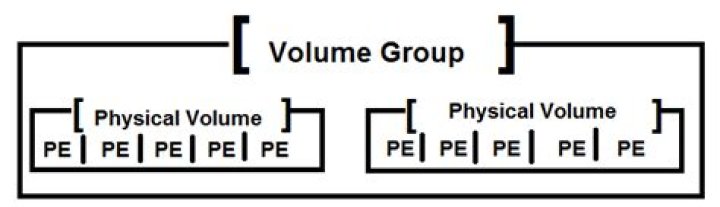

I have originally created 2 Logical Volumes in a Volume Group. The 2 Logical Volumes occupy the whole Volume Group and are sat on contiguous Physical Extents.
However, after I have shrunk the first Logical Volume (LV_root), it becomes smaller and empty Physical Extents appear between the 2 Logical Volumes. Here is the output from the "pvdisplay" command :
$ sudo pvdisplay --maps --- Physical volume --- PV Name /dev/sda5 VG Name VG_i5_2500 PV Size 99.65 GiB / not usable 2.00 MiB Allocatable yes PE Size 4.00 MiB Total PE 25510 Free PE 3025 Allocated PE 22485 PV UUID 3nRvBS-qq10-8XZZ-n3x9-gfHx-hrxN-AouB3q --- Physical Segments --- Physical extent 0 to 18431: Logical volume /dev/VG_i5_2500/LV_root Logical extents 0 to 18431 Physical extent 18432 to 21456: FREE Physical extent 21457 to 25509: Logical volume /dev/VG_i5_2500/LV_swap Logical extents 0 to 4052 I want to know that is there a way to move LV_swap towards LV_root so that there is no empty Physical Extents between them (i.e. in general, how to move Logical Volumes within the same Volume Group in order to make more rooms for contiguous free Physical Extents.) ?
Moreover, is Contiguous free Physical Extents necessary when creating new Logical Volumes in a Volume Group ?
2 Answers
There isn't an lvmove command in standard LVM (though HP may have one in a custom version).
The way to do this would be to move the contents of the volume off somewhere else, then delete it and recreate it, then copy back.
As your volume is swap, then moving the contents isn't necessary. You can swapoff, delete the volume, then create a new swap volume and swapon.
However, a goal of LVM could be said to not have to bother with any of this. Contiguous physical extents are not necessary to create a volume, it will just get inserted into the gaps. The main time you'd get a performance penalty is if you had a file that crossed non-contiguous extents and so would require an extra seek when being read.
3According to the pvmove man-page there is the possibility to move extents around on the same device:
If the source and destination are on the same disk, the anywhere allocation policy would be needed, like this: pvmove --alloc anywhere /dev/sdb1:1000-1999 /dev/sdb1:0-999 Maybe overlapping regions are forbidden but then you could move your volume in 2 steps:
pvmove --alloc anywhere /dev/sda5:21457-24481 /dev/sda:18432-21456 pvmove --alloc anywhere /dev/sda5:24482-25509 /dev/sda:21457-22484 



