I have data which I pivot as Row Labels and Column Labels which gives me something like this:

And what I would like to do is add columns like Grand Total (i.e. which applies to all columns as a whole, and not each column individually) to calculate things such as Average, Min, Max, Standard Deviation.....
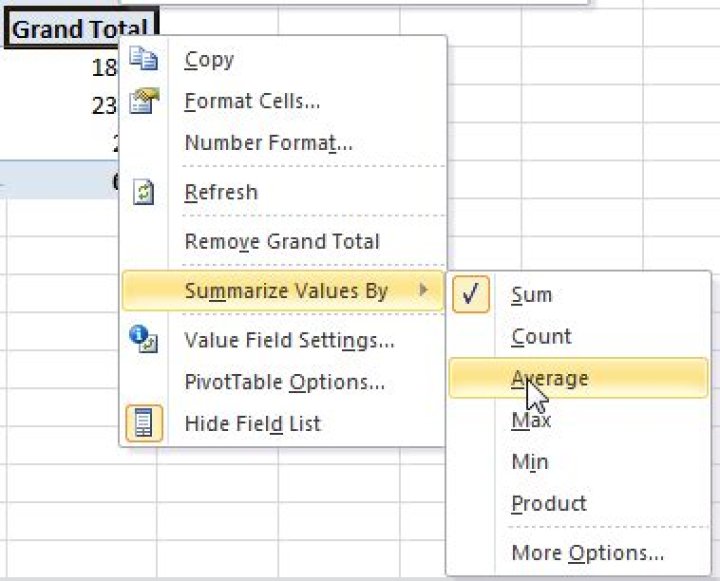
I have found a way to change the Grand Total column (more options gives you more calculations like standard dev):
However I can't find a way to add more columns (i.e. I would like to keep Grand Total, and add more columns for Average, Min, Max, Standard Deviation
How can I add a calculated column to my pivot table in a similar way to Grand Total?
UPDATE: Adding a calculated field to my pivot table
However whatever I do, my calculated field shows the same as the SUM.
Am I doing something wrong with the calculated field?
22 Answers
What you need is not a calculated field, but a calculate item.
Your column field has 12 items, namely the 12 months of a year. What you want is an additional column called Avg. So we need to add Avg besides the 12 items:
Activate (click on) any cell with a label of the column field, say the cell with Jan, then PivotTable tools -> Options -> Fields, Items & Sets -> Calculated Item (it is dimmed if you do not activate a cell for field labels.) Then, name a new item Avg and set the formula =AVERAGE(Jan,Feb,Mar,Apr,May,Jun,Jul,Aug,Sep,Oct,Nov,Dec)
Add other calculated items similarly.
I think the easist solution to your problem is to drag the field you want to operate on (Temperature) again into values and then choose "Average" instead of "Sum" in the "summarize vlaues by" menu available after right clicking. Min, Max are available.




