I am using Ubuntu 14.04, and I got problems with the fonts after installing Kubuntu desktop. For example
<html> <body> <p>  !"#$%&'()*+,-./0123456789:;<=>?@ABCDEFGHIJKLMNOPQRSTUVWXYZ[\]^_`abcdefghijklmnopqrstuvwxyz{|}~€‚ƒ„…†‡ˆ‰Š‹ŒŽ‘’“”•–—˜™š›œžŸ ¡¢£¤¥¦§¨©ª«¬­®¯°±²³´µ¶·¸¹º»¼½¾¿ÀÁÂÃÄÅÆÇÈÉÊËÌÍÎÏÐÑÒÓÔÕÖ×ØÙÚÛÜÝÞßàáâãäåæçèéêëìíîïðñòóôõö÷øùúûüýþÿ </p> <p>  !"#$%&'()*+,-./0123456789:;<=>?@ABCDEFGHIJKLMNOPQRSTUVWXYZ[\]^_`abcdefghijklmnopqrstuvwxyz{|}~€‚ƒ„…†‡ˆ‰Š‹ŒŽ‘’“”•–—˜™š›œžŸ ¡¢£¤¥¦§¨©ª«¬­®¯°±²³´µ¶·¸¹º»¼½¾¿ÀÁÂÃÄÅÆÇÈÉÊËÌÍÎÏÐÑÒÓÔÕÖ×ØÙÚÛÜÝÞßàáâãäåæçèéêëìíîïðñòóôõö÷øùúûüýþÿ </p> </body> </html> gives the following screenshot in Chromium browser:

whereas in Firefox, I get:
It seems like Chromium browser chooses some other font than DejaVu Sans as the default Sans-Serif font. I wonder why, and how to make it choose DejaVu Sans instead.
Also:
$ fc-match sans-serif gives:
DejaVuSans.ttf: "DejaVu Sans" "Book" 1 Answer
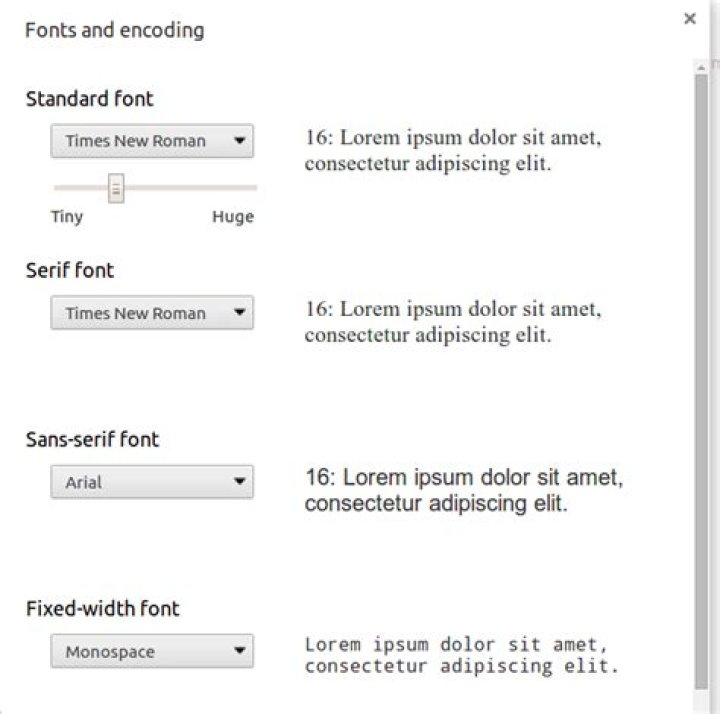
I think I found the problem.. It seems like all the default font settings in Chromium got reset when installing Kubuntu desktop. In Settings->Web Content->Customize fonts.. all fonts was set to Abyssinica SIL..
The fonts quality improved by selecting DejaVu font instead:
Example after changing:
Still, the quality could be improved by installing Microsoft TrueType core fonts:
sudo apt-get install ttf-mscorefonts-installer And then changing the default font settings again to Times New Roman and Arial:
Example of same page after final change:




