I am running Ubuntu 13.10, and I'm pretty new to Linux. I tried:
$ sudo apt-get install chkconfig Package chkconfig is not available, but is referred to by another package. This may mean that the package is missing, has been obsoleted, or is only available from another source
E: Package 'chkconfig' has no installation candidate
I manually downloaded the package and unzipped it. The resulting folder has a file called:
chkconfig.install But how do I run this? I tried this, but it didn't work.
$ sudo chkconfig.install 9 Answers
The command chkconfig is no longer available in Ubuntu.The equivalent command to chkconfig is update-rc.d.This command nearly supports all the new versions of ubuntu.
The similar commands are
update-rc.d <service> defaults update-rc.d <service> start 20 3 4 5 update-rc.d -f <service> remove In Ubuntu /etc/init.d has been replaced by /usr/lib/systemd. Scripts can still be started and stoped by 'service'. But the primary command is now 'systemctl'. The chkconfig command was left behind, and now you do this with systemctl.
So instead of:
chkconfig enable apache2 You should look for the service name, and then enable it
systemctl status apache2 systemctl enable apache2.service Systemd has become more friendly about figuring out if you have a systemd script, or an /etc/init.d script, and doing the right thing.
sysv-rc-conf is an alternate option for Ubuntu.
sudo apt-get install sysv-rc-conf sysv-rc-conf --list xxxx alias chkconfig=sysv-rc-conf chkconfig --list syntax
sysv-rc-conf command line usage: sysv-rc-conf --list [service name] sysv-rc-conf [--level <runlevels>] <service name> <on|off> Chkconfig is no longer available in Ubuntu.
Chkconfig is a script. You can download it from here.
Install this package in Ubuntu:
apt install sysv-rc-conf its a substitute for chkconfig cmd.
After install run this cmd:
sysv-rc-conf --list It'll show all services in all the runlevels. You can also run this:
sysv-rc-conf --level (runlevel number ex:1 2 3 4 5 6 ) Now you can choose which service should be active in boot time.
The following command do the same on Ubuntu:
systemctl list-dependencies
But how do I run this? I tried typing:
sudo chkconfig.installwhich doesn't work.
I'm not sure where you got this package or what it contains; A url of download would be helpful. Without being able to look at the contents of chkconfig.install; I'm surprised to find a unix tool like chkconfig to be bundled in a zip archive, maybe it is still yet to be uncompressed, a tar.gz? but maybe it is a shell script?
I should suggest editing it and seeing what you are executing.
sh chkconfig.install or ./chkconfig.install ; which might work....but my suggestion would be to learn to use update-rc.d as the other answers have suggested but do not speak directly to the question...which is pretty hard to answer without being able to look at the data yourself.
As mentioned by @jerry you can add services with the below command.
update-rc.d <service> defaults update-rc.d <service> start 20 3 4 5 update-rc.d -f <service> remove To validate them check the above commands you can check /etc/rc*.d/ directory where service start with "k" means it will not execute during the boot and service start with "S" will start during the boot.
# for runlevel symlinks: ls /etc/rc*.d/ In the below screenshot you can see apache2 starting in runlevel2(S02apache2) and stopping in runlevel1(K01apache2)

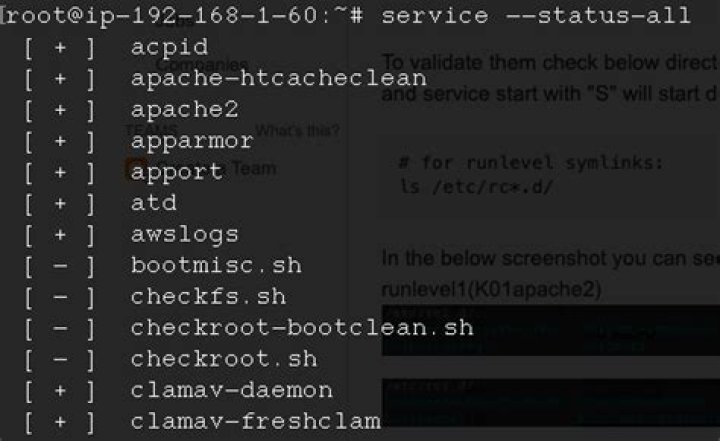
You can also check the service status with the below command where "+" means service is in running state "-" is in stopped.
service --status-all
OR
install sysv-rc-conf utility.
apt-get install sysv-rc-conf example sysv-rc-conf --level 2345 apach22 on man sysv-rc-conf 



