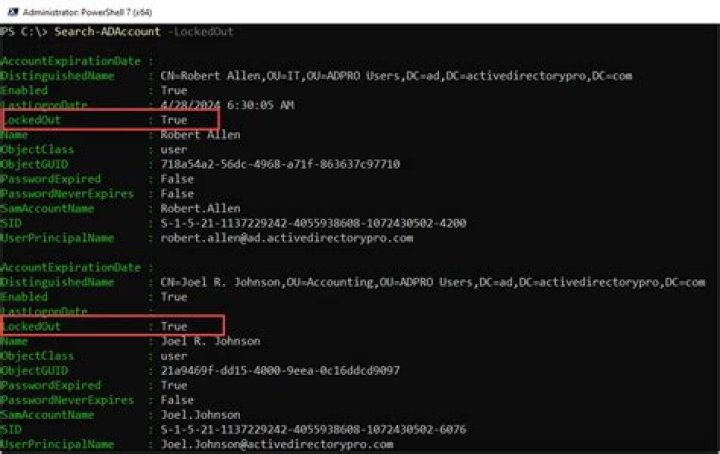
I want to know if it is possible to verify if a specific AD account is locked.
The command Get-ADUser does not return this parameter :
-------------------------- EXAMPLE 3 -------------------------- Command Prompt: C:\PS> Get-ADUser GlenJohn -Properties * - Surname : John - Name : Glen John - UserPrincipalName : jglen - GivenName : Glen - Enabled : False - SamAccountName : GlenJohn - ObjectClass : - user SID :S-1-5-21-2889043008-4136710315-2444824263-3544 - ObjectGUID :e1418d64-096c-4cb0-b903-ebb66562d99d - DistinguishedName : CN=Glen John,OU=NorthAmerica,OU=Sales,OU=UserAccounts,DC=FABRIKAM,DC=COM Description : ----------- Get all properties of the user with samAccountName 'GlenJohn'. --------------------------END EXAMPLE --------------------------
Is there an other way to get this information ?
5 Answers
The LockedOut property is what you are looking for among all the properties you returned. You are only seeing incomplete output in TechNet. The information is still there. You can isolate that one property using Select-Object
Get-ADUser matt -Properties * | Select-Object LockedOut LockedOut --------- False The link you referenced doesn't contain this information which is obviously misleading. Test the command with your own account and you will see much more information.
Note: Try to avoid -Properties *. While it is great for simple testing it can make queries, especially ones with multiple accounts, unnecessarily slow. So, in this case, since you only need lockedout:
Get-ADUser matt -Properties LockedOut | Select-Object LockedOut Here's another one:
PS> Search-ADAccount -Locked | Select Name, LockedOut, LastLogonDate Name LockedOut LastLogonDate ---- --------- ------------- Yxxxxxxx True 14/11/2014 10:19:20 Bxxxxxxx True 18/11/2014 08:38:34 Administrator True 03/11/2014 20:32:05 Other parameters worth mentioning:
Search-ADAccount -AccountExpired Search-ADAccount -AccountDisabled Search-ADAccount -AccountInactive Get-Help Search-ADAccount -ShowWindow If you want to check via command line , then use command "net user username /DOMAIN"

I found also this list of property flags: How to use the UserAccountControl flags
SCRIPT 0x0001 1 ACCOUNTDISABLE 0x0002 2 HOMEDIR_REQUIRED 0x0008 8 LOCKOUT 0x0010 16 PASSWD_NOTREQD 0x0020 32 PASSWD_CANT_CHANGE 0x0040 64 ENCRYPTED_TEXT_PWD_ALLOWED 0x0080 128 TEMP_DUPLICATE_ACCOUNT 0x0100 256 NORMAL_ACCOUNT 0x0200 512 INTERDOMAIN_TRUST_ACCOUNT 0x0800 2048 WORKSTATION_TRUST_ACCOUNT 0x1000 4096 SERVER_TRUST_ACCOUNT 0x2000 8192 DONT_EXPIRE_PASSWORD 0x10000 65536 MNS_LOGON_ACCOUNT 0x20000 131072 SMARTCARD_REQUIRED 0x40000 262144 TRUSTED_FOR_DELEGATION 0x80000 524288 NOT_DELEGATED 0x100000 1048576 USE_DES_KEY_ONLY 0x200000 2097152 DONT_REQ_PREAUTH 0x400000 4194304 PASSWORD_EXPIRED 0x800000 8388608 TRUSTED_TO_AUTH_FOR_DELEGATION 0x1000000 16777216 PARTIAL_SECRETS_ACCOUNT 0x04000000 67108864 You must make a binary-AND of property userAccountControl with 0x002. In order to get all locked (i.e. disabled) accounts you can filter on this:
(&(objectClass=user)(userAccountControl:1.2.840.113556.1.4.803:=2)) For operator 1.2.840.113556.1.4.803 see LDAP Matching Rules
This ScriptingGuy guest post links to a script by a Microsoft Powershell Expert can help you find this information, but to fully audit why it was locked and which machine triggered the lock you probably need to turn on additional levels of auditing via GPO.




