
Where can you view the full history from all sessions in Windows Server 2016?
The following PowerShell command only includes the commands from the current session:
Get-History 7 Answers
In PowerShell enter the following command:
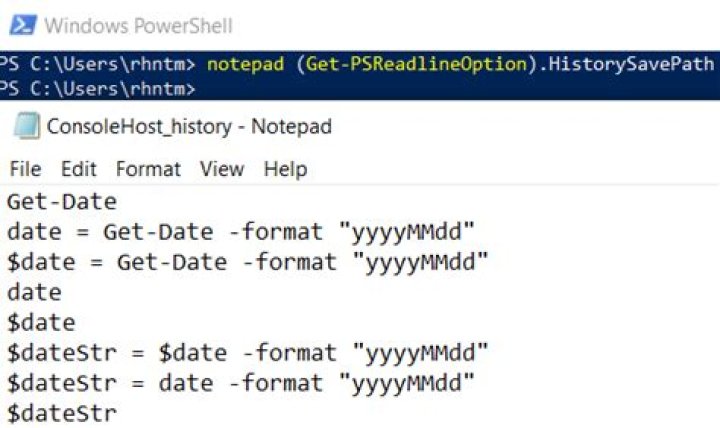
(Get-PSReadlineOption).HistorySavePath This gives you the path where all of the history is saved. Then open the path in a text editor.
Try cat (Get-PSReadlineOption).HistorySavePath to list the history in PowerShell.
For getting full history from PowerShell and save the output to file I use this command:
Get-Content (Get-PSReadlineOption).HistorySavePath > D:\PowerShellHistory.txt Since you are on windows you can also use below to open 'notepad' with it.
notepad (Get-PSReadlineOption).HistorySavePath There's mention of Windows Server/Enterprise editions, but as a Pro (standard retail version) user HistorySavePath is also available to me. I needed to see what python packages were recently installed in an older session and wanted to add an answer here for people looking for specific things in the history.
# if you like file names and line numbers included in your output Select-String "<search pattern>" (Get-PSReadlineOption).HistorySavePath # if you Just want the text without any of the other information Get-Content (Get-PSReadlineOption).HistorySavePath | Select-String "<search pattern>" In my case I ran
Select-String 'pip install' (Get-PSReadlineOption).HistorySavePath which gave me a list of pip install commands run from my previous sessions
... [Path/To/File]:10401:pip install dash [Path/To/File]:10824:pip install -r .\requirements.txt [Path/To/File]:11296:pip install flask-mysqldb [Path/To/File]:11480:pip install Flask-Markdown [Path/To/File]:11486:pip install pygments [Path/To/File]:11487:pip install py-gfm [Path/To/File]:11540:pip install bs4 The Psreadline module 2.1 beta1 on Powershell gallery (Powershell 7 only) does intellisense on the commandline using the saved history: It's been starting to show up in Vscode.
Also in Psreadline, you can search the saved history backwards with either f8 (after typing something on the command line) or control-R. Get-psreadlinekeyhandler lists the key bindings.
get-psreadlinekeyhandler -bound -unbound | ? function -match history You can try this PowerShell Command History
1On windows PowerShell
To get in a session you can use h or history
but to get all commands written in the computer you use
cat (Get-PSReadlineOption).HistorySavePath