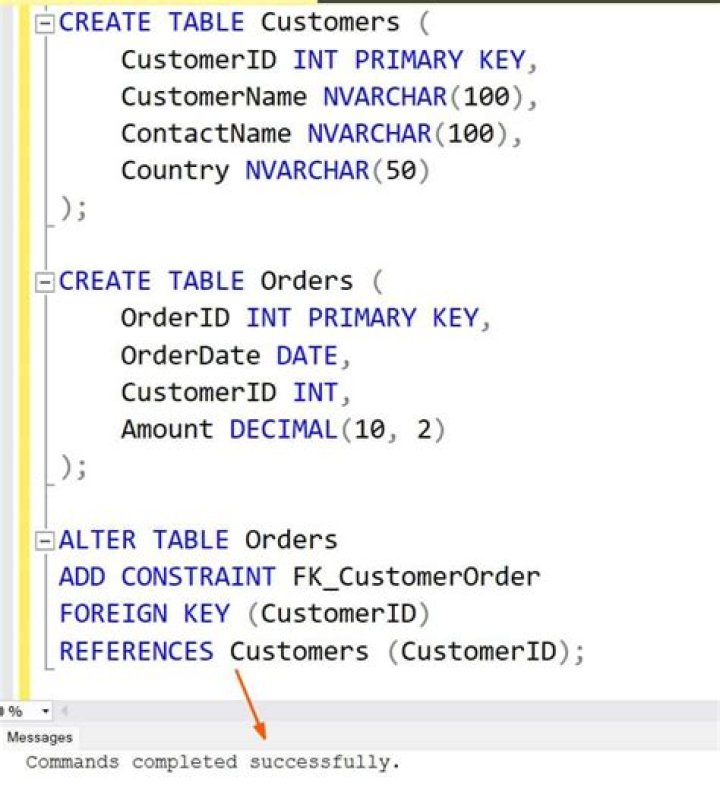
I am trying to drop a table but getting the following message:
Msg 3726, Level 16, State 1, Line 3
Could not drop object 'dbo.UserProfile' because it is referenced by a FOREIGN KEY constraint.
Msg 2714, Level 16, State 6, Line 2
There is already an object named 'UserProfile' in the database.
I looked around with SQL Server Management Studio but I am unable to find the constraint. How can I find out the foreign key constraints?
216 Answers
Here it is:
SELECT OBJECT_NAME(f.parent_object_id) TableName, COL_NAME(fc.parent_object_id,fc.parent_column_id) ColName FROM sys.foreign_keys AS f INNER JOIN sys.foreign_key_columns AS fc ON f.OBJECT_ID = fc.constraint_object_id INNER JOIN sys.tables t ON t.OBJECT_ID = fc.referenced_object_id WHERE OBJECT_NAME (f.referenced_object_id) = 'YourTableName' This way, you'll get the referencing table and column name.
Edited to use sys.tables instead of generic sys.objects as per comment suggestion. Thanks, marc_s
7Another way is to check the results of
sp_help 'TableName' (or just highlight the quoted TableName and press ALT+F1)
With time passing, I just decided to refine my answer. Below is a screenshot of the results that sp_help provides. A have used the AdventureWorksDW2012 DB for this example. There is numerous good information there, and what we are looking for is at the very end - highlighted in green:

Try this
SELECT object_name(parent_object_id) ParentTableName, object_name(referenced_object_id) RefTableName, name FROM sys.foreign_keys WHERE parent_object_id = object_id('Tablename') I found this answer quite simple and did the trick for what I needed:
A summary from the link, use this query:
EXEC sp_fkeys 'TableName' Quick and simple. I was able to locate all the foreign key tables, respective columns and foreign key names of 15 tables pretty quickly.
As @mdisibio noted below, here's a link to the documentation that details the different parameters that can be used:
1Here is the best way to find out Foreign Key Relationship in all Database.
exec sp_helpconstraint 'Table Name' and one more way
select * from INFORMATION_SCHEMA.KEY_COLUMN_USAGE where TABLE_NAME='Table Name' --and left(CONSTRAINT_NAME,2)='FK'(If you want single key) I am using this script to find all details related to foreign key. I am using INFORMATION.SCHEMA. Below is a SQL Script:
SELECT ccu.table_name AS SourceTable ,ccu.constraint_name AS SourceConstraint ,ccu.column_name AS SourceColumn ,kcu.table_name AS TargetTable ,kcu.column_name AS TargetColumn FROM INFORMATION_SCHEMA.CONSTRAINT_COLUMN_USAGE ccu INNER JOIN INFORMATION_SCHEMA.REFERENTIAL_CONSTRAINTS rc ON ccu.CONSTRAINT_NAME = rc.CONSTRAINT_NAME INNER JOIN INFORMATION_SCHEMA.KEY_COLUMN_USAGE kcu ON kcu.CONSTRAINT_NAME = rc.UNIQUE_CONSTRAINT_NAME ORDER BY ccu.table_name if you want to go via SSMS on the object explorer window, right click on the object you want to drop, do view dependencies.
SELECT obj.name AS FK_NAME, sch.name AS [schema_name], tab1.name AS [table], col1.name AS [column], tab2.name AS [referenced_table], col2.name AS [referenced_column] FROM sys.foreign_key_columns fkc INNER JOIN sys.objects obj ON obj.object_id = fkc.constraint_object_id INNER JOIN sys.tables tab1 ON tab1.object_id = fkc.parent_object_id INNER JOIN sys.schemas sch ON tab1.schema_id = sch.schema_id INNER JOIN sys.columns col1 ON col1.column_id = parent_column_id AND col1.object_id = tab1.object_id INNER JOIN sys.tables tab2 ON tab2.object_id = fkc.referenced_object_id INNER JOIN sys.columns col2 ON col2.column_id = referenced_column_id AND col2.object_id = tab2.object_id; In SQL Server Management Studio you can just right click the table in the object explorer and select "View Dependencies". This would give a you a good starting point. It shows tables, views, and procedures that reference the table.
--The following may give you more of what you're looking for:
create Procedure spShowRelationShips ( @Table varchar(250) = null, @RelatedTable varchar(250) = null ) as begin if @Table is null and @RelatedTable is null select object_name(k.constraint_object_id) ForeginKeyName, object_name(k.Parent_Object_id) TableName, object_name(k.referenced_object_id) RelatedTable, c.Name RelatedColumnName, object_name(rc.object_id) + '.' + rc.name RelatedKeyField from sys.foreign_key_columns k left join sys.columns c on object_name(c.object_id) = object_name(k.Parent_Object_id) and c.column_id = k.parent_column_id left join sys.columns rc on object_name(rc.object_id) = object_name(k.referenced_object_id) and rc.column_id = k.referenced_column_id order by 2,3 if @Table is not null and @RelatedTable is null select object_name(k.constraint_object_id) ForeginKeyName, object_name(k.Parent_Object_id) TableName, object_name(k.referenced_object_id) RelatedTable, c.Name RelatedColumnName, object_name(rc.object_id) + '.' + rc.name RelatedKeyField from sys.foreign_key_columns k left join sys.columns c on object_name(c.object_id) = object_name(k.Parent_Object_id) and c.column_id = k.parent_column_id left join sys.columns rc on object_name(rc.object_id) = object_name(k.referenced_object_id) and rc.column_id = k.referenced_column_id where object_name(k.Parent_Object_id) =@Table order by 2,3 if @Table is null and @RelatedTable is not null select object_name(k.constraint_object_id) ForeginKeyName, object_name(k.Parent_Object_id) TableName, object_name(k.referenced_object_id) RelatedTable, c.Name RelatedColumnName, object_name(rc.object_id) + '.' + rc.name RelatedKeyField from sys.foreign_key_columns k left join sys.columns c on object_name(c.object_id) = object_name(k.Parent_Object_id) and c.column_id = k.parent_column_id left join sys.columns rc on object_name(rc.object_id) = object_name(k.referenced_object_id) and rc.column_id = k.referenced_column_id where object_name(k.referenced_object_id) =@RelatedTable order by 2,3 end You could use this query to display Foreign key constaraints:
SELECT K_Table = FK.TABLE_NAME, FK_Column = CU.COLUMN_NAME, PK_Table = PK.TABLE_NAME, PK_Column = PT.COLUMN_NAME, Constraint_Name = C.CONSTRAINT_NAME FROM INFORMATION_SCHEMA.REFERENTIAL_CONSTRAINTS C INNER JOIN INFORMATION_SCHEMA.TABLE_CONSTRAINTS FK ON C.CONSTRAINT_NAME = FK.CONSTRAINT_NAME INNER JOIN INFORMATION_SCHEMA.TABLE_CONSTRAINTS PK ON C.UNIQUE_CONSTRAINT_NAME = PK.CONSTRAINT_NAME INNER JOIN INFORMATION_SCHEMA.KEY_COLUMN_USAGE CU ON C.CONSTRAINT_NAME = CU.CONSTRAINT_NAME INNER JOIN ( SELECT i1.TABLE_NAME, i2.COLUMN_NAME FROM INFORMATION_SCHEMA.TABLE_CONSTRAINTS i1 INNER JOIN INFORMATION_SCHEMA.KEY_COLUMN_USAGE i2 ON i1.CONSTRAINT_NAME = i2.CONSTRAINT_NAME WHERE i1.CONSTRAINT_TYPE = 'PRIMARY KEY' ) PT ON PT.TABLE_NAME = PK.TABLE_NAME ---- optional: ORDER BY 1,2,3,4 WHERE PK.TABLE_NAME='YourTable' You can also return all the information about the Foreign Keys by adapating @LittleSweetSeas answer:
SELECT OBJECT_NAME(f.parent_object_id) ConsTable, OBJECT_NAME (f.referenced_object_id) refTable, COL_NAME(fc.parent_object_id,fc.parent_column_id) ColName FROM sys.foreign_keys AS f INNER JOIN sys.foreign_key_columns AS fc ON f.OBJECT_ID = fc.constraint_object_id INNER JOIN sys.tables t ON t.OBJECT_ID = fc.referenced_object_id order by ConsTable In Object Explorer, expand the table, and expand the Keys:
try the following query.
select object_name(sfc.constraint_object_id) AS constraint_name, OBJECT_Name(parent_object_id) AS table_name , ac1.name as table_column_name, OBJECT_name(referenced_object_id) as reference_table_name, ac2.name as reference_column_name from sys.foreign_key_columns sfc join sys.all_columns ac1 on (ac1.object_id=sfc.parent_object_id and ac1.column_id=sfc.parent_column_id) join sys.all_columns ac2 on (ac2.object_id=sfc.referenced_object_id and ac2.column_id=sfc.referenced_column_id) where sfc.parent_object_id=OBJECT_ID(<main table name>); this will give the constraint_name, column_names which will be referring and tables which will be depending on the constraint will be there.
The easiest way to get Primary Key and Foreign Key for a table is:
/* Get primary key and foreign key for a table */ USE DatabaseName; SELECT CONSTRAINT_NAME FROM INFORMATION_SCHEMA.KEY_COLUMN_USAGE WHERE CONSTRAINT_NAME LIKE 'PK%' AND TABLE_NAME = 'TableName' SELECT CONSTRAINT_NAME FROM INFORMATION_SCHEMA.KEY_COLUMN_USAGE WHERE CONSTRAINT_NAME LIKE 'FK%' AND TABLE_NAME = 'TableName' The procedure
_sp_help 'tbl_name'_ does give a lot of information but I find the procedures
_sp_fkeys 'tbl_name'_ and _sp_pkeys 'tbl_name'_ easier to use, and maybe with a more future-proof result.
(And they do answer the OP perfectly)




