I have a client who has an issue whereby her Print Spooler on her Windows 7 PC stops after 2 minutes. I have set the service to restart on all subsequent failures, but it still drops out after 2 minutes, restarts after 1 minute, then crashes again after a further 2 minutes. Rinse and repeat.
- I have updated all printer drivers, and run Windows update.
- I have scanned for viruses
- I have run
SFCwhich came up clean. - I have tried deleting all the files from within
%windir%\windows\system32\spool\printers - I have deleted all extra providers from within
HKEY_LOCAL_MACHINE\SYSTEM\CURRENTCONTROLSET\CONTROL\PRINT\ - I have taken ownership of
spoolsv.exe
In Turn windows features on or off I have tried unticking Internet Printing Client, ticking LPD Print Service and ticking LPR Port Monitor
This issue has persisted through multiple restarts over the course of a week. I'm hesitant about using a registry cleaner but if it comes down to it, I could potentially be persuaded if nothing else works.
13 Answers
First of all, never use registry cleaners! They don't do anything to your computer that could be considered beneficial. And they especially don't solve any problems whatsoever.
While you have attempted numerous ways to fix your problem, it seems as if you were simply trying solutions instead of analyzing your problem at hand. This can be very problematic as it can create additional problems that may seem related to your initial problem. Some of your mentioned approaches sound a bit risky...
When you detect that a service on your computer stops and starts repeatedly, you should first check the event log.

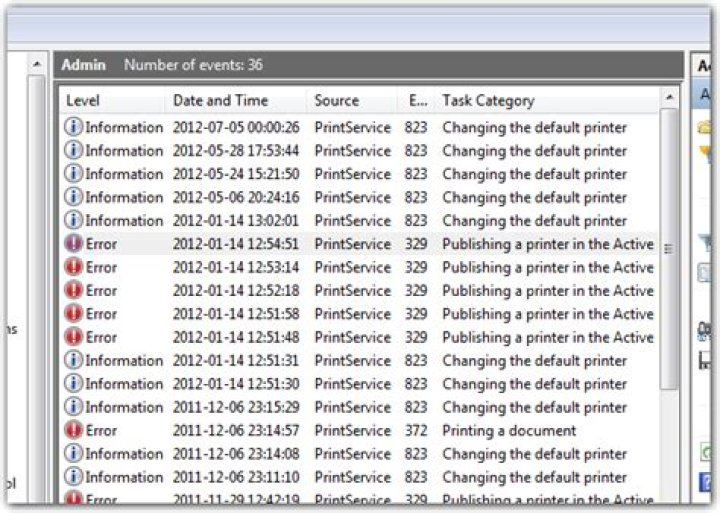
In the Event Viewer you'll want to find the log for the Print Spooler. It will be logged in the log for the Printer Service, which is located under:
Event Viewer (local)\Applications and Service Logs\Microsoft\Windows\PrintService
Here you'll be able to inspect what problems recently occured with the service:
This has to be your first stop when analyzing such an issue.
There's nothing in the log!
In the case that there is nothing (useful) in the log, you have to take an even closer look at what is going on.
When in doubt, use Process Monitor. Sadly, explaining how to use it to analyze a problem such as this one is far outside of the scope of this answer.
If you want/need to try, I'd recommend watching a Case of the Unexplained.
1It turns out this was caused by corrupt drivers. The reason I didn't pick up on this earlier is that I downloaded fresh drivers already and it turns out that the drivers on HP's website were the problem. I tried a different driver and that fixed the problem.
I had to delete the printers, delete the driver packages from within Print Management, and delete their definitions from HKEY_LOCAL_MACHINE\SYSTEM\CurrentControlSet\Control\Print\Providers\ LanMan Print Services\Servers\Printers\
From there is was a simple reinstallation with alternate drivers.
I had a similar problem where the Print Spooler service stopped almost immediately after starting. I also had a printer in Settings > Devices > Printers & scanners which refused to remove itself when I selected it and clicked Remove device.
Solution
Open
regedit, navigate toHKEY_CURRENT_USER\Printers\Connectionsand delete all the keys in that folder.Restart the
Print Spoolerservice viaservices.msc.
Note: All of the printers I had installed were no longer available so I was happy to remove them; you may want to be more careful which printers you remove.
Regarding other solutions
The only provider under HKEY_LOCAL_MACHINE\SYSTEM\CurrentControlSet\Control\Print\Providers\ was winprint, which other solutions said to keep.
The owner of spoolsv.exe was TrustedInstaller, I did not change it.




