I would like some help with home networking.
I have a place with two rooms. In one of the rooms there is a router with wireless capabilities. I can connect a computer to it with ethernet cables or get internet through Wifi.
Now my problem is the following:
I have a computer *without WIFI capabilities * so every time I want to use internet I have to connect it though a cable in the room with the router.
I want to use this computer in the other room. (Yes, perhaps I could add wifi capabilities to it, but let's discard this option). Is there a way that I can use wired connections in room 2 (other than having a really long cable).
I am imaging something like some device that gets wifi connection and then give the signal though ethernet?
1911 Answers
You could look into a wireless bridge (or WiFi bridge). This may be the component/term you're looking for in your situation. It's basically a reversed access point and it's a feature some WiFi routers have built-in. You connect it to an existing wireless network and it then "outputs" the network on its ethernet port or ports, usually acting as a switch depending on how you configure it.
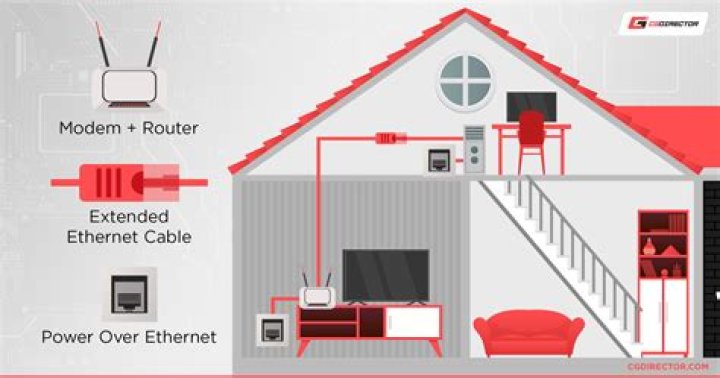
A second option might be powerline networking. It's a technology that uses existing powerlines in your home (yes, using the sockets you plug your toaster or microwave in) to piggy back network signals. However, this is very dependent on how your home is wired and your mileage may vary in terms of speed, latency and stability.
12Wireless is one answer, but theres a good opposite in "wired" as a solution.

ANSWER Run an ethernet cable, but do it properly, neatly and tidy.
How? Depends on the floor plan, and the structure of the walls, and whether you have permission or not.
- Start by getting permission from the owner (or not - that's on you)
- If your walls are framed timber and lined with sheetrock/plasterboard then locate a hollow area in the wall that is not obscured by furniture. Near a power point might be a good indication.
Find and buy these items:
- 2x wall plates with as many holes as you want cables. I'd go no less than two, and you could go up to 6 in one plate

- Jacks - I'd suggest cat6 for future-proofing. Make sure they fit the faceplate
- And a short length of cat6 solid-core cable. A couple of metres will be more than enough.
- 2x wall plates with as many holes as you want cables. I'd go no less than two, and you could go up to 6 in one plate
You will also require a Punch down tool, and some way to cut/strip the cable.
Cheap and cheerful, costs about the same as one jack.
If you're uncomfortable wiring the cable to the jack, you could just fit two bullnose plates to the walls, and feed a long patch cable through there.
Or there are "keystone jacks" that are wall-panel mounted RJ45 joiners, so you could have a short half-metre patch cord held entirely within the wall cavity. That would also avoid wiring.
Why bother when wireless is so convenient?
You're aware that your wired connection is probably 1000 Mbit, or perhaps 100 Mbit if things are a bit older. And that its all yours, in both directions (aka full duplex)
Wireless ethernet has a lower maximum, its half-duplex, and that limit is shared across all actively transmitting devices.
Of course there are plenty of exceptions, like MIMO, and that your internet link will probably be slower, and thus the limiting factor.
5I use Powerline devices but depends on your electrical wiring. I also use them to extend Wi-fi to my Man Cave in the garden.
2Another way to go about this is to use ethernet over coax (EoC), also known as MoCa. It uses existing coax (cable) wiring in your home as the transmission medium, so you don't have to install any wires — just plug in some adapters. And it can coexist with the use of cable for internet access & TV.
2As others have already mentioned a USB WiFi adapter would be the easiest solution. Or if you have an old WiFi router it might be configurable as a bridge.
There are still other options. If you have a laptop you can also configure this to work as a bridge if it has both WiFi and a LAN port. Plug your computer into the LAN port of the laptop. Every operating system (Windows, Mac OS, or Linux) has a way to share the WiFi connection.
One thing I am not entirely sure about is if you can also use a smartphone. It might be possible (at least in theory) to plugin your smartphone via USB and also use it as a bridge. This would be similar to tethering, but would use WiFi instead of the cellular network.
The two answers I've used haven't been mentioned!
(1) What is called a wifi range extender - advertised and sold to pick up a weak wifi signal and emit a strong one (eg if you're in a very big house). But most of these also have a jack for an ethernet cable which is the part of it you will use
(2) A router that allows installing DD-WRT which you then set up in Client Bridge mode. (Difficult. I'll never bother trying this again, now I know about option (1)).
If you have an ASUS router, their AI Mesh mode would allow you to add a ASUS router as an AI Mesh node in the second room and use the ethernet ports on the back to connect to your network. I have that setup in my home, and it's super flexible and fast if you're using 802.11ac (5Ghz), if not the cheapest option.
0I use a pair of powerline adapter plugs, really plug and play. You'll need to connect the plugs with ethernet in each room.
1I have used powerline very successfully both for Lan connection and a Lan connected wlan repeater. This overcame problems with wlan bridging which was always flakey. Much less hassle than fixed Lan wiring. The only limitation I have encountered is that if the length of the connecting power run is too great it doesn't work!
Powerline adapters seem to be what you are looking for. They use your home electric circuit to carry ethernet signals from socket to socket. Note that this also depends on how your home is wired. You need at least 2 of these devices, unit A and unit B. Most of them are plug and play, but read the vendor's manual. Basically, you connect unit A to your wireless router's LANX port using an ethernet cable, plug it into a socket (or adapter socket) nearby. Go to the other room with unit B, plug it in a socket. You might need to press some button to sync them... refer to manual. Run your ethernet cable from unit B's ethernet port to your WiFi-less device and that's it.
I used a drill, the basement ceiling and a long cable I bought on ebay so it can feed the dvr! Cheap wifi bits did not work for it. Now I am thinking about a hub for the smart tv next to it, but so far wifi is good for that.
I have a wifi repeater I got on eBay, but never figured how to configure it!
Maybe 5g will free them all from the wifi, router, cable modem, cable pricing?




