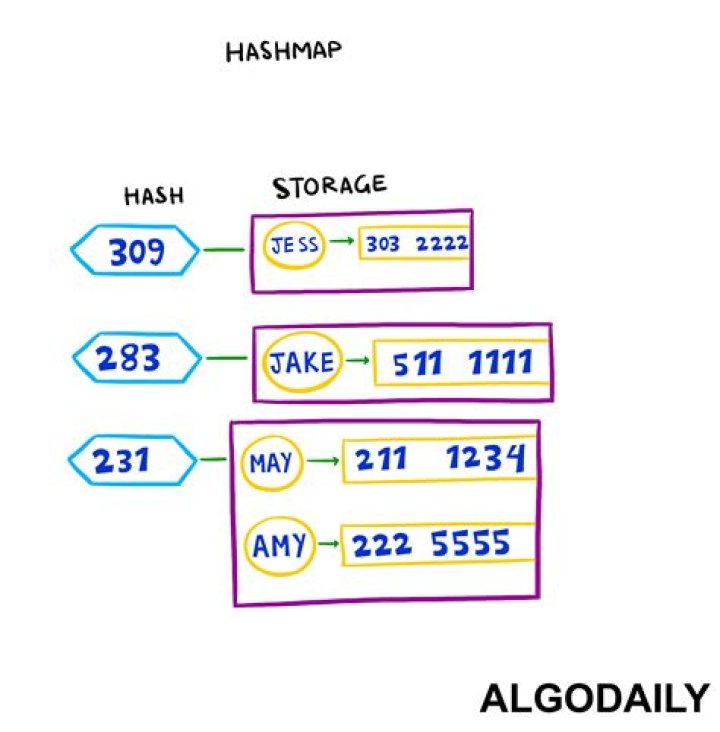

I want to implement a HashMap in Python. I want to ask a user for an input. depending on his input I am retrieving some information from the HashMap. If the user enters a key of the HashMap, I would like to retrieve the corresponding value.
How do I implement this functionality in Python?
HashMap<String,String> streetno=new HashMap<String,String>(); streetno.put("1", "Sachin Tendulkar"); streetno.put("2", "Dravid"); streetno.put("3","Sehwag"); streetno.put("4","Laxman"); streetno.put("5","Kohli") 10 Answers
Python dictionary is a built-in type that supports key-value pairs.
streetno = {"1": "Sachin Tendulkar", "2": "Dravid", "3": "Sehwag", "4": "Laxman", "5": "Kohli"} as well as using the dict keyword:
streetno = dict({"1": "Sachin Tendulkar", "2": "Dravid"}) or:
streetno = {} streetno["1"] = "Sachin Tendulkar" All you wanted (at the time the question was originally asked) was a hint. Here's a hint: In Python, you can use dictionaries.
It's built-in for Python. See dictionaries.
Based on your example:
streetno = {"1": "Sachine Tendulkar", "2": "Dravid", "3": "Sehwag", "4": "Laxman", "5": "Kohli" } You could then access it like so:
sachine = streetno["1"] Also worth mentioning: it can use any non-mutable data type as a key. That is, it can use a tuple, boolean, or string as a key.
streetno = { 1 : "Sachin Tendulkar", 2 : "Dravid", 3 : "Sehwag", 4 : "Laxman", 5 : "Kohli" } And to retrieve values:
name = streetno.get(3, "default value") Or
name = streetno[3] That's using number as keys, put quotes around the numbers to use strings as keys.
Hash maps are built-in in Python, they're called dictionaries:
streetno = {} #create a dictionary called streetno streetno["1"] = "Sachin Tendulkar" #assign value to key "1" Usage:
"1" in streetno #check if key "1" is in streetno streetno["1"] #get the value from key "1" See the documentation for more information, e.g. built-in methods and so on. They're great, and very common in Python programs (unsurprisingly).
Here is the implementation of the Hash Map using python For the simplicity hash map is of a fixed size 16. This can be changed easily. Rehashing is out of scope of this code.
class Node: def __init__(self, key, value): self.key = key self.value = value self.next = None class HashMap: def __init__(self): self.store = [None for _ in range(16)] def get(self, key): index = hash(key) & 15 if self.store[index] is None: return None n = self.store[index] while True: if n.key == key: return n.value else: if n.next: n = n.next else: return None def put(self, key, value): nd = Node(key, value) index = hash(key) & 15 n = self.store[index] if n is None: self.store[index] = nd else: if n.key == key: n.value = value else: while n.next: if n.key == key: n.value = value return else: n = n.next n.next = nd hm = HashMap() hm.put("1", "sachin") hm.put("2", "sehwag") hm.put("3", "ganguly") hm.put("4", "srinath") hm.put("5", "kumble") hm.put("6", "dhoni") hm.put("7", "kohli") hm.put("8", "pandya") hm.put("9", "rohit") hm.put("10", "dhawan") hm.put("11", "shastri") hm.put("12", "manjarekar") hm.put("13", "gupta") hm.put("14", "agarkar") hm.put("15", "nehra") hm.put("16", "gawaskar") hm.put("17", "vengsarkar") print(hm.get("1")) print(hm.get("2")) print(hm.get("3")) print(hm.get("4")) print(hm.get("5")) print(hm.get("6")) print(hm.get("7")) print(hm.get("8")) print(hm.get("9")) print(hm.get("10")) print(hm.get("11")) print(hm.get("12")) print(hm.get("13")) print(hm.get("14")) print(hm.get("15")) print(hm.get("16")) print(hm.get("17")) Output:
sachin sehwag ganguly srinath kumble dhoni kohli pandya rohit dhawan shastri manjarekar gupta agarkar nehra gawaskar vengsarkar class HashMap: def __init__(self): self.size = 64 self.map = [None] * self.size def _get_hash(self, key): hash = 0 for char in str(key): hash += ord(char) return hash % self.size def add(self, key, value): key_hash = self._get_hash(key) key_value = [key, value] if self.map[key_hash] is None: self.map[key_hash] = list([key_value]) return True else: for pair in self.map[key_hash]: if pair[0] == key: pair[1] = value return True else: self.map[key_hash].append(list([key_value])) return True def get(self, key): key_hash = self._get_hash(key) if self.map[key_hash] is not None: for pair in self.map[key_hash]: if pair[0] == key: return pair[1] return None def delete(self, key): key_hash = self._get_hash(key) if self.map[key_hash] is None : return False for i in range(0, len(self.map[key_hash])): if self.map[key_hash][i][0] == key: self.map[key_hash].pop(i) return True def print(self): print('---Phonebook---') for item in self.map: if item is not None: print(str(item)) h = HashMap() Python Counter is also a good option in this case:
from collections import Counter counter = Counter(["Sachin Tendulkar", "Sachin Tendulkar", "other things"]) print(counter) This returns a dict with the count of each element in the list:
Counter({'Sachin Tendulkar': 2, 'other things': 1}) In python you would use a dictionary.
It is a very important type in python and often used.
You can create one easily by
name = {} Dictionaries have many methods:
# add entries: >>> name['first'] = 'John' >>> name['second'] = 'Doe' >>> name {'first': 'John', 'second': 'Doe'} # you can store all objects and datatypes as value in a dictionary # as key you can use all objects and datatypes that are hashable >>> name['list'] = ['list', 'inside', 'dict'] >>> name[1] = 1 >>> name {'first': 'John', 'second': 'Doe', 1: 1, 'list': ['list', 'inside', 'dict']} You can not influence the order of a dict.
A dictionary in Python is the best way to implement this. We can create the following dictionary using the given <key,value> pairs:
d = {"1": "Sachin Tendulkar", "2": "Dravid", "3": "Sehwag", "4": "Laxman", "5": "Kohli"} To extract the value of a particular key, we can directly use d[key]:
name = d["1"] # The value of name would be "Sachin Tendulkar" here 



