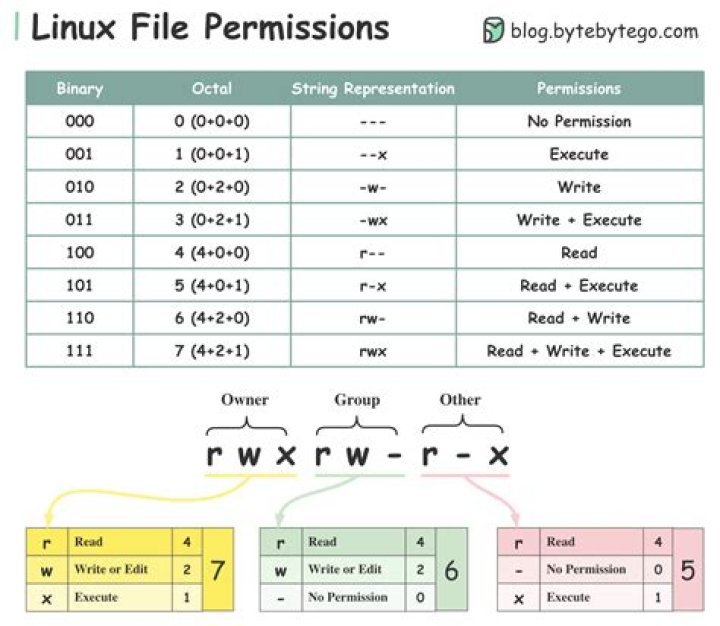

I know I can assign the permission to write to an owner/group/others like this:
chmod u+w myfolder Can I specify the specific user here? Some like this:
chmod username u+w myfolder 5 Answers
You could use setfacl:
setfacl -m u:username:rwx myfolder This sets permissions for specific users, without changing the ownership of the directory.
Check out the man page for further details and examples.
Note:
setfaclis short for set File ACL (Access Control List)If you want to apply it recursively to all the subdirectories: add the -R flag like this:
setfacl -R -m u:username:rwx myfolder
If you want to change the user owning this file or directory (folder), you will have to use the command chown. For instance, if you run
sudo chown username: myfolder the user owning myfolder will be username. Then you can execute
sudo chmod u+w myfolder to add the write permission to the username user.
But if you want to add this user to the group associated with "myfolder", you can run
sudo usermod -a -G groupname username and then execute
sudo chmod g+w myfolder to add the write permission to the group.
9No this is not possible. You can either change the owner of the file with
[sudo] chown username: foldername or you can add the user to the group that owns the file with
usermod -a -G {group-name} username If you want to apply it recursively to all the subdirectories: add the -R flag like this:
setfacl -R -m u:username:rwx myfolder In Ubuntu recursively (folder and it's all sub folders) giving permission to a specific user:
sudo chown -R <username>: <folderName>